HotPicks
THE BEST NEW OPEN SOURCE SOFTWARE ON THE PLANET
Calibre Audacious Sway Floorp Mission Center Clementine Parabolic Unvanquished CorsixTH Jellyfin Nexus Mods
Jonni Bidwell
jumps out of his canal barge into the HotPicks hot seat this month to track down open source apps that float his boat.
EBOOK MANAGER
Calibre
Version: 7.20
Web: https://calibre-ebook.com
We haven’t talked much about the Calibre ebook manager for a while (it got the Nick Peers treatment back in LXF252), but there’s a brand new version out, so let’s remedy that. Firstly, we should make clear that if you just want a simple ebook reader, Calibre is not for you. It’s a fully featured ebook management suite. It can read them, for sure, but it can also create, edit and convert them, annotate them and sync them with a variety of ebook readers.
If you’re out of the Calibre loop, you’ll be pleased to know that since version 5 (released in 2020) Calibre has migrated to Python 3. The developer did not end up single-handedly maintaining Python 2. Anyway, in this version, there are some new features in the PDF Engine, namely header/footer detection and removal. Since it’s been a while, though, we’ll run through some of the new features in the 7.x series. The main story is Category Notes, whereby you can add notes to any author, genre, publisher or any other tag that your titles might be, er, tagged with.
In this release, Calibre can manage audiobooks (in audio EPUB format), too. Don’t get too excited, though, because many of these use proprietary codecs, so they don’t always work on Linux. You can always use Calibre’s new text-to-speech engine (Piper), to get the audiobook experience. Piper uses a neural network to create much more realistic sounding voices. And you can even configure the pause length at the end of each sentence.
Calibre’s
PDF engine (there are, in fact, two now, called old and new) allows converting PDFs. And there’s a huge number of news sources (including the
New York Times, Scientific American
and the
Wokingham Times),
so you can see fetch your news in handy ebook form from your favourite propaganda outlet. Oh, and
Calibre
is fully extensible through its plugin system, so if you really need a feature, you can write it yourself.
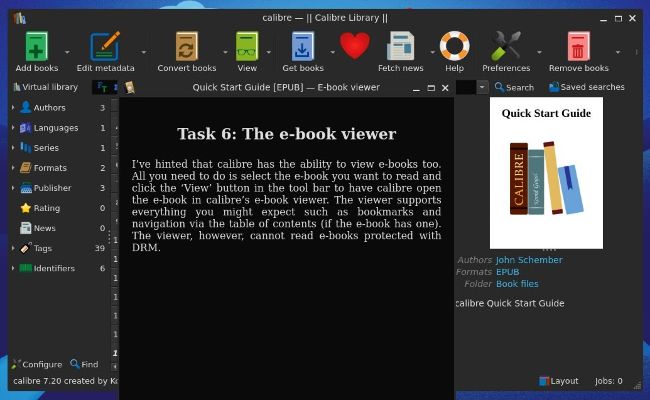
Calibre’s Get Started guide comes in the form of an ebook, appropriately.
GET TO KNOW CALIBRE...
1 Categories
Filter your library by author, genre, tag or any other field. Use Category Notes to annotate further.
2 Add
Add books either individually or recursively from a folder. Duplicates are easy to weed out.
3 Convert
Calibre can convert between formats as well as use heuristics to fix common formatting problems.
4 View
Calibre has a built in ebook viewer that does exactly what it says on the tin.
5
Get books
Calibre integrates with all manner of
online stores, from Amazon to Barnes and Noble, to make importing your ebooks as smooth as possible.
6
Fetch news
Would you rather your favourite news
websites provided their stories in ebook format? You can do that here.
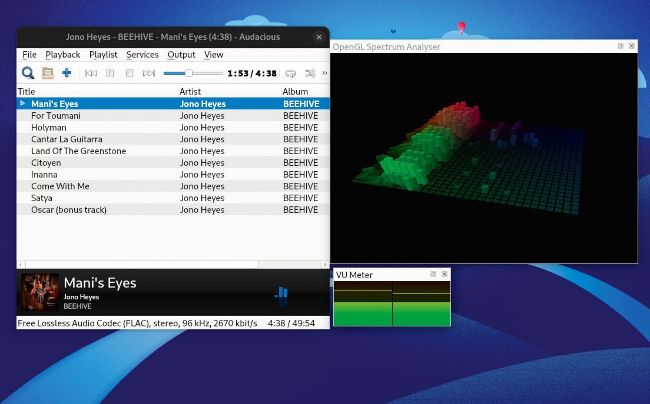
We love a good spectrum analyser here, especially rendered in a colourful, 3D style.
MUSIC PLAYER
Audacious
Version: 4.4.1 Web: https://audaciousmedia-player.org
S
ometimes you just need a simple music player. No music library, no streaming from privacy-invading proprietary services, no overcooked user interface. Just a lightweight tool that doesn’t make listening a chore.
Audacious
fits this bill perfectly. It’s a descendent of the venerable
XMMS,
which greybeards will remember from Linux in the late ’90s.
XMMS
was itself inspired by the legendary
Winamp
(which Llamasoft attempted to open source in September, but accidentally open sourced some licensed codecs, so had to hastily revoke its offerings).