Problems Solved
Our experts solve all your tech problems
Email us your problem and we’ll try to help: noproblem@computeractive.co.uk
PROBLEM OF THE FORTNIGHT
Can I get mobile connection for my Fire TV Stick? 1
Q We’re fortunate enough to own a narrowboat, on which we cruise during the summer. In the evenings, we enjoy a bit of TV. Currently, we have a 12V self-tuning channel seeker on the roof of the boat, linked to the 240V TV, which is powered through an inverter from a battery. However, we only ever seem to get BBC, ITV and some other minor commercial channels. Currently we have an old 32in set with no USB port for a dongle, so I know I’ll need a new TV for any advances. Is there a way to raise a one-off internet link and pair it to a Fire TV Stick, say?
Michael Rook
A Yes, you can do this. In fact, it’s pretty straightforward – but whether it proves better than your current setup will depend very much on whether you can receive a 4G or 5G mobile-phone signal wherever you happen to moor up.
The simplest approach is to use your smartphone as a wireless hotspot. To do this, just enable the phone’s personal hotspot feature, then connect the Fire TV Stick to it over Wi-Fi. On an iPhone, tap Settings followed by Mobile Service and then Personal Hotspot, then tap to turn on ‘Allow Others to Join’. In Android, tap Settings followed by ‘Network and Internet’ and then ‘Hotspot and tethering’ (see screenshot 1 ) before tapping to flip the Wi-Fi hotspot switch to its On position (see screenshot 2 ).
With this done, the Fire TV Stick will ‘see’ the phone’s hotspot just as any other Wi-Fi router, letting you stream from whatever service you want. However, while exact figures will vary from service to service, be aware that streaming video can eat through a lot of data, with around 1 or 2GB per hour of footage a fair rule of thumb. So you’ll want to make sure your mobile plan includes enough data (and that the provider allows this data to be used for tethering, as not all do).
Also ensure you switch on ‘Turn off hotspot automatically’ (see screenshot 3 ) to prevent your data being eaten up inadvertently. You’ll probably also want to keep the phone on charge while you’re watching, because acting as a hotspot can quickly drain the battery.
Alternatively, you could invest in a 4G/5G router with its own data SIM, sometimes referred to as a MiFi (mobile Wi-Fi) device. It’s similar to using a mobile-phone hotspot and won’t necessarily be any better, but it could serve as a more permanent solution – one that you can just leave plugged in and positioned in a place on your boat where you’re likely to get the best signal.
Three, for example, offers a 4G/5G MiFi unit for £22 a month with unlimited data and no upfront payment, albeit with a minimum 24-month commitment (www.snipca. com/56913). If you’d prefer not to be tied to a long contract, the cost is £249 for the device and then £35 a month for a one-month rolling plan.
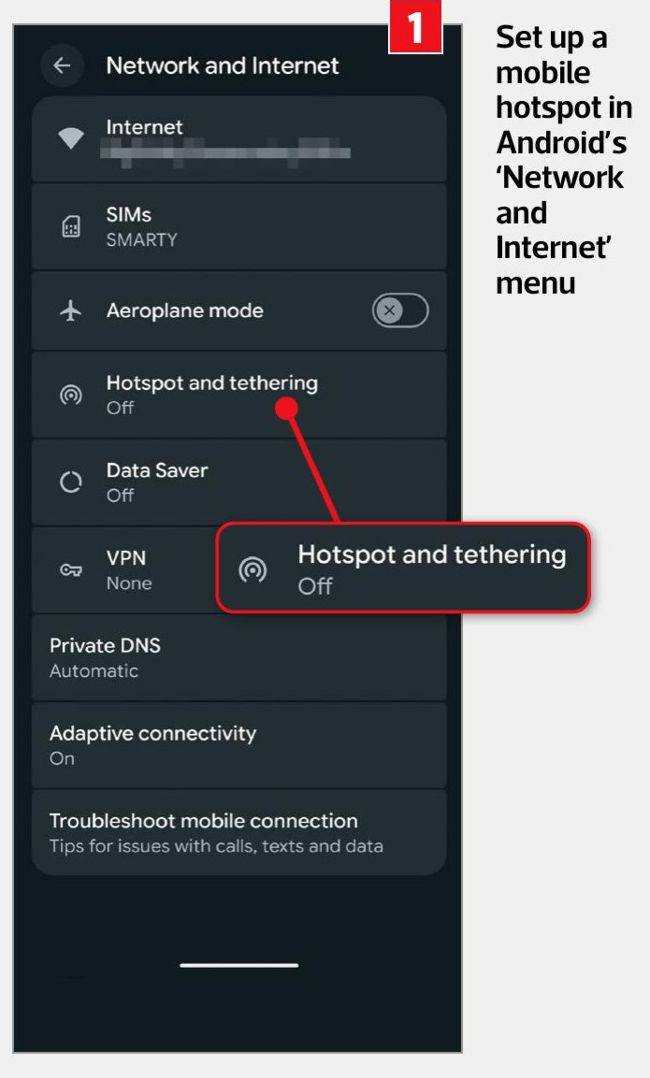
Set up a mobile hotspot in Android’s ‘Network and Internet’ menu
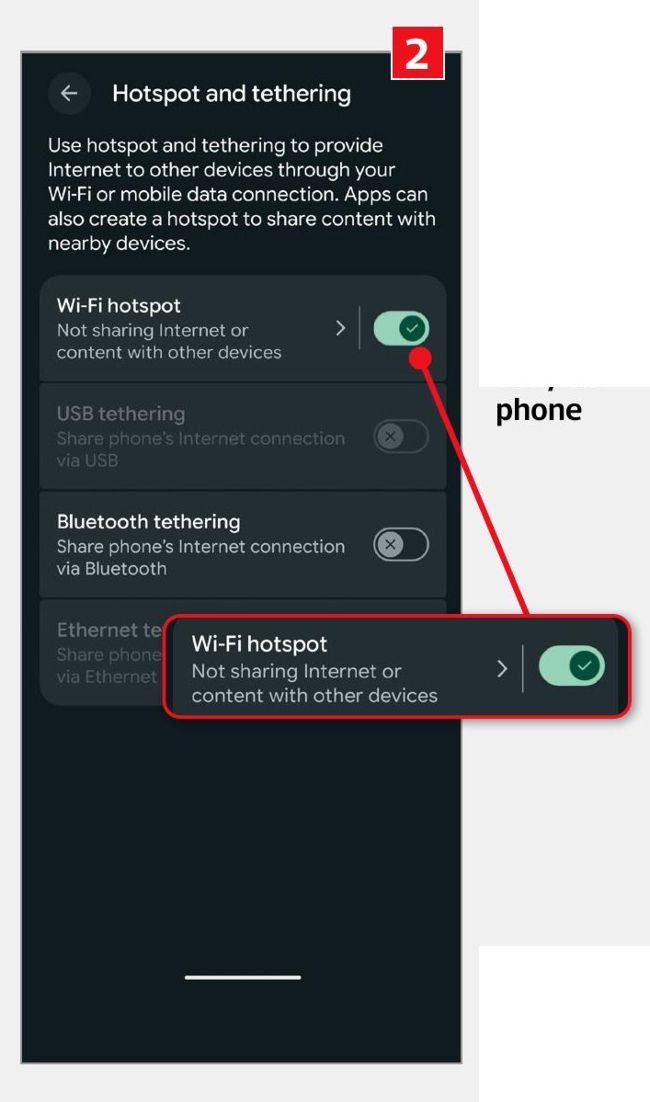
Turn on ‘Wi-Fi hotspot’ to let other devices connect to the internet via your phone