RUST
Develop Linux filesystem tools in Rust
Mihalis Tsoukalos explains how to manipulate and examine files and directories in Rust so you can write filesystem tools.
OUR EXPERT
Mihalis Tsoukalos is a systems engineer and a technical writer. Find him on Twitter using @mactsouk.
QUICK TIP
Get the code for this tutorial from the Linux Format archive: www. linuxformat. com/archives ?issue=289
The subject of this second Rust tutorial is working with files and directories as filesystem entities. This means that we’re going to learn how to move, delete and copy files, explore directories, search directory trees and learn information about file permissions and file metadata. But first, we’re going to learn about the Result data type.
To get started we’re going to look deeper into the Result data type ( std::result::Result ) that we first saw in last month’s Rust tutorial. Result is a Rust enum. An enum is a type with a list of different predefined values. An enum variable can only have one of these predefined values at any given time. The definition of Result is as follows:
pub enum Result {
Ok(T),
Err(E),
}
Given that, have in mind that we can change the signature of main() to return a Result value. So, because the Result enum has usually two values, main() can be rewritten to something like the following:
fn main() -> Result<(), ParseIntError> {
}
...
You can replace ParseIntError with any error value you want, including the generic std::io::Error , or you can omit it entirely. You can learn more about Result by visiting https://doc.rust-lang.org/std/result/enum. Result.html.
Rusty Standards
Rust comes with a rich Standard library that can be extended with the use of external libraries, which in Rust terminology are called crates. This section presents the most useful functions and modules from the Standard library of Rust that are related to the subject of this tutorial – the standard Rust library is included under the std:: crate. So, the list of handy Rust modules includes the following:
> The std::path module contains functions and methods for cross platform path manipulation.
> The std::env module enables you to obtain information about the environment the process runs on. So, with its functionality you can learn about environment variables, the current directory as well as other important directories.
> The std::result module is about error handling with the Result data type, which was presented in the previous section.
The screenshot (above) shows the official documentation page of the Rust Standard Library – you can find more about it by visiting https://doc.rust-lang. org/std. Let’s take what we’ve covered and use it to write a small command line utility that differentiates between regular files and directories.
Part Two
Missed part one? Turn to page 62 to get hold of it!
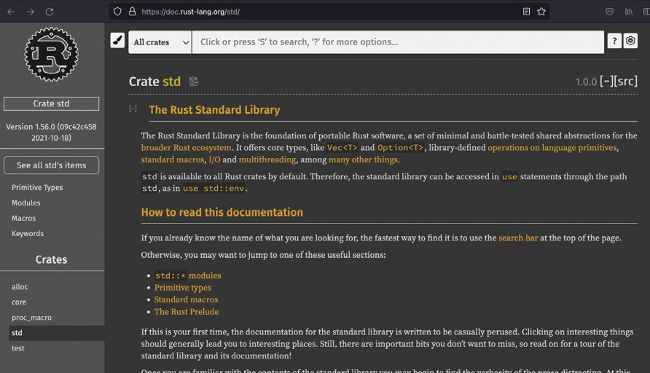
This shows the documentation page of the std crate, which is part of the Rust Standard Library and contains lots of handy functions, data types and macros.