ASK
TECH SUPPORT & TECHSPLANATIONS
Get official documentation at support.apple.com | Get help with hardware at support.apple.com/repair
EXPERT ADVICE
Our resident genius solves your Mac and iOS problems
Email Mac|Life at ask@maclife.com
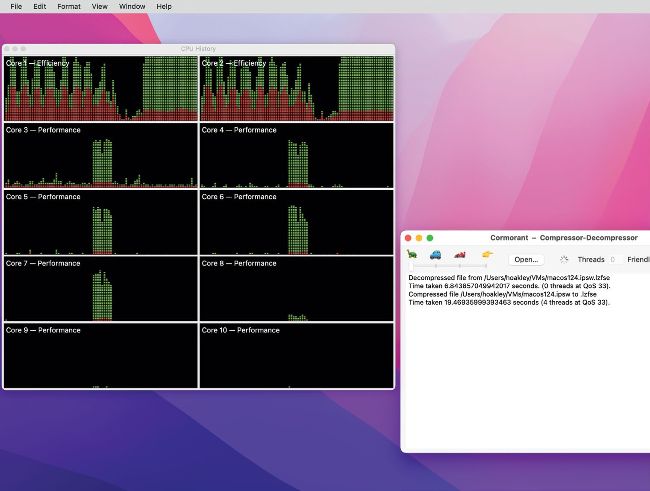
Few apps give the user control over which type of core they run on in Apple silicon Macs.
> You can’t speed up background tasks
When TechTool Pro runs on my Mac Studio, much of its work is done on the M1 chip’s slow cores. Is there any way that can I force it to use the fast cores instead, so it completes that work more quickly?
Apps normally run time–consuming tasks in parallel threads to avoid locking the app up with a spinning beachball. When those threads are created, the code should assign them a priority, known as Quality of Service (QoS), a setting of great importance when running on M–series chips.
In Apple silicon Macs, the QoS also determines which type of cores those threads are run on. Only the lowest QoS causes macOS to run those threads just on the Efficiency (E) cores, even when there are Performance (P) cores available. So in this case, the threads doing that work are set with that lowest QoS.
While you can use the command tool taskpolicy to demote threads with higher QoS to run on the E cores, there’s currently no way to promote threads with lowest QoS so they can be run on P cores instead. Some apps now give the user control in their settings, but without that there’s no way of changing the QoS and getting the app to make better use of available P cores. You should ask the developer of that software to give the user that control.
Notarize now very crucial
WHEN NOTARIZATION WAS introduced by Apple, it didn’t seem too important. Its checks on apps proved fallible, and opening unnotarized apps merely added an extra step to the process. Once you’d got an app through its first run, there didn’t seem to be any difference either, and the Finder doesn’t even tell you what’s notarized.
This changes in Ventura. Now, every time you run a notarized app, it’s checked just the same as if freshly installed to ensure its contents match the signature, and that the signature and notarization are valid.
Not so for apps that aren’t notarized, though: once past their first run, they can still modify themselves or be modified maliciously — something that isn’t difficult to do. The time has come to reflect whether those unnotarized apps have become your Mac’s greatest vulnerability.