COVER FEATURE
BEST NEW SOFTWARE for 2026
Don’t limit yourself and your PC to the same old programs for the next 12 months. Robert Irvine recommends 10 brilliant free tools to download over the coming year
Now we’ve survived the biggest software event of 2025 – Microsoft ending support for Windows 10 – it’s time to start looking to the future. And whether you’ve upgraded to Windows 11 or stayed with its predecessor, your PC can always benefit
from some useful new software. In our Best Free Software section (see page 18), we regularly recommend popular and reliable programs, such as PowerToys, Files, Glow, IrfanView and Thunderbird. These are frequently updated to give us new options to explore and explain, and we wouldn’t get by without them.
WHAT YOU CAN DO
• Block ads and trackers automatically as you browse the web
• Debloat Windows to remove unwanted apps and junk files
• Back up your photos securely using end-to-end encryption
• Capture screenshots of videos with a single click
• Monitor the internet quality of your home network
• Keep all your software updated to the latest versions
• Download multiple files from the web in one go
• Get unlimited email storage across your devices
But with a new year almost upon us, we’ve decided to put those old favourites aside (for now) and focus on some exciting new software. In this feature, we recommend 10 brilliant programs for 2026 that have only appeared – or come to our attention – in the past 12 months.
For each suggestion, we’ve included an alternative new or recently updated tool you can use instead of – or as well as – our first choice. We also name-check equivalent programs you can do without.
Because our recommendations are new, several are still in beta and may suffer a few bugs or trigger a security warning (for being ‘not commonly downloaded’). But they’re all safe to use and provide lots of ways to expand and enhance your PC experience over the next year.
BROWSE THE WEB SPEEDILY & PRIVATELY
1 Helium Browser
www.snipca.com/56979
2025 has seen the rise of ‘agentic’ AI browsers, such as Opera Neon, Perplexity Comet and ChatGPT Atlas (currently macOS-only). Other browsers, including Edge, Firefox, Brave and Chrome (in the US), have kept up by adding and expanding their own AI features, sometimes to the annoyance rather than approval of their users.
Helium is a new, streamlined alternative to those increasingly bloated programs, offering a speedy and secure way to browse the web. It’s based on Chromium and is still in the ‘alpha’ early stage of development, but is already a great choice for those who value their online privacy over unwanted AI tools.
Helium comes with the brilliant uBlock Origin installed ( 1 in our screenshot below), which automatically blocks ads, trackers and malicious websites, and can be customised with additional filters. Just choose ‘Use defaults’ 2 when you first launch the browser.
You can install other extensions from the Chrome Web Store, including Manifest V2 tools Google now disallows and a third-party password manager such as Bitwarden or Proton Pass. For security reasons, Helium doesn’t have a built-in password manager (see our Cover Feature in Issue 720 – buy a back issue from www.snipca.com/56977).
The browser enforces HTTPS on all websites and its default search engine is the privacy-focused DuckDuckGo. It also supports DuckDuckGo’s ‘bangs’, which let you search using your favourite websites and online tools by typing simple commands, for example !w for Wikipedia and !yt for YouTube. Explore Helium’s directory of more than 10,000 bangs at www.snipca.com/56978 - there’s one for ChatGPT (!cgbt) for when you need AI assistance.
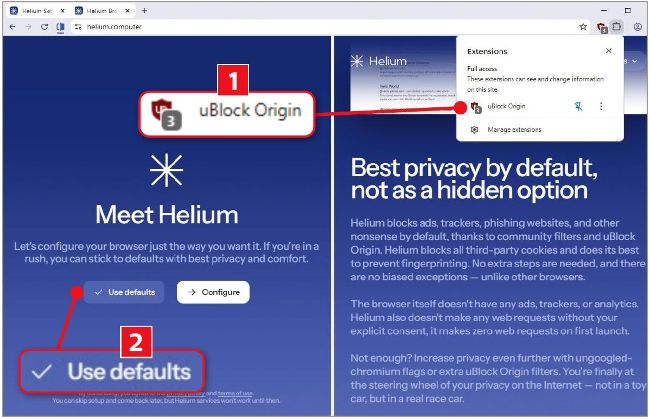
Helium offers a fast and private way to browse the web, without any bloat
Other than a handy split view for browsing two tabs side by side (pictured below), Helium doesn’t have many other features. This keeps its design very minimalist, fast on page loading and low on memory usage. It doesn’t (yet) have a mobile app or sync your data across devices, but you can import your bookmarks from other browsers.