In The Club
Run a club or society? Here's how your tech can make it easier
Track RSVPs with Canva’s invitations
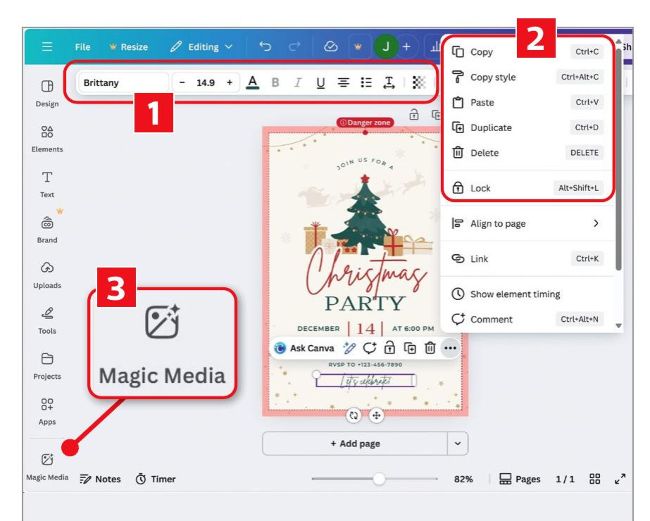
Select an element, change its font, then lock, copy or delete it
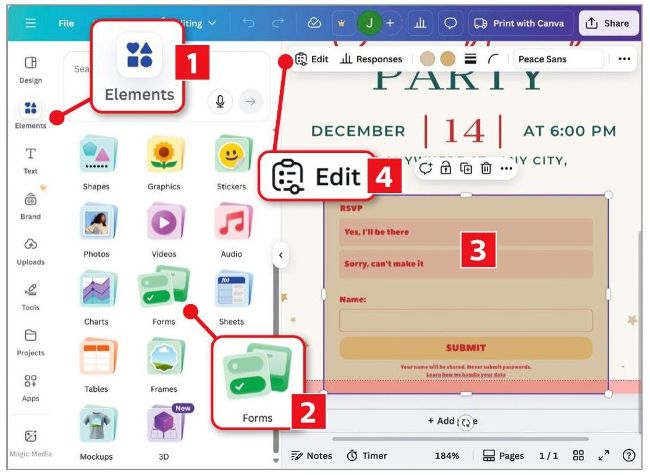
Insert the RSVP form then click Edit to customise it
There are plenty of tools for sending invitations and managing RSVPs, such as Evite (www.evite.com) – see Issue 703’s column. But if you already use Canva (for designing logos or creating flyers), you’ll be delighted that it now lets you embed an RSVP form directly into your design, so members can respond with a couple of clicks. Canva automatically collects all the responses in a spreadsheet, where you can easily sort them.