Sie sehen gerade die Germany Version der Website.
Möchten Sie zu Ihrer lokalen Seite wechseln?
27 MIN LESEZEIT

Revive your PC

SAVE YOUR OLD PC!

Give your old hardware some extra longevity and beat the fiscal blues. shows you how Windows fails and Linux Mint prevails.

Spring is upon us northern hemisphere dwellers once again. While many of us busy ourselves cleaning cobwebs from our caves or canal dwellings, others look to the season of rejuvenation as a time for investing in new hardware. That dusty Windows 7 PC under the stairs might be destined for landfill. Or perhaps your Windows 10 machine is struggling and it seems like no amount of cobweb cleaning (actual and metaphorical) will remedy it. Slow PCs are a nightmare to use and we understand the temptation of out with the old and in with the new.

But if ‘the new’ is a new Windows machine, we urge caution. Also, as inflation continues to float at around 10%, many of us can’t afford to be dropping Benjamins (or Charleses) on shiny new computers. But with just a little hardware refresh and the power of open source software, old machines can be granted a new lease of life. And users can be spared the latest privacy incursions and hardware demands of Windows 11.

Linux Mint is easy to install, simple to use and doesn’t (usually–Ed) spy on you. And with a couple of sticks of memory and a solid-state drive (SSD), we’ll show you how it can make your old machine fly (not into a dumpster).

Old hardware vs new software

Microsoft would love you to buy a new Windows 11 PC, but your old hardware can find a new lease of life.

When Windows 10 was released, Microsoft quite clearly said that this would be the final version of the OS. This turned out to be a poor marketing strategy and soon rumours of Windows 11 began to circulate. The software was eventually released at the end of 2021, and many Windows 10 users now live in fear of a phantom forced update to the new release by night.

Windows 10’s hardware requirements were quite low, largely on account of Microsoft understandably wanting to get as much of its userbase on to the same version. If you want to install Windows 11, though, it’s a different story. We can forgive the 4GB of RAM and dual-core, 64-bit processor stipulations – that’s in line with what you’d want to run a modern desktop environment on Linux. We can also forgive 64GB of storage, but only because storage is cheap these days. What draws our ire is the need for UEFI Secure Boot and, in particular, a Trusted Platform Module (TPM) 2.0 chip. UEFI has been around for a decade (though not everyone likes it), but compatible TPM chips have only gone mainstream over the last five years.

Farewell to Windows

It is possible, via editing of ugly registry keys during installation, to bypass any or all of these requirements. But this isn’t something your average user is going to know how to do. Nor might they want to – such a configuration is unsupported by Microsoft, and it claims “is not entitled to receive updates”. Anecdotal evidence suggests such installs have in fact received security updates, but it’s not at all given that this will continue. The upshot is there’s a whole host of very capable hardware stuck running Windows 10, and when that goes EOL in 2025, that hardware will have to exit the Microsoft ecosystem, one way or another.

We’ve long touted Linux’s ability to run on older hardware, so naturally we implore anyone feeling disgruntled about not qualifying for Windows 11 to give it a whirl. Anything that ran Windows 10 can run Linux Mint without a care. Things are not so simple once we start looking at hardware from previous epochs, though. Up until around 2004, most x86 PCs had 32-bit processors, which is to say that at the lowest levels, they operated on binary ‘words’ 32 bits long. These words were not long enough, so the x86_64 architecture was born, and by 2006, very few 32-bit x86 CPUs were being produced. Windows 10 still supports 32-bit machines, as do many versions of Linux (Debian, Gentoo, PCLinuxOS). However, many popular Linux distros, in particular Ubuntu, Fedora and Arch, do not. We’re going to look at Linux Mint over the page, our go-to distribution for beginners and those fleeing Windows. Mint’s main release is based on Ubuntu, but it has a lesser-known Debian-based release that works much the same way. So, this is what we recommend for your 32-bit boxes.
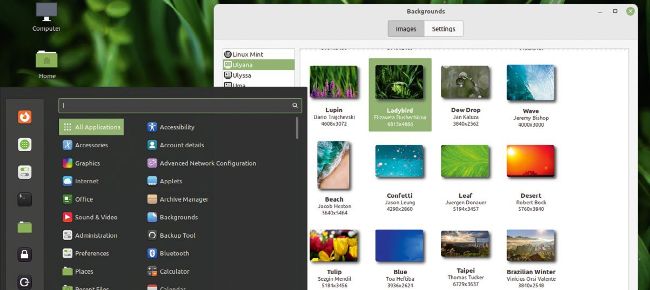
Don’t judge a book by its cover, but by all means judge Linux Mint by its incredible background selection.

» VERY OLD HARDWARE

It’s well documented that Linux came into being by way of Linus Torvalds’s 386 PC in 1991. In the beginning, this was the only hardware the OS supported. Soon it was rewritten in portable code and ports to the Motorola 68000 IBM s/series, and other platforms duly appeared. It might have been a sad day, then, when in 2012 386 support was dropped from the kernel. Linus didn’t seem to think so, though, as he bid it and its ugly memory management good riddance. So, no, you can’t run (modern) Linux on a 386 today. The kernel supports 486s and early Pentiums, but you’d run into trouble running most distros on them. Distros that still provide 32-bit builds might still require CPU support for physical address extension (PAE), which is only present on Pentium Pro and later hardware, dating back to 1995. PAE allows more than 4GB of RAM to be addressed, although each program is limited to 4GB. This is whence cometh the misconception that 32-bit systems can’t use more than 4GB (but it’s also 32-bit Windows limit). You can disable PAE at the boot menu (and distros such as Bodhi’s Legacy edition disable it by default).

Dinosaur-era CPUs that don’t support multimedia extensions (like SSE introduced with Pentium III chips circa 1999) generally don’t support video decoding, so can’t run modern web browsers (which would eat their allotted 4GB of RAM anyway). And a world of pain awaits anyone trying to run modern desktops on old graphics cards or integrated chipsets.

Schalten Sie diesen Artikel und vieles mehr frei mit
Sie können genießen:
Genießen Sie diese Ausgabe in voller Länge
Sofortiger Zugang zu mehr als 600 Titeln
Tausende von früheren Ausgaben
Kein Vertrag und keine Verpflichtung
Versuch für €1.09
JETZT ABONNIEREN
30 Tage Zugang, dann einfach €11,99 / Monat. Jederzeit kündbar. Nur für neue Abonnenten.


Mehr erfahren
Pocketmags Plus
Pocketmags Plus

Dieser Artikel stammt aus...


View Issues
Linux Format
May 2023
ANSICHT IM LAGER

Andere Artikel in dieser Ausgabe


WELCOME
In with the old!
We’re in no position to talk about getting
REGULARS AT A GLANCE
Ubuntu 23.04: Lunar Lobster latest
Exciting things are happening: a new installer, hardened app security and a revamped desktop environment.
Linux on Apple Mx hardware
The Linux kernel now officially supports M-series Macs. But before you get too excited, full integration is a long way off.
It’s a flat future
Flathub to go independent and accept app payments.
END OF LIFE
Donnie Berkholz is senior vice president product at
RELIABLY SECURE
Keith Edmunds is MD of Tiger Computing, which
Fractional scaling is still coming…
Gnome to support protocol.
Half-Life 1 gets ray tracing
Old game given makeover.
Plasma 6 is in development
Version 6 uses Qt6.
Distro watch
What’s behind the free software sofa?
HANDS UP!
Moshi Turner is a software engineer at Collabora.
Kernel watch
Jon Masters keeps up with all the latest happenings in the Linux kernel, so you don’t have to.
THE ITANIC
Jon Masters is a kernel hacker who’s been
Answers
Got a burning question about open source or the kernel? Whatever your level, email it to answers@linuxformat.com
MAILSERVER
WRITE TO US Do you have a burning
BACK ISSUES MISSED ONE?
ISSUE 300 April 2023 Product code: LXFDB0300 In
Time Switch
Version : 2023.01.28 Web : https:// github.com/fsobolev/timeswitch
ChatGPT
Version: 0.11.0 Web : https://app.nofwl.com O penAI’s
Tokodon
Version: 23.01.0 Web: https://apps.kde.org/tokodon Another online service
CopyQ
Version : 6.4.0 Web : https://hluk.github.io/CopyQ The
HSTR
Version : 2.6.0 Web : https://github.com/dvorka/hstr Like
Katalog
Version : 1.16 Web: https://sourceforge . net/projects/katalogg
Stellarium
Version: 1.2 Web: https://stellarium.org S tellarium
iQPuzzle
Version: 1.2.9 Web: https://elth0r0 . github.io/iqpuzzle
Veloren
Version: 0.14.0 Web: https://veloren.net V eloren
Eiciel
Version: 0.10.0 Web: https://rofi . roger-ferrer.org/eiciel
Forgetpass
Version: 1.0.12 Web: https://github . com/alexkdeveloper/forgetpass Virtually
REVIEWS
Sabrent Rocket 2230 SSD
Shane Downing test-drives the perfect Steam Deck drive upgrade.
Intel Core i5 13400F
Being skinflint northern types around here, it’s high praise for Jacob Ridley to say this is the best budget processor right now!
Brave Browser 1.48.171
Nate Drake climbs on his soap box and explains why Brave is the last word in private browsing.
Endless OS 5.0.1
Nate Drake has hours of endless fun with the colourful and simple-to-use Endless OS without once needing to go online.
Vanilla OS 22.10 R7
With his first taste of the ultra-secure Vanilla OS, Nate Drake finds that plain doesn’t by any means equal boring.
Tor Browser 12.0.3
Nate Drake nosedives into the dark net with the Tor Browser and is blown away by its new censorship-resistant features.
Rogue Legacy 2
Workers with endless descendants happy to repeat their work over and over? Anne-Marie Coyle has never seen The Management so happy…
ROUNDUP
Lightweight desktops
In search of extra speed and efficient use of resources checks out the best lightweight desktop environments
Pi USER
New Raspberry Pi camera launched
The £50 camera eliminates rolling shutter artefacts, the bane of digital photography!
RetroFlag GPi CASE 2W
Going back to the future is Les Pounder’s go-to retro phrase – let’s hope this case isn’t as long in the tooth.
Biqu Hurakan
Forever cleaning surfaces with isopropyl alcohol, Denise Bertacchi wonders whether this is the printer for her?
Using the GPIO with MicroBlocks
Les Pounder scratches an itch and builds code for his Raspberry Pi Pico using drag-and-drop coding blocks.
Building a web-based robot control interface
In part five of his series, Les Pounder shows us how to build a custom web interface for controlling your DIY robot.
TOP OF THE FOSS!
TRACK YOUR FITNESS
Michael Reed looks at an open source Android app that can track your fitness.
TUTORIALS
Fast and easy image processing
Shashank Sharma dreams of achieving a leaner version of himself. Until then, he’ll settle for an ImageMagick derivative that’s skinnier, yet useful.
Host your own music streaming server
Nick Peers discovers how to make your personal music collection available from anywhere with this simple, but effective, music server.
Relive classic FOCAL days on your PDP-11
It’s probably not one of your favourite languages, but Mike Bedford says if you want to learn about programming’s heritage, don’t ignore FOCAL.
Enhance GIMP with must-have plugins
For many years, plugins have extended the basic functions of GIMP. Karsten Günther pick the ones he thinks you shouldn’t be without.
Build your own distro with NixOS
“Why, I do declare!” Matt Holder proclaims as he builds his very own operating system, using just an ISO file and declarative text files…
ChatGPT troubleshoots your Linux problems
Nick Peers investigates the different ways in which ChatGPT might help you maintain and fix problems with your PC.
IN DEPTH
MIND YOUR LANGUAGE!
Interested in learning a new language? Or just curious about current hot technologies? Darien Graham-Smith explores the language leaderboard.
CODING ACADEMY
Become a C++ chess master
Tiring of retro gaming rewrites, Andrew Smith turns his grandmaster mind to more classical games in a 3D style.
Observability of the kernel and containers
Barely able to contain himself, Mihalis Tsoukalos explains how to use eBPF to monitor applications, the Linux kernel and containers
Chat
X
Pocketmags Unterstützung