Mac Software
Resolving riddles and restrictions with what you want to run on your Mac
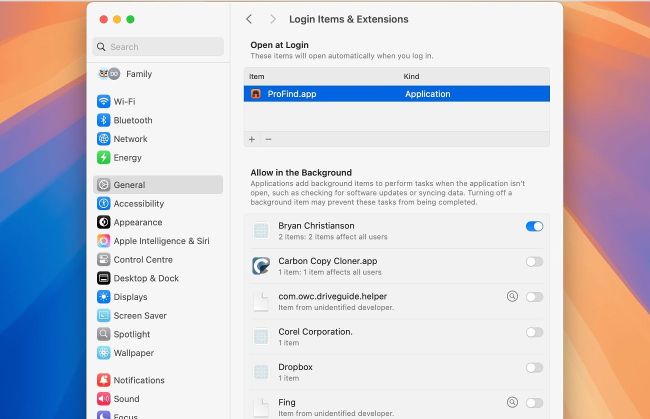
Removing an app completely may require you to delete it from more than one list in Login Items & Extensions settings.
> Remove a Login Item
I thought I’d removed the ProFind app, but my Mac running macOS 15.5 keeps alerting me that the app can’t be opened, and should be trashed. How can I stop that?
That alert normally indicates that the app or component’s signature is broken and can’t be trusted. One reason for that in recent versions of macOS is that the app has been partly updated, but its signature hasn’t been replaced to match what’s currently installed.
As this alert keeps popping up at random, it’s most probably because macOS is trying to run this component of the app as it’s a Login Item, or an app extension (Appex). Looking in the latest version of ProFind confirms that it does have a Login Item inside, named ProFinderHelper.app.