US
4 MIN READ TIME
ASK

Mac Software

Resolving riddles and restrictions with what you want to run on your Mac
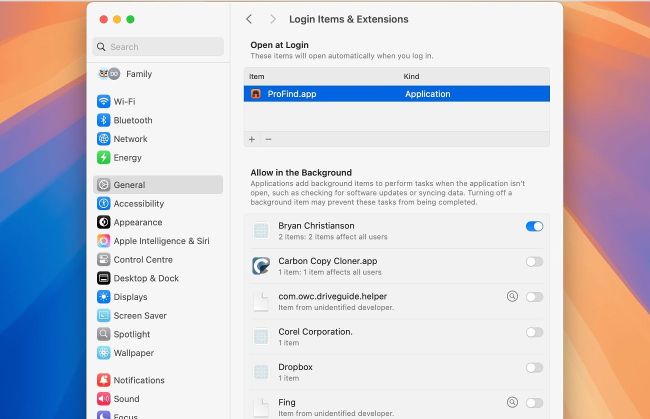
Removing an app completely may require you to delete it from more than one list in Login Items & Extensions settings.

> Remove a Login Item

I thought I’d removed the ProFind app, but my Mac running macOS 15.5 keeps alerting me that the app can’t be opened, and should be trashed. How can I stop that?

That alert normally indicates that the app or component’s signature is broken and can’t be trusted. One reason for that in recent versions of macOS is that the app has been partly updated, but its signature hasn’t been replaced to match what’s currently installed.

As this alert keeps popping up at random, it’s most probably because macOS is trying to run this component of the app as it’s a Login Item, or an app extension (Appex). Looking in the latest version of ProFind confirms that it does have a Login Item inside, named ProFinderHelper.app.

Unlock this article and much more with
You can enjoy:
Enjoy this edition in full
Instant access to 600+ titles
Thousands of back issues
No contract or commitment
Try for 99c
SUBSCRIBE NOW
30 day trial, then just $9.99 / month. Cancel anytime. New subscribers only.


Learn more
Pocketmags Plus
Pocketmags Plus

This article is from...


View Issues
Mac|Life
November 2025
VIEW IN STORE

Other Articles in this Issue


START
IT’S ALL IN THE AIR
THIS MONTH’S COVER star is the new iPhone
Next batch of releases leaked?
THE LATEST NEWS FROM THE WORLD OF APPLE
News in brief
A bite of the Apple
WHAT’S NEXT FOR VISION PRO?
Discover the future of Apple’s spatial computer
> THE SHIFT
JOHN–ANTHONY DISOTTO thinks the iPhone Air is the most magical device Apple has made in years — despite its evident shortcomings
FEATURES
macOS Tahoe superguide
macOS 26 brings us a new interface, increased design parity, and more
Personalize your Mac
New ways for your Mac to match your style
Spotlight & Shortcuts
These two popular Mac features get a boost
Using Continuity
Bridge the gap between your iPhone and Mac
Live Activities
The popular iPhone feature comes to the Mac
The new Games app
Discover all your gaming needs in one place
Journal, Notes, & Reminders
What’s new and improved in these popular apps
Everything else
Other tasty treats in macOS Tahoe
Photos in macOS Tahoe
The Mac image editor gets a few welcome changes
Supercharge YOUR MAC
Unlock your Mac’s full potential and take your experience to new heights with the best gadgets and devices
Home & Student
Work hard, play hard, and enjoy your Mac to the max with this essential selection of great gadgets…
Photo & Video
Polish your photo and video projects with accessories that will sharpen your shots and footage
Creative Pro
Unlock your creative potential with a selection of must–have accessories that will bring your ideas to life
WatchOS 26 tips & tricks
Apple’s latest, greatest watchOS is a glass act
What’s hot in watchOS 26
watchOS is more than just a pretty (watch) face
Health & Fitness
For watchOS 26, Apple’s focus is fitness
CREATE
Master notifications on Mac
HOW TO DO ANYTHING ON YOUR MAC, iPHONE & iPAD
Selective color effects
How to adjust the hue, saturation and brightness of specific colors
Surf safer with DuckDuckGo
Protect your privacy online and avoid being scammed
Perfect your presentations
Use Apple Intelligence to make your Keynote presentations better than ever!
Master Adobe Firefly on the go
How to use image and video generative AI tools on your iPhone
Create custom ringtones on iPhone
At last! Apple makes custom ringtones easy
Multitask with ease on iPad
Multitasking has had a massive power–up in the latest iPadOS
Try Preview on iPad and iPhone
Apple’s productivity app has made it across from the Mac at last!
Vapor chamber cooling in iPhone 17
Engineers have been working up a sweat trying to prevent devices from overheating
ASK
ASK
TECH SUPPORT & TECHSPLANATIONS
MacOS
Shine a spotlight on the solutions to your most irritating Mac problems
REVIEWS
iPhone Air
Slim, tough and fast. But what about the trade–offs?
Apple AirPods Pro 3
Apple’s best earbuds are now even better
Apple Watch Series 11
Improved battery life and tougher front glass lead the way
Citizen Sleeper 2: Starward Vector
Will your space cowboy survive in this futuristic dystopia?
Enabot EBO Air 2 Plus Companion Robot
Intelligence meets intimacy in this robot pal
RapidWeaver Elements
A website builder made for pros that’s surprisingly accessible
Best of the best
Can’t find the hardware or app you’re looking for in our reviews section? Then check in here — we’ve highlighted the best in every major category, as voted for by us
iMac G4
A new iPad on a robot arm? Graham Barlow thinks he’s seen this before…
Chat
X
Pocketmags Support