Photo Answers
In a tizzy over a tripod transaction? Vague about viewfinders? Send your technique and camera questions to digitalcamera@futurenet.com
Andrew James
Andrew is a highly experienced writer and photographer – if you have a problem, he is here to help.
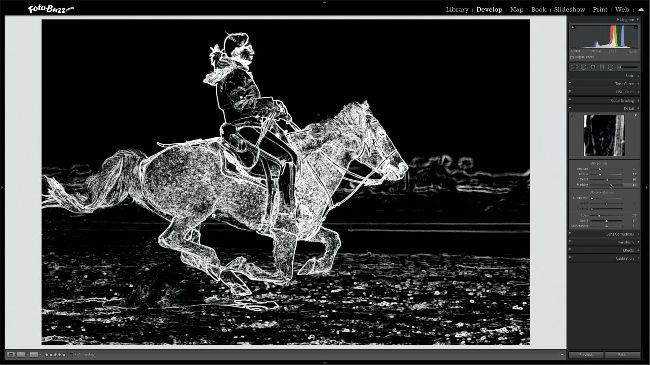
Lightroom can sharpen your photos, but don’t imagine it can rescue a blurry shot.
Andrew James
Sharp and sharper
Q
What is the actual difference between taking a sharp picture and sharpening it afterwards?
Chloe Woodman
A
The ‘true sharpness’ of your photo is captured when you press your shutter button. It is a combination of several factors, such as where you have focused; the amount of depth of field governed by your aperture choice; and, to some degree, the focal length and quality of your lens, too.
On top of that, the shutter speed chosen is a big factor. More images are probably rendered blurry by camera shake than anything else – therefore a shutter speed fast enough to freeze motion of the camera or the subject is a prerequisite. Atmospheric conditions also make a difference. For example, misty conditions or atmospheric haze can affect the apparent sharpness in your photo. These are all elements that are locked in at the time of taking your image and cannot be completely altered afterwards, even if you shoot raw.
However, you can improve apparent sharpness within an image during editing, although I’d stress that you can’t make a blurry photo suddenly sharp by tweaking a few settings. All image processing software has a sharpening tool, which works by boosting the contrast on the hard edges of a subject or scene, as you can see above in Lightroom. The edge areas in white are the areas that get sharpened.
If you shoot JPEGs rather than raw files, your camera’s software will apply some sharpening to your images. If you shoot raw, no sharpening is added, although processing software like Lightroom and Camera Raw do add default sharpening on import.