GB
  
You are currently viewing the United Kingdom version of the site.
Would you like to switch to your local site?
10 MIN READ TIME

Photo Answers

Bamboozled by bracketing? Maddened by macro lens mysteries? Send your technique and camera questions to digitalcamera@futurenet.com

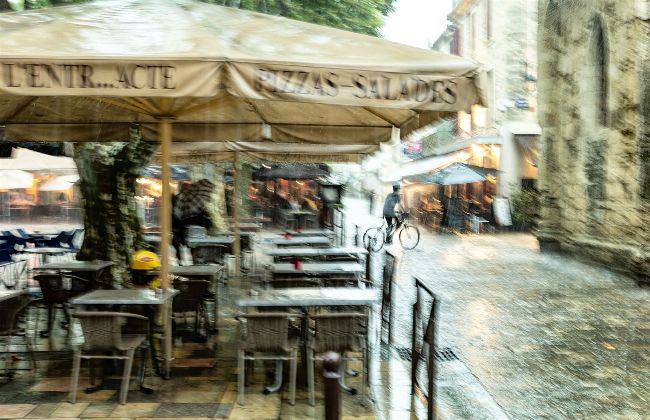
There are two ways you can create an image that looks like an impressionist painting. One involves Photoshop filters but a more satisfying option is to use the technique of intentional camera movement (ICM).
Andrew James
Andrew is a highly experienced writer and photographer – if you have a problem, he is here to help.

Making a good impression

Q I’ve seen images that almost look like impressionist paintings. Can you tell me how this is done?

A There are two options here, Jeff. Either the image has been created by using intentional camera movement (ICM) or a conventional image has been brought into Photoshop and then given a treatment using a filter. To do this in Photoshop, you’d go to Filter >Filter Gallery and choose one of the main Artistic options available, such as Paint Daubs, Dry Brush, Watercolour and Rough pastels. You can play around with the strength of each filter to see if there is anything you like that works with the photo you have chosen.

I’m not a great fan of these filters but I acknowledge they can be fun. The ICM route is more satisfying and takes a bit of skill to get right. You need a slow shutter speed, something like 1/8 sec and a lot of trial and error. You need to deliberately jiggle the camera about as you shoot your images, which makes composition slightly harder, so I always think it’s worth shooting a wider than you need and cropping afterwards. The danger with this technique is the image can sometimes look a little ‘muddy’ if the scene isn’t colourful. You might need to add some extra clarity afterwards in post-processing because even an impressionist-style photo needs good contrast, just as a real painting does. However, get it right and you have a unique image of a scene, as no two ICM images ever look exactly the same.

Unlock this article and much more with
You can enjoy:
Enjoy this edition in full
Instant access to 600+ titles
Thousands of back issues
No contract or commitment
Try for 99p
SUBSCRIBE NOW
30 day trial, then just £9.99 / month. Cancel anytime. New subscribers only.


Learn more
Pocketmags Plus
Pocketmags Plus

This article is from...


View Issues
Digital Camera Magazine
Spring 2024
VIEW IN STORE

Other Articles in this Issue


Welcome
Welcome
Longer days mean that we’re on the cusp
Digital Camera
This month’s contributors
Chris Burkard Adventure photographer Photography has taken Burkard
Photo skills
Chris Burkard
The adventure photographer has a new book out called The Oceans. Niall Hampton discovers the stories behind the images and the author’s relationship with the sea
Photo Active
10 things you can shoot, edit and create this month, from butterflies and castles to the perfect confetti shot
30 TIPS FOR SHOOTING SUPER SHOTS THIS SPRING
Pro photographer Simon Roy reveals his key techniques
CAMERA CINIC
Master the art of modern photography
Get the knowledge
Get familiar with your camera’s drive options
Three drive settings
Advice for tailoring your camera’s settings to match the situation
Three types of bracketing explained
Cover all your colour, exposure and focusing options by bracketing
Perfect examples of when burst shooting can help
You might not need the camera’s rapid shooting skills often but when you do, they can be really useful
Drive modes
They offer much more than shooting photos very quickly
Pros and cons
Continuous shooting
Camera know-how
Electronic shutters
Camera tech
Card speed
Shoot photos like a pro
Using the drive menu to help improve your shots
VIDEO TRAINING
The issue 280 download includes video lessons that build on our tutorials, plus bonus videos with extra tips www.digitalcameraworld.com/dc280
The power of Path Blur in Photoshop
Use this handy filter to mimic long-exposure scenes and transform them with a bold black and white treatment
Changing clothes after the photoshoot
Had a creative change of mind when editing? Let’s explore Lightroom tools that can help
Take control of contrast in Photoshop
There’s more to contrast than black and white points – increasing or decreasing contrast can be a powerful creative tool
15 actions, presets and profiles to boost your shots
THIS MONTH’S BONUS SOFTWARE EXTRAS
Regulars
The art of seeing
Seeking a sense of place, Benedict Brain captures the vibe of Mexico in a diptych
Hotshots
Winning images from the International Landscape Photographer of the Year competition 2023
Reader gallery
Digital Camera readers show how they’ve been getting creative, submitting images across a range of genres
Shot of the month
A new book about Ruth Orkin explores the work of a photographer inspired by the visual language of cinema
In Focus
The latest photography news from around the globe
Scanning ahead…
A year on from the first Generative AI videos, Jon Devo looks at how far the tech has come
KitZone
New gear, buying tips and the world’s toughest tests
Jay Clue & Sam Glenn-Smith
Images by these underwater photographers are featured on PADI’s latest diver certification cards. Niall Hampton finds out more...
What the f-stop?
How much do you really know about photography? Test yourself to the max every issue with our tricky trivia quiz!
Gear & tests
Buyer’s guide
Use our real-world testing scores from across the market to purchase your next camera with confidence
Chat
X
Pocketmags Support