Genius Bar
Our Apple devices and the software on them are some of the finest products on the planet, but even they have their moments. We’re here to give you expert advice and get you back up and running in no time

Glossary
The place to come for key terms made easy
Hot Corners
On Mac you can use the corners of the screen as hot corners, to quickly start actions when you move the pointer to a corner. For example, you can start the screen saver when you move the pointer to the top-left corner of the screen.
Legacy Contact
A Legacy Contact is someone you choose to have access to the data in your Apple account after your death. This feature is available on all devices running iOS/iPadOS 15.2 and macOS 12.1 by going to Settings>Apple ID> Password & Security.
Universal Clipboard
This is an Apple ecosystem feature that enables you to copy and paste content between Macs, iPads and iPhones. To use it you need to ensure all devices are signed into the same Apple ID, Wi-Fi network and have Bluetooth and Handoff turned on.
macOS System Settings
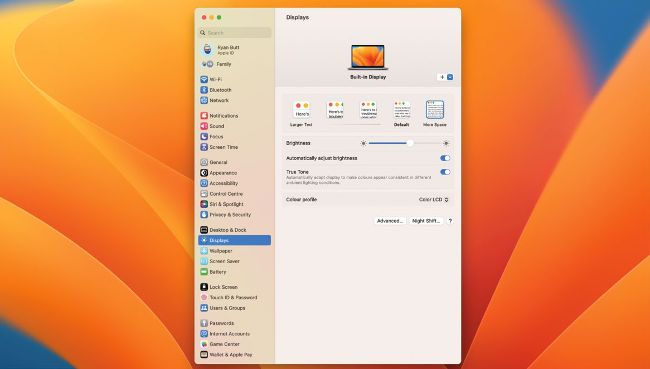
• Image credit: Apple Inc
This may sound like a really ‘noob’ question, but how do I change the screen resolution on my MacBook?
Mike Mabaleka
1
Open settings
If you’re running macOS Ventura, go to System Settings>Displays and the screen resolution will be represented by the text size options presented in a row.
2 Choose an option
You can select from the ‘Default’, lower-resolution ‘Larger Text’ options, or the ‘More Space’ option, which zooms right out so that you can fit much more on your desktop.