Attualmente si sta visualizzando la versione Italy del sito.
Volete passare al vostro sito locale?
22 TEMPO DI LETTURA MIN

COVER FEATURE

Ditch Your PASSWORD MANAGER

Don’t trust your browser to store your login data – switch to a safer and smarter password manager. Robert Irvine tests 20 and recommends the best three

Some people say the safest place to store passwords is in a notebook. After all, a pen and paper can’t be hacked. But in practice, writing down full login details for every website and app you use is a tedious task that’s not without risk.

WHAT YOU CAN DO

• Sign into your online accounts automatically

• Sync your passwords across your PC, phone and tablet

• Securely store all your personal information

• Identify weak, reused and compromised passwords

• Generate stronger passwords for your accounts

• Log into websites using passkeys and 2FA codes

• Avoid spam and scams by using email aliases

• Give trusted people emergency access to your passwords

Many sites now insist you use long, complex passwords containing numbers and special characters, which leaves plenty of scope for error in your notebook jottings. Entering a ‘1’ instead of an ‘l’ or a ‘0’ instead of an ‘O’ will prevent you from accessing an online account.

It’s therefore wiser to save your logins in a password manager, so you can fill in those username and password boxes automatically. The easiest option is to use the tool built into your web browser, such as Google Password Manager in Chrome.

However, for reasons we explain opposite, it’s much safer and smarter to use a dedicated password manager. There are dozens to choose from, including free, freemium and paid-for options, with different benefits and restrictions.

Here we’ve tested 20 popular password managers to find the best tools. We considered factors such as ease of use, features, versatility and value for money to decide our top three, as well as three runners-up. We also show you how to make using your chosen password manager as simple and secure as possible.
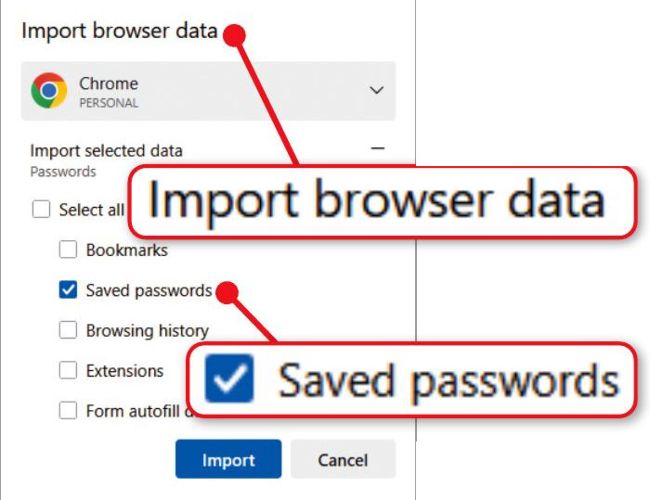
Passwords you import to your browser won’t update automatically

WHY YOU NEED A PROPER PASSWORD MANAGER

Use zero-knowledge encryption

The built-in password managers in Chrome, Edge and other browsers offer only basic protection of your credentials. Entering the password or PIN you use to sign into your computer is usually enough to reveal your passwords. This means anyone who knows your PC login can also access all your passwords. Mobile browsers are more secure, because they protect your passwords using your device’s biometric screen-lock method, such as your fingerprint or face.

Although your synced passwords are encrypted through your account with the respective services, Google Password Manager (used by Chrome and Android) and Microsoft’s password manager don’t provide end-to-end encryption by default (Apple and Mozilla do). To activate it, you need to set up on-device encryption through the password manager’s settings (see screenshot above right).

In contrast, dedicated password managers protect your logins automatically when you set up your master password. They secure your password vault using zero-knowledge encryption, which means they can’t see your data, and passwords you sync online are protected using end-to-end encryption. Only you can decrypt them by entering your master password.

What’s more, standalone password managers aren’t at risk from the security threats that target browsers, including malicious scripts and extensions, phishing attacks and vulnerabilities in the software itself. And, unlike Chrome and Edge, they don’t collect your data or track you online.

Store all your personal data securely

The best password managers go beyond storing website and app logins, and protect your other personal data too. This includes your phone number, home address and payment-card details, and lets you auto-fill that information in online forms.

Most browsers store these details separately from your passwords, without any form of encryption (card details are partially concealed by asterisks). They also lack the option to save secure notes containing sensitive information such as your Wi-Fi password, passport and insurance-policy numbers.

Auto-fill passwords across devices

Some built-in password managers auto-fill data only in the browser, not in mobile apps. You can set most dedicated tools as the default auto-fill service on your Android or iOS device to fill in usernames and passwords on all supported apps (see page 56). In fairness, Google Password Manager and Apple Passwords (via iCloud Keychain) also do this, but they’re limited in other ways.

Sbloccate questo articolo e molto altro con
Si può godere di:
Godetevi questa edizione per intero
Accesso immediato a oltre 600 titoli
Migliaia di numeri arretrati
Nessun contratto o impegno
Prova per €1.09
ABBONATI ORA
30 giorni di accesso, poi solo €11,99 / mese. Disdetta in qualsiasi momento. Solo per i nuovi abbonati.


Per saperne di più
Pocketmags Plus
Pocketmags Plus

Questo articolo è...


View Issues
Computer Active
720
VISUALIZZA IN NEGOZIO

Altri articoli in questo numero


Computeractive
WELCOME
From the Editor I’m sure we’ve all
Microsoft U-turns on W10 support, but UK misses out
The top stories in the world of technology
Pay £2.99 a month to remove Facebook adverts
F acebook will soon give users the chance
CO-OP HACK IN APRIL COST £206M
The Co-op said being hacked in April cost
TESCO MOVES USERS TO NEW PAYG DEALS
Tesco Mobile is moving all customers to its
TOMORROW’S WORLD
Remember the Black Knight in Monty Python and
Openreach to test 8.5Gbps broadband in 2026
O penreach will test broadband speeds of 8.5Gbps
BROWSE OLD TV TIMES MAGAZINES
Genealogy site Findmypast has launched a TV Times
PAY MORE FOR DISNEY+ STANDARD ANNUAL
Disney+ has increased the price of its Standard
THE WORLD’S GONE MAD!
Social media, YouTube and podcasts have caused a
Channel 4 becomes first broadcaster to stream Freely-only shows
C hannel 4 has become the first UK
ChatGPT tricked into solving image CAPTCHAs
C hatGPT has been trained to solve image-based
Openreach’s new telecareswitching system goes live
O penreach is set to launch a new
ChatGPT to block sexual content for under-18s
C hatGPT will now block “graphic sexual content”
GIFFGAFF OFFERS FIRST BROADBAND SERVICE
Giffgaff has launched its first home broadband service.
TALKMOBILE LAUNCHES ESIMS FROM 4GB DATA
Talkmobile has launched eSIMs for new customers who
SKY Q BOXES GET NEW U TV APP
The new U TV app – formerly called
Will the EU finally kill off cookie-consent pop-ups?
Officials want to eliminate one of the internet’s biggest annoyances
Protect your tech
Scams and threats to avoid, plus new security tools
Letters
Tell us what’s on your mind
I’ll eat my Freeview aerial if viewers fall below 7 million
I think you can file the news that
Who’s responsible for a missing parcel – the eBay seller or me?
We stand up for your legal rights
Can I get a refund for Windows I got for my iMac?
Q I’ve previously run Microsoft Office programs on my
Virgin cuts bill by £33 after repeated problems
Virgin Media has agreed to deduct £33 from
Can Jabra refuse to honour warranty because I bought from eBay?
Q I bought Jabra Elite Active 4 earbuds (pictured
Should Virgin refund me for my dead landline?
Q In July 2025, I found my Virgin
Geekom sent newer model after mini PC died
I have two Geekom mini PCs that I
Search passport records
If your ancestors often travelled outside the UK, follow Richard Holt’s advice to…
Google Play Games on PC
GAME EMULATOR
Glow 25.12
SYSTEM-INFORMATION TOOL
OBS Studio 32
VIDEO-CAPTURE TOOL
SHOULD I PAY FOR…?
Choose the right version of software
What should I download?
We advise you which software and apps to use
SOFTWARE WARNING!
Don’t install Photo Recover-File Recovery app
What’s All the Fuss About...
Video wallpapers
Make your photo prints last longer
Don’t let your favourite snaps fade or yellow with time. Jonathan Parkyn explains how to keep your precious photo prints looking bright and vibrant for longer
Replace tools that Microsoft has axed
Has Microsoft just killed off your favourite program, extension or tool? Jonathan Parkyn explains what’s gone, why and what to use instead
Problems Solved
Our experts solve all your tech problems
Problems Solved
Reader Support
Jargon Buster
1080p High-definition video: 1920x 1080 pixels. Also called
Easy when you Know How
Unable to upgrade his unsupported Windows 10 laptop, Robert Irvine tries to…
Reviews
PCSpecialist Defiance II
Power hungry
Apple iPhone 17
Just refine
Acer Aspire 14 AI 2025
LAPTOP ❘ £599 from Currys www.snipca.com/56363 Steals
Netgear Orbi 370
Seventh heaven
Haptic feedback
What is it? Haptics allow gadgets such
TP-Link Tapo Smart HomeBase H500
Hub gear
What’s the best cheap security camera?
We solve your buying dilemmas
Edifier ES300
Makes some noise
JLab Go Pods ANC
Squash racket
reMarkable Paper Pro Move
Noteworthy
1980s-style speakers and headphones?
What are they? Four audio devices released
On Sale Weds 22 Oct
iPhone Air It’s the thinnest iPhone ever, but
Buy It
Our pick of products that have won the Buy It award
Buy It
Our pick of products that have won the Buy It award
Win 1 of 2 CHERRY XTRFY MX 8.3 TKL Wireless keyboards
The CHERRY XTRFY MX 8.3 TKL Wireless is
Workshops & Tips
HOW TO...
Generate free images using LibreOffice’s AI by Nik Rawlinson
Workshop
Install Windows 11 without the junk
Readers’ Tips
TIP OF THE FORTNIGHT Make PDFgear read
Browser Tips
Secret settings and the best extensions
AI Tips
Clever new tools and tweaks
Phone and Tablet Tips
Brilliant things to do on your device
Make Windows Better
Expert tips for every version
Make Office Better
Top tips for the best office programs
In The Club
Run a club or society? Here's how your tech can make it easier
Chat
X
Supporto Pocketmags