CZKAWKA
Quickly track down & delete unwanted files
Nick Peers takes a deep dive into this fast-evolving and brilliant tool for finding and removing redundant files from your PC.

OUR EXPERT
Nick Peers was unsurprised–but still unnerved–by the thousands of potentially redundant files that Czkakwa has found on his hard drives.
Keeping your hard drive clean can feel like an uphill struggle as it fills up with detritus. Weeding through your files by hand is a painstaking task, and this is where a search-and-delete tool like Czkawka comes riding to the rescue.
Czkawka can do so much more than find duplicated files. It can also track down similar images and videos, music duplicates, broken files (and symlinks), empty files and folders, and more. It’s written in Rust, uses caches to speed up follow-up scans, and is available both via the Linux desktop and as a CLI application.
Gettingt started
Czkawka can be installed in various ways: via snap, Flatpak (https://flathub.org/apps/details/com.github. qarmin.czkawka) or you can download the AppImage (https://github.com/qarmin/czkawka/releases). If you install it through snap, you’ll need to give Czkawka access to all your drives:
TERMINAL USE
If you’d like to incorporate Czkawka into batch scripts, or run it from the Terminal, you’ll first need to install the czkawka_cli command-line tool, which requires compiling and installing separately:
$ sudo apt install -y curl git build-essential
$ curl --proto ‘=https’ --tlsv1.2 -sSf https://sh.rustup.rs | sh
$ sudo apt install -y libgtk-3-dev
$ git clone https://github.com/qarmin/czkawka.git && cd czkawka
$ cargo run --release --bin czkawka_cli
Once done, you’ll be able to use czkawka_cli by following the standard syntax:
$ czkawka_cli tool -flag options
The CLI version supports 12 tools, comprising all the functionality of the main program: big for large files, dup for duplicates, image for finding similar images, and so on.
The CLI doesn’t offer any interactivity, so by default each tool will simply perform the required scan, then display the results of its findings in the Terminal window. You’ll need to re-run the command using the -D flag to remove files (for example, -D AEN would delete all files except the newest version). You can also save the results to a file using the -F flag (so -F ) for reviewing more carefully before making any firm decisions.
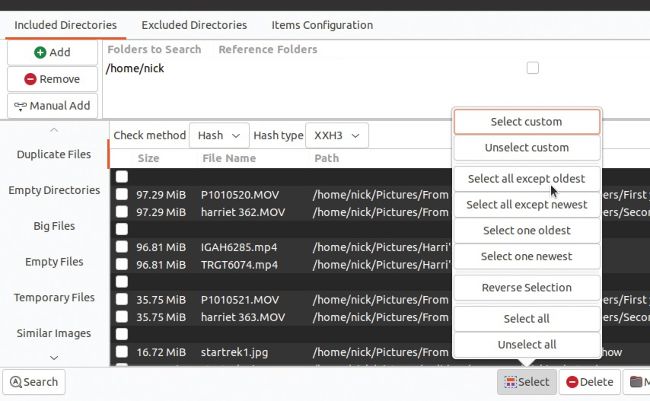
Manually selecting files by hand can be time-consuming. Let Czkawka’s automated select tool lend a hand.
$ sudo apt update && sudo snap install czkawka
$ sudo snap connect czkawka:removable-media
If you plan to use Czkawka’s Similar Videos tool, you’ll also need ffmpeg. If you get a warning when you attempt to use the tool, simply install it thus: