PYTHON
Using Python sockets for multiplayer gaming
Discover how to implement multi-player gaming in a Galaxian-style shooter with Andrew Smith, in the second part of coding Star-Fighter!

OUR EXPERT
Andrew Smith is a software developer for NHS Digital, has a bachelors degree in software engineering and a master’s degree in computer networks.
QUICK TIP
You may find it useful to use three console windows for this tutorial: one for editing or viewing source code; one for running the server instance; and one for running the client instance.
T his month we’re going to look at the multiplayer version of Star-Fighter that was covered in LXF282 and played as a single player game (created by Francis Michael Tayag). We’ll cover the network programming techniques that make it possible to play this game across a LAN (local area network) and where in the source code the changes have been made.
Both instances of the game (server and client) will be executed on the same machine, even though it’s possible to run them on separate machines on the same LAN. Network programming in Python is an advanced topic so if any readers are new to Python, it may be advisable to focus on just the setup and execution of the project. It’s also worth pointing out that this tutorial won’t cover how parts of the game work or how the game is structured, because this was discussed in LXF282. Instead, this tutorial focuses on the networking element of the game (which uses the sockets library) and where changes have been made in the game to make multiplayer action possible.
We’re aiming to run two instances of the game on the same device. It’s possible that some readers may not have two computers readily available, so for this tutorial just one device is used. Let’s begin by setting up our Python development environment.
Installation and setup
To install Python, open a terminal window (Ctr-Alt-T) and type sudo apt-get python3 followed by sudo aptget install pip3 . Then install the PyGame module by typing pip3 install pygame . To make sure that you’re using PyGame version 2.0 (Star-Fighter does use a recent version of PyGame), type python3 -m pip install pygame==2.0.0 . You should now have version 2.0 of PyGame installed. Type the following to check what you’ve just installed:
python3
import pygame
quit()
If all’s well then your screen should look the same as the screengrab (facing page, top right).
Finally, grab a copy of the Star-Fighter project source code by cloning the GitHub repository. Before typing the following to clone (copy) the GitHub repository, move into a folder on your system that you’d like the project to be copied to.
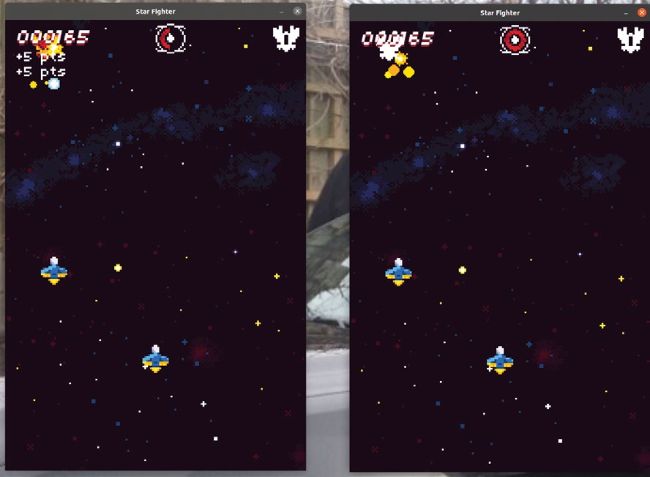
An example of multiplayer gameplay. Shown are both the server and client instance of the program running on the same device.