DISTROBOX
Explore a box full of distributions
Containers
Open Mats Tage Axelsson’s box – it’s much nicer than Pandora’s and he’ll show you how to use all the distros in there too…
The mass of distributions and package managers is soothing to the soul but requires extra effort. You may not use anything but the vanilla stuff that comes bundled with your distribution, but if you’re on the look out for something extra, or want to develop using a strict development environment, you can use Distrobox.
Distrobox runs containers as though they are part of your system, making it easy to mix and match without messing up stability. If you have tried Docker or Podman, you will be familiar with the idea of containers. If not, where have you been for the last decade? So here’s an introduction to the setup and use of Distrobox, to help you decide if it is for you or not!
OUR EXPERT
Mats Tage Axelsson uses Linux every day for longer than is socially acceptable among most people. This leads to a deep knowledge of Linux. And loneliness.
Open the box!
The designers describe Distrobox as “a fancy wrapper around Podman or Docker”. When you run Docker or Podman, you must set your image to communicate with the host system, and these settings are from a security perspective.
Handling these settings is complicated and essential to get right for web-facing servers. When you use it as a second source of packages, only for local use, you can drop your guard a little. With Distrobox, all the settings are done by the tool.
On your own PC, your containers have access to your home directory. This is the biggest point of running Distrobox: all containers run with the same user and user directories. This is very convenient for your own PC but this is not how you should run containers serving the public internet.
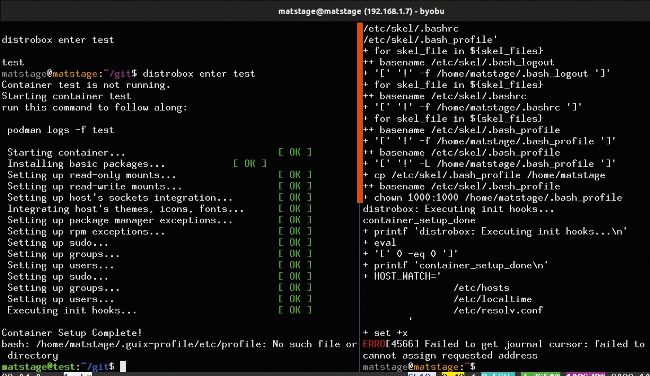
As you enter your container the first time, it installs basic packages for using the container as a Distrobox.
It can be hard to use applications in containers, because security is paramount. On your PC, though, you can do more things, especially with Podman. This means you can use an application from the AUR on a Fedora machine and it behaves as if installed locally.
Why use it?
The first reason to use a tool like Distrobox would be to get familiar with a new package system manager. Though differences are small, they can be significant enough to make life difficult when going between them. You may also have your own PC use one system, while you run into other systems for professional reasons. Maybe you run a VPS for a game server.
Another reason is to find those rare applications that only work on some obscure distro you do not use on your home system. It could be that the latest and hottest apps only exist in the AUR or that an old application still only works on Ubuntu 18.04. With a container, you can keep the old system while moving forward with your main stable setup.