GB
  
You are currently viewing the United Kingdom version of the site.
Would you like to switch to your local site?
18 MIN READ TIME

HotPicks

THE BEST NEW OPEN SOURCE SOFT WARE ON THE PL ANET

HiFile Textadept Kooha Warehouse Brave Feh Dosage Bugdom 2 OpenArena (Quake3e) Linux Assistant GridPlayer

FILE MANAGER

HiFile

Version: 0.9.9.5

Web: www.hifile.app

A file manager is an integral part of a desktop environment. And while most do an adequate job of handling files and folders, for a majority of users, they aren’t everyone’s cup of tea. HiFile is one of the growing list of third-party file managers that make up for the shortcomings of the default ones.

The app is available as an AppImage. Grab it from its website, and make it an executable via your existing file manager, or with chmod +x .

One of the highlights of HiFile is that it’s lightning fast and lightweight. On first launch, you’re asked to select some basic settings, such as language and colour theme, which you can change later.

It uses a dual-pane layout, which is a traditional layout in many file managers. If you haven’t used one before, you’ll soon realise its convenience, especially when it comes copying and moving files and folders. You can use HiFile for all common file manager tasks, such as renaming, deleting, creating archives or extracting items from them, viewing text files, binary files or images, and much more. Interestingly, HiFile treats archives as normal folders; you can open them and perform any operations as with normal folders.

You can also use it to find, filter and sort files or folders. If you have folders that you tend to visit often, you can bookmark them with Ctrl+B or the star icon. This then makes it easier to access them.

HiFile is highly customisable, too. You can also zoom in and out of the interface just as you do in a web browser. Hold down the Ctrl key and then either scroll with the mousepad or touchpad, or with the + and - keys.

Talking of keyboard controls, one of HiFile’s specialities is the use of the spacebar to jump from one location to another. Also, when you start typing the name of a folder, HiFile quickly points you to the correct folder.
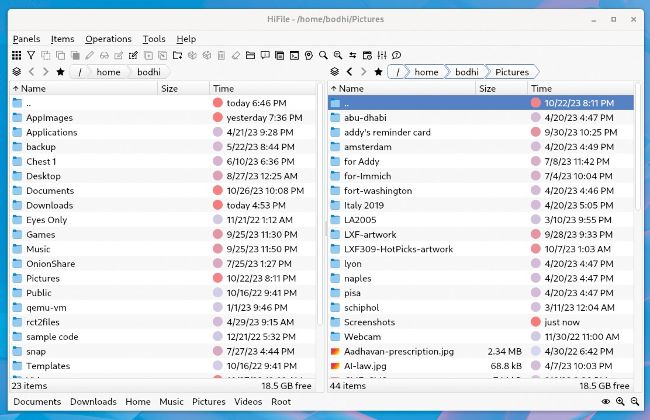
HiFile has tons of useful features that make it a very efficient file manager, especially for keyboard warriors.

LET’S EXPLORE HIFILE...

1 Dual-pane

A two-pane view offers several advantages over a single-pane view, especially if you tend to find yourself juggling between multiple folders.

2 Toolbar

The toolbar lists all the commonly used functions, along with a tooltip to help new users get acquainted.

3 Item selection

HiFile shows selections in a different colour. Selections are also persistent, and aren’t cancelled until you press Escape or leave the current folder.

4 Bookmarked folders

These are the bookmarked folders, which are also displayed at the top of all path searches for easier access.
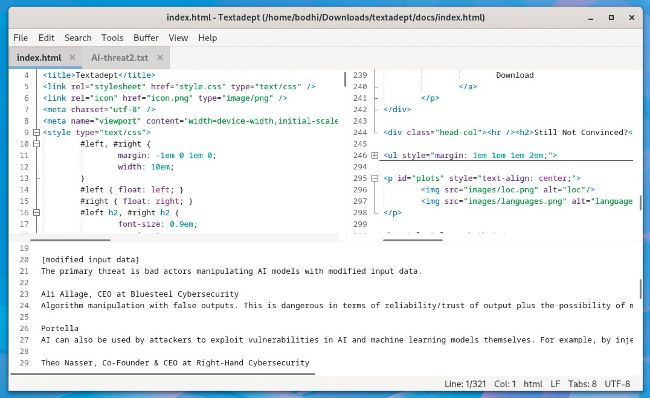
Textadept has a GTK version as well as a terminal version, which is ideal for editing on remote machines.

TEXT EDITOR

Textadept

Version: 12.1

Web: https://orbitalquark.github.io/textadept/

Most distros ship with a default text editor, which is usually quite vanilla. Textadept’s philosophy is very similar to the venerable Vim in that it’s an easy-to-use, yet highly extensible text editor, albeit with a GUI.

Unlock this article and much more with
You can enjoy:
Enjoy this edition in full
Instant access to 600+ titles
Thousands of back issues
No contract or commitment
Try for 99p
SUBSCRIBE NOW
30 day trial, then just £9.99 / month. Cancel anytime. New subscribers only.


Learn more
Pocketmags Plus
Pocketmags Plus

This article is from...


View Issues
Linux Format
January 2024
VIEW IN STORE

Other Articles in this Issue


WELCOME
MEET THE TEAM
We’re trying to entice people to learn to
Fresh start
As we dive into 2024 and a whole
REGULARS AT A GLANCE
Newsdesk
THIS ISSUE: Valve console Steams ahead Foundations laid for HPSF Canonical cloud creation
High Performance Software Foundation announced
The HPSF is to inspire HPC innovation and “make life easier for high performance software developers”.
Canonical launches MicroCloud
The Ubuntu publisher releases new cloud software.
WHAT’S IN A NAME?
Italo Vignoli is one of the founders of
CLOSING THE DOOR
Joe Brockmeier is head of community, Percona. Another
Blender 4.0 released
Latest stable version has overhauled UI and improved support for OneAPI.
Foundation gets €1 million from Germany
Gnome recognised as public interest infrastructure.
Itanium heading for scrapheap
The end of an era: Will the Linux kernel drop support for ia64 architecture?
Distro watch
What’s behind the free software sofa?
DRIVER’S TEST
Faith Ekstrand is an engineering fellow at Collabora.
GETTING TOGETHER
Jon Masters is a kernel hacker who’s been
Kernel Watch
Jon Masters keeps up with all the latest happenings in the Linux kernel, so you don’t have to.
ONGOING DE VELOPMENT
There continue to be significant developments on the
Answers
Got a burning question about open source or the kernel? Whatever your level, email it to answers@linuxformat.com
Mailserver
WRITE TO US Do you have a burning
REVIEWS
Intel Core i9 14900K
Fast, powerful and a bit boring is not how to describe Jacob Ridley…
OSGeoLive 16.0
Uncharted no more – Nate Drake maps out the array of geospatial tools on offer in the specialist distro OSGeoLive.
GhostBSD 23.10.1
Roll over Slimer. Nate Drake explores the latest GhostBSD and finds that, like Casper, it’s extremely friendly and easy to manage.
Kubuntu 23.10
Nate Drake explores the lavish new Plasma desktop in the latest Kubuntu. Is this the greatest KDE-based distro to date?
Counter-Strike 2
It’s CS:GO Jim, but not as we know it, says Rich Stanton, as he takes the long-standing esport stalwart’s successor for a spin.
ROUNDUP
Live distributions
Michael Reed checks out five distros that you could carry around on your keychain to give you Linux goodness at a moment’s notice.
LEARN LINUX!
Finally had enough of your Windows PC? Nick Peers reveals how to fully road-test – then switch to – a user-friendly Linux distro.
Pi USER
Arm buys a slice of Pi
The deal effectively cements the Raspberry Pi to the Arm ISA for an undisclosed sum.
Pi OS Bookworm
Les Pounder has a Raspberry Pi 5 and isn’t afraid to use it, now that he has the latest Raspberry Pi OS.
Creality K1 Max
A big fan of fancy, Denise Bertacchi has taken to the K1’s bigger brother.
Take your Pi 5 to the next level!
Les Pounder has got his hands on a Raspberry Pi 5 and wants to show you how to get the best from it.
IN DEPTH
Tall Tails
Nate Drake explores how to configure the latest version of Tails for maximum security and convenience.
TUTORIALS
Safeguard your secrets
Shashank Sharma gets a taste for 007’s life by reading fiction and occasionally sending encrypted messages to his unsuspecting brother.
Dump your paper docs with perfect OCR
Nick Peers reveals how to extract editable text from images and printed materials with the help of optical character recognition software.
WordPress security, events and users
Michael Reed concludes his overview of setting up and maintaining a WordPress site with some finishing touches and a look at plugins.
Relive your BBC Basic days!
Turn your home system into a BBC Micro by following David Bolton’s advice to download BBC Basic and write programs just like it’s 1982.
Make your own pointand-click adventure
Nate Drake invites you to relive the glory days of Scumm-style point-and-click adventure games by creating your very own.
ADMINISTERIA
Massively improve your SSH login security
Passwords are so last century proclaims Stuart Burns! Using public keys and a couple of tweaks makes for a far more secure login.
Learning the way of the Docker
Docker is designed for an easy sysadmin life. Here are some top tips for using it.
Oxylabs
Mayank Sharma finds this proxy service to be a breath of fresh air.
Private Internet Access
A high-value VPN with a pile of interesting features that’s keeping the nefarious Mike Williams out of trouble.
No Ethernet, I expect you to die!
More stubborn than an anachronistic spy stereotype and just as reliable, Darien GrahamSmith uncrosses the network twisted pair.
CODING ACADEMY
Write a Linux shell from scratch
Never one to shy away from the difficult, Ferenc Deak takes us by the hand and helps us code a shell – from scratch.
Build a smart-home data application
Matt Holder investigates how to take data from an API and display it in a GUI for fun and possibly profit!
Chat
X
Pocketmags Support