HotPicks
THE BEST NEW OPEN SOURCE SOFTWARE ON THE PLANET
SonoBus>>Opal>>GSConnect>>Nativefier>>Desktop Files Creator>>SaveDesktop>>TagSpaces >>War Thunder>>Osu!>>NightPDF>>HomeBrew
Mayank Sharma
can’t decide whether he was more petrified when he rode his first modern roller coaster or when he hopped inside an ancient paternoster lift.
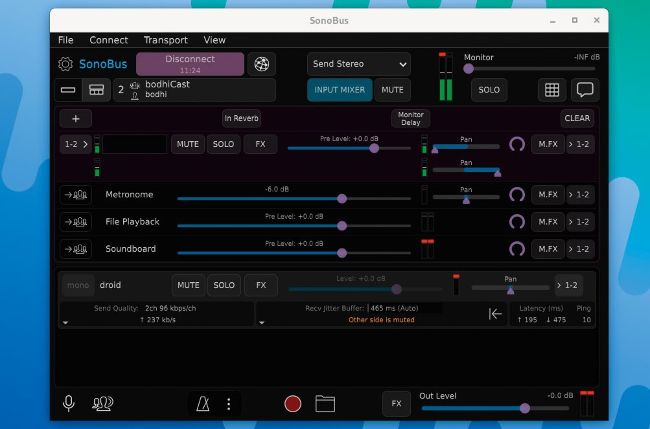
Audiophiles will appreciate the fine-grained control SonoBus offers over the streams, enabling them to tweak things such as quality and latency.
AUDIO STREAMER
SonoBus
Version: 1.6.2
Web: https://sonobus.net
If you host a podcast or an audio call with multiple participants, you can use SonoBus I to record the audio from everyone, as well as stream audio content to the whole group. The crossplatform app works across devices over the local network as well as over the internet.
The project can be installed via its official repo for Debian-based distros such as Ubuntu, and Linux Mint: $ echo “deb http://pkg.sonobus.net/apt stable main” | sudo tee /etc/apt/sources.list.d/sonobus.list $ sudo wget -O /etc/apt/trusted.gpg.d/sonobus.gpg https://pkg.sonobus.net/apt/keyring.gpg $ sudo apt update && sudo apt install sonobus
If you use another distro, you can install the app via its official Snap package available on Snapcraft with sudo snap install sonobus .
Regardless of how you install the Snap package, you need to then run the following commands to make sure SonoBus can access the audio:
$ sudo snap connect sonobus:
alsa
$ sudo snap connect sonobus:jack1
The app’s interface isn’t convoluted, but it isn’t very intuitive either. To get started, click the Connect button. This brings up a new window that offers the option to connect to either a private or a public group.
A private group is only accessible to those who know the name of the group and the optional password it’s locked with, while public groups are open to anyone on the internet using the app.
To create a private group, you need to choose a unique group name and optionally set a password for added security. Now pass on this information to your friends, and they need to enter the details of the private group after hitting the Connect button in their version of SonoBus. Once other participants join in, you can use the app to share and stream audio as well as record audio from everyone.
To get the most out of the app, it’s best to spend a few minutes leafing through its user guide.
LET’S EXPLORE SONOBUS...
1Connected users
All connected users are listed here. You
can choose the audio format and quality for each participant.
2with participants
This area contains buttons to connect to
other participants either by creating a private group or via a public group.
3Chat window
All connected participants, whether they are in a private or a public group, can chat with everyone by broadcasting messages to all participants.
4Record sessions
This button starts and stops recording the stream from all the unmuted participants to the disk.
5Broadcast audio
Clicking on this icon opens the file manager to help you select an audio file that can then be broadcast to all the participants in the group.
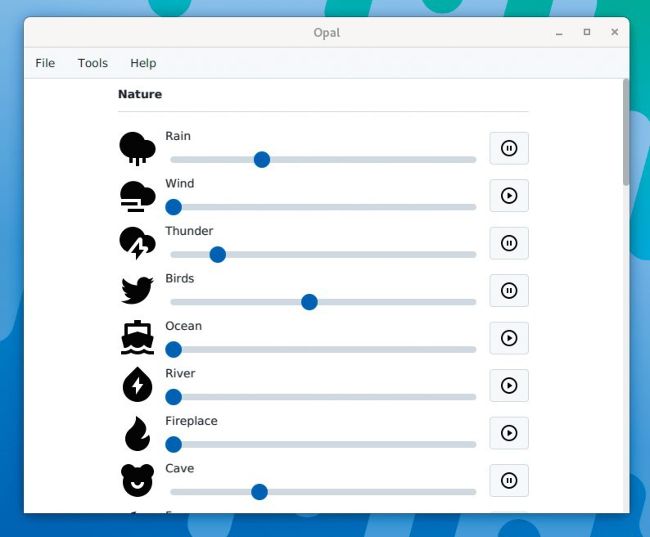
Once you’ve created your ideal background noise, you can save it as a preset for easy retrieval.
BACKGROUND MUSIC
Opal
Version: 1.1.0 Web: https://codedead. com/software/opal
Think you’ll be able to work more productively inside a cave in a forest, with rain pelting on the roof and birds chirping in the distance near a flowing stream? You can find out with Opal.