DIGIKAM
Manage your photo collection with finesse
Mike Bedford explains how DigiKam enables you to manage your photos, finding what you’re looking for with the most powerful of tools…
Credit: http://digikam.org
OUR EXPERT
Mike Bedford
wishes he’d got serious about photo management some time ago, as tagging years’ worth of photos is going to be no easy job. But he’s confident that it’ll be worth the effort.
QUICK TIP
Our instructions involve configuring DigiKam to employ a simple hierarchy that has folders and subfolders in a single album. However, it’s also possible to have multiple albums and, going yet further up the tree, you can have multiple collections, each of which can contain several albums.
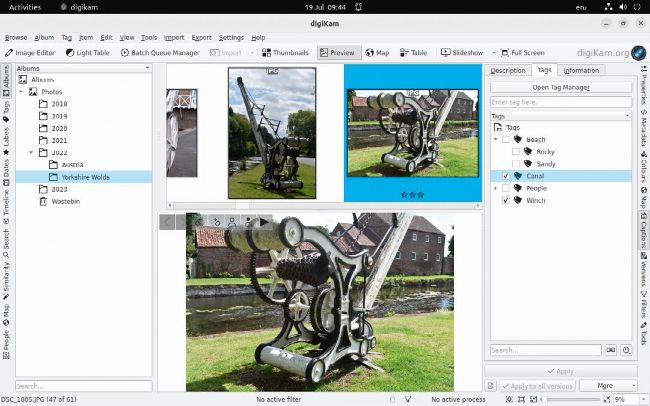
Adding keywords, which can be arranged hierarchically, is just one of many ways you can tag your photos to simplify searching.
W hen you have a collection of photos running into the thousands, finding what you’re looking for can be like seeking the proverbial needle in a haystack. Certainly, storing your photos in a sensible folder structure helps, but not always. For example, it could take some time to track down all your photos that include a sheep. And it gets worse. With digital photos costing nothing to take, even when you find the scene you had in mind, you could discover you have half a dozen alternatives, differing slightly in exposure, focusing or framing. You probably appraised them when you first took them, but picking the best several years later involves carefully viewing them all again. Solving these common problems, and many others, is made easy with a photo-management package, and here we show you how. We’re looking at DigiKam (www.digikam.org), which is one of the most respected free open source photo-management tools, but others also have an enthusiastic following, and the principles are similar.
Workflow and installation
There’s no such thing as a free lunch, and this certainly applies to using photo-management software – you only get the benefit from using this sort of software if you put in some effort up front. Let’s return to our previous example of looking for photos containing sheep, but we want to restrict our search to shots that are well composed, focused and framed. Even with DigiKam, you’re only going to find these if you’ve previously tagged those photos that show a sheep with the word ‘sheep’, and have given your photos some sort of quality score.
Our first bit of advice, therefore, is to add this sort of information to your photos as soon as possible after you’ve taken them. It’s easier this way, because you don’t have to rack your brain to remember exactly where a photo was taken, for example, and it also means you aren’t creating an ever-growing backlog. However, if you’re starting from scratch with photo management, you have to bite the bullet and work your way through your existing collection of photos. We recommend starting with the most recent and working your way back from there. Whether you’re tagging a handful of photos you took the day before, or starting the Herculean task of doing so on the last 10 or 20 years of photos, the principles are the same.