Shoot images in low light
Capture colour and detail in low-light without a tripod or a flash
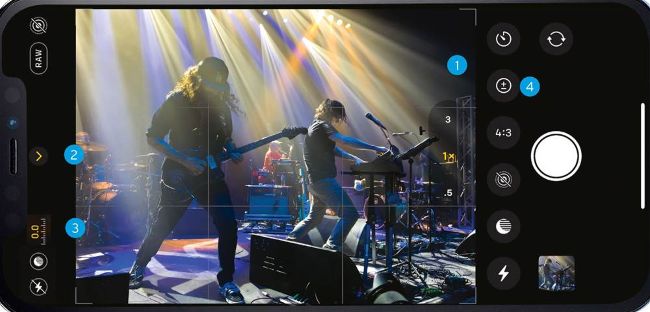
Image credit: Alex Henry Foster & The Long Shadows
1 Aperture
> The iPhone 13 Pro Max’s wide aperture of f/1.5 allows a low ISO speed, reducing ugly digital noise.
2 Chevron options
> Tap here to access controls such as the Night mode dial and the Flash settings.
3 Exposure Adjustment
> Go to Settings > Camera > Preserve settings. Toggle on Exposure Adjustment to display the exposure adjustment indicator.
4 Exposure adjustment
> Tap here to summon a dial that enables you to brighten a dark scene by up to two f-stops.
IT WILL TAKE
> 15 minutes
YOU WILL LEARN