GB
  
You are currently viewing the United Kingdom version of the site.
Would you like to switch to your local site?
4 MIN READ TIME

Sleep better with appleWatch

Your watch can stop apps from waking you up and track your sleep

Sleep better with appleWatch

Your watch can stop apps from waking you up and track your sleep

IT WILL TAKE

10 minutes

YOU WILL LEARN

How to get the most from Sleep Focus and sleep tracking

YOU’LL NEED

watchOS 9

Genius tip!

Unfortunately, you can’t keep track of your sleep and charge your watch at the same time. Make sure you’ve got a fair bit of charge on your watch before you settle down to sleep.

Sleep matters, but there’s much more to it than simply how long you spend in bed. The quality of your sleep is what really counts, and your Apple Watch can help you work on that.

There are two key ways in which your Apple Watch can help you sleep more soundly. The first is Sleep Focus, which enables you to set a bedtime schedule and customise what your watch does through the night (or day, if you’re on shifts) – so, for example, you can decide what your watch should display and whether you want a blanket Do Not Disturb or if you want certain apps to notify you through the night.
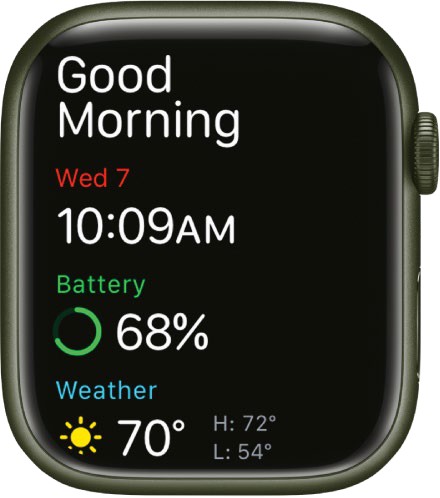
Your Apple Watch knows when you’re awake; you get this cheery ‘Good Morning’ greeting when you get up.

The second is sleep tracking. Every night your Apple Watch uses its microphone, its accelerometer and its heart rate monitor to record how you sleep and how long you are in each of the key sleep modes: Awake; REM, which is when your eyeballs are moving around and you’re often having dreams; Core sleep, also known as light sleep; and Deep sleep. It then shows the results on a daily graph on your watch; you can see weekly, monthly and annual data in the Health app on your iPhone.

Identify patterns

You can then use that collected data to identify patterns, especially if you also look at other data in your Health or related apps. For example, you might sleep really badly at the weekends because of your social whirl or noisy neighbours, or you might sleep better on days that you exercise.

HOW TO Monitor your sleep with apple Watch

1 Set up Sleep

The first place to visit is the Watch app on your paired iPhone. Scroll down to Sleep, tap on it, and you should see the screen shown here. Make sure the option ‘Track Sleep with Apple Watch’ is selected if you want to use sleep tracking.

2 Set Sleep Focus

Tap on Manage Sleep Focus in Settings to edit the Focus Mode for when you go to bed. By default, no apps or people can contact or notify you, but you can change this if you prefer – for example, because you’re on call.

3 Pick a face

You can set specific lock screens for your iPhone and Apple Watch while Sleep Focus is active, which is useful if you’re likely to take a bleary-eyed look at your Apple Watch in the middle of the night. This option only shows installed faces.

4 Use the Sleep Screen

If you prefer, you can click on Sleep Focus > Options and select the default Sleep Screen, which removes almost everything but the time from your Apple Watch display when Sleep Focus is active. You can also turn off the time display.

5 Set your schedule

If you haven’t already, you can create a sleep schedule in the iPhone’s Health app. This will automatically activate Sleep Focus at the time(s) you specify, and you can use it to set regular alarms to get you out of bed.

6 See your sleep

All you need to do now is wear your watch to bed. In the morning, you’ll be able to see your sleep data in the Health app as well as on your Apple Watch. The tracking records four different sleep states: Awake, REM, Core and Deep.

7 Get more info

The Health app records more than just your sleep cycles. It also tracks your heart rate and your respiratory rate throughout your sleep, enabling you to get a better picture of your body’s activity when you’re in different stages.

8 Add your own

Don’t worry if you forget to wear your watch to bed; your iPhone can still record the overall time you spent in bed, albeit without information about your different sleep stages. You can also add your own data manually in Health.

9 Try other options

Apple’s own Sleep app isn’t the only sleep-related option for your Apple Watch, and if you scroll down in the Health app you’ll see a selection of Health-compatible apps with links to the appropriate page in the App Store.

Unlock this article and much more with
You can enjoy:
Enjoy this edition in full
Instant access to 600+ titles
Thousands of back issues
No contract or commitment
Try for 99p
SUBSCRIBE NOW
30 day trial, then just £9.99 / month. Cancel anytime. New subscribers only.


Learn more
Pocketmags Plus
Pocketmags Plus

This article is from...


View Issues
MacFormat
February 2023
VIEW IN STORE

Other Articles in this Issue


MacFormat
hello (again)
With millions of apps to choose from on
Mac FORMAT
MacFormat, Future, Quay House, The Ambury Bath, BA1 1UA
APPLE CORE
Apple boosts iCloud security and privacy
End-to-end encryption improvements coming
Self-service repairs come to the UK
Fancy fixing your own Mac? Well now you
Apple Music gets ‘karaoke’ mode
If you’ve always wanted to show off your
APPLE NEWS ROUNDUP
APP STORE PRICE PLAN FROM £0.29 TO £11,999.99
Apple Car to arrive in 2026 with $100,000 price tag
Apple is likely testing its next-gen chips ahead of release
M2 Max benchmarks appear online
Likely testing of new Apple silicon chips ahead of official release
Pixelmator Pro 3.2 £17.99
Easy-to-use image editor – now with added video editing
Crave
THE GEAR WE’RE LUSTING AFTER
MATT BOLTON…
THINKS THAT IN A WORLD WHERE PHONE UPGRADES CAN’T BE EXCITING ANY MORE, MAYBE THEY SHOULD BE BORING
FEATURE
THE BEST FREE APPS for Mac, iPhone and iPad
We take a look at some of the best downloadable software that won’t cost you a penny
Must-have freebies for Mac
Boost your Mac’s toolset without busting your bank account
Did you know?
If you get the alert (below), grant permission
Indispensable additions to your iPhone
Our selection of the very best apps for iOS devices, from creativity to organisation
Did you know?
Searching for something online on a regular basis?
Compelling apps for your iPad
Make your iPad more capable without having to splash the cash…
History of Apple
With Apple now in its fourth decade, we explore key products from its history, the impact they’ve had on gaming, and the sometimes surprising impact that gaming has had on Apple itself
APPLE SKILLS
Master login items on Mac
The Login Items feature gets an important makeover in macOS Ventura
Manage duplicate images
Discover and sort duplicate clips and stills for a cleaner Photos library
Make the most of Notes
Discover all the new and useful features on offer in the Notes app
How to use Live Text
Edit and translate image text on your iPhone
Type smarter on-screen
Type faster, write better and send images with Apple’s on-screen keyboard
Grading on the go
How to give your colours, tones and composition a cinematic makeover
Matter – the allied standard
Matter is the smart home tech of the future, and it’s coming to Apple devices
What is Thread?
Matter goes hand-in-hand with another new technology called Thread – in fact, people often talk about Matter and Thread as though they are one and the same thing.
GENIUS TIPS
First Aid from the top or bottom?
EDITED BY HOWARD OAKLEY EXPERT ADVICE Our resident
iOS software
Swipe away your touchscreen troubles and rekindle your love of Apple’s mobile devices
Peripherals
Thinking inside the box to refresh the parts other tips can’t reach
macOS Ventura printer error
Provided your printer supports AirPrint, removing it and
Missing Target Display
by ZHONGWEI QIN Q MyiMac 27-inch running High
macOS
Shine a spotlight on the solutions to your most irritating Mac problems
Find proper movie files
HoudahSpot can exclude .ts files from its search,
Lost accented characters
Q WhenI updated macOS, I lost the ability
Mac
letters@macformat.com
APPLE CHOICE
Philips 16B1P3302
Have portable monitor, will travel
OWC Envoy Pro Mini
A lightweight, fast and versatile pocket drive
Mophie 3-in-1 Travel Charger
The perfect solution for charging Apple gear on the go?
OneOdio Monitor 60
Affordable over-ear headphones for wired listening
The best laptop backpacks
Protect your MacBook on the move with these smart and stylish bags
EASY VIDEO EDITORS FOR MAC
Take the next step on your movie-making journey
Wondershare Filmora
The perfect balance of power and usability, a serious step up from iMovie
Camera Guard for Mac
Lock down your Mac with ease
Tim 7.2.0
Keep track of the time you spend working on projects
Intruder in Antiquonia
Short but, unfortunately, not particularly sweet
Imgmi
AI-powered image enhancement and editing
Dynamic Island
Clever uses for the iPhone 14 Pro’s coolest party trick
STORE GUIDE
STORE GUIDE
Your guide to the best Apple hardware and third-party accessories
BEST BUYS… Third-party hardware >
Image credits: Sony Group Corporation, ZAGG Inc,
BEST BUYS… Third-party Mac apps >
> PHOTO EDITOR Luminar AI £59 skylum.com
BEST BUYS… Third-party iPhone, iPad & Watch apps
> VIDEO EDITOR (iOS/iPADOS) LumaFusion 3 £25.99 luma-touch.com
GOODBYE
Emergency SOS
Forget a message in the bottle. Graham Barlow wants to send an SOS to the world with his iPhone 14
Chat
X
Pocketmags Support