GB
  
You are currently viewing the United Kingdom version of the site.
Would you like to switch to your local site?
16 MIN READ TIME

BROADCAST YOURSELF!

Calling all influencers! With some hardware, some software and a little know-how, you can be a superstar on YouTube too

The artist Andy Warhol famously said that one day everybody would be famous for 15 minutes. He got the number right and the unit wrong: today, everybody can be famous for 15 seconds. That’s how long a song on TikTok lasts – although the video it contains can be a little longer.

There’s been an explosion of people uploading music, video and podcasts for people to stream live or listen to at their leisure, an explosion in places to share content, and a whole new world of hardware and software to help make the most of it. It’s never been easier to share on social media – although making money from it is more difficult. But money isn’t the only reason to broadcast yourself. It’s a lot of fun, and you never know where your clips might take you.

Over the next few pages we’ll discover the hardware, software and hosts you need to get the most out of sharing. We’ll look at the gadgets and apps that do all the difficult stuff for you, explore how to edit your video to make it pop, and show you how to look good on camera. Although we’ll mainly be talking about the Mac here, lots of the kit, apps and advice apply to iPad and iPhone too.

WHAT YOU WILL NEED

The hardware and software you need to save and stream

FIrst things first, in order to turn your bright ideas into something others can see or stream, you’re going to need a few items of both hardware and software.

The hardware you need depends on the content you plan to make and where you’re going to put it. For example, you can make videos for TikTok or Instagram reels with just an iPhone and Apple’s free Clips app, and you can also get iMovie for free in order to access more professional tools, such as effects and editing. You can record a podcast directly into GarageBand and use its built-in effects to make it sound great, and if you want to record people over Zoom or FaceTime there’s our old favourite Audio Hijack, which can record pretty much any audio that plays on your Mac.
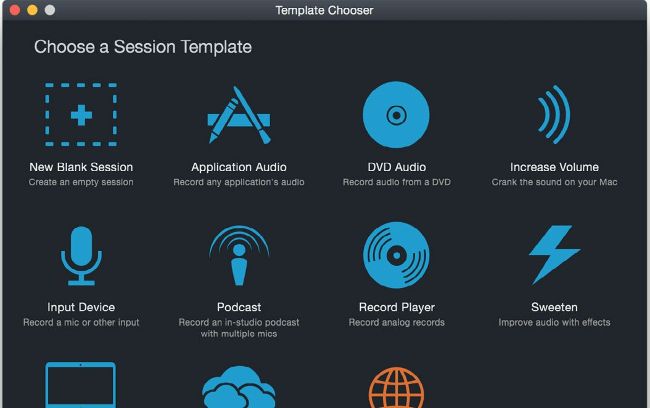
If you’re recording podcasts, Audio Hijack makes it easy to bring in Zoom or FaceTime guests, record multiple mics or capture any Mac audio.

The most important part of your setup is the hardware that records your sound or your video. For podcasting or voiceovers that means a good quality USB microphone to plug directly into your Mac (or your iPhone or iPad via USB-C or Apple’s USB to Lightning converter) or a non-USB microphone connected via a USB audio interface such as a Focusrite Scarlett Solo, M-Audio M-Track Solo or a Komplete Audio box.

For video, if you have a reasonably recent iPhone then its camera is better than many budget cameras and almost all webcams, and if you have macOS Ventura and iOS 16 or later you can use Continuity Camera to make your iPhone work as a webcam for any video app.

Unlock this article and much more with
You can enjoy:
Enjoy this edition in full
Instant access to 600+ titles
Thousands of back issues
No contract or commitment
Try for 99p
SUBSCRIBE NOW
30 day trial, then just £9.99 / month. Cancel anytime. New subscribers only.


Learn more
Pocketmags Plus
Pocketmags Plus

This article is from...


View Issues
MacFormat
October 2023
VIEW IN STORE

Other Articles in this Issue


Mac FORMAT
Editorial
It’s amazing to think that almost half of
Master Apple shortcuts
macOS Cmd is the Command key. Alt or
magazinesdirect
magazinesdirect.com
APPLE CORE
APPLE CORE
HOT TOPIC! Apple reportedly has AI chatbot in progress
Apps & games
[ MAC APP] Mimestream $49.99/year (about £39/year) Gmail
Crave
THE GEAR WE’RE LUSTING AFTER
CONTACTS
Have your say on all things Apple!
APPLE’S AIRTAGS NUMBERS
Apple’s cute tracker tags do more than simply help you keep tabs on your belongings. They also make for some interesting statistical facts too…
MATT BOLTON…
SAYS THAT IN THE CURRENT ERA OF TECH MADNESS, IT’S VERY WELCOME FOR APPLE TO BE A BIT BORING SOMETIMES
Apple’s MLS Season Pass
Fan-focused football – at last!
MEET YOUR NEW MAC
Choose the right one for you!
APPLE SKILLS
Create strong passwords
Discover how to get started with Bitwarden’s free password tool
Take control of video clips
Use Elements Organiser to find the best clips to edit in Premiere Elements
Use Ecosia to browse privately and sustainably
Save the world and boost your privacy with this eco-friendly browser
Finally write that book!
Take a half-formed idea and transform it into a finished story
Master the Music app on iPad
Enjoy music anywhere at home or on the go on iPad
Build your website with Blocs
The power to create responsive websites is at your fingertips with this app
Shoot long exposures
Add motion blur and light streaks using Camera or third-party apps on iPhone
Master Maps on Apple Watch
The Maps makeover on watchOS makes it even better for getting around
Apple’s Game Porting Toolkit
Apple’s new tool for developers could be a game-changer for Mac
GENIUS TIPS
EXPERT ADVICE Our resident genius solves your Mac
Clean up your hard drive
Whether you’re rapidly running out of space or simply want to put your files and apps in better order, the answer lies with a clear out of your Mac’s storage
Our ratings
Our reviews are totally independent; we’re not affiliated
APPLE CHOICE
Nothing Ear (2)
Feature-packed wireless earbuds
Philips Evnia 25M2N5200P
Can this mid-level gaming monitor beat the opposition?
Belkin BoostCharge Magnetic Wireless Power Bank 2.5K
Low-cost MagSafe-ready battery booster
ESR iPad Rebound Hybrid Case 360
Affordable protection with a twist
Nanoleaf 4D
Screen-matching smart lights are colourful fun
Xencelabs Pen Tablet Medium Bundle
Everything you need from a drawing tablet
Monduo 16 Pro Duo Display
Supersize your MacBook Pro display
THE BEST VIDEO- CALLING APPS
Chat with friends, family and colleagues on your Mac
Logic Pro for iPad
Pro-level music tools come to iPad
Sid Meier’s Railroads!
You won’t need a ticket for this ride
great new activities
Try something new in your local area
STORE GUIDE
STORE GUIDE
Your guide to the best Apple hardware and third-party accessories
NEXT MONTH
Mac Format
MacFormat, Future, Quay House, The Ambury Bath, BA1
ONE MORE THING
Siri GPT
Graham Barlow can’t wait to give normal Siri the heave-ho and get the AI upgrade we’ve all been waiting for
Chat
X
Pocketmags Support