MEET YOUR NEW MAC
Choose the right one for you!
Written by Ian Osborne
What
do you look for in a Mac? Do you want a powerful computer that can handle multiple 8K video feeds, or are you after a more basic device for web surfing and email? Does it need to be portable or are you happy to leave it on your desk? Is money no object or do you have to watch what you spend? Or maybe you’re looking for customisation options when buying a Mac from the Apple Store? In this feature, we’ll explore the wide range of choices available to you, according to your needs and budget. There’s a Mac for (almost) every pocket. We also recommend some essential add-ons, accessories and apps you can buy for your new Mac to help you make the most of it.
But before you go ahead and buy a brand new Mac, bear in mind the other options. The Apple Refurbished Store (apple.co/3phwED7) sells refurbished Macs and other Apple products, often at a decent discount. These have been thoroughly tested and are backed by a one-year warranty. They may have minor cosmetic defects, but they’re as good as new. You could also consider buying a secondhand Mac. There’s plenty to choose from on eBay, Facebook Marketplace and local computer retailers. If you have a limited budget but don’t need to run the latest version of macOS, a used Mac laptop could be a great choice. So, from a top-tier Mac for power computing to an affordable Apple machine for hobbies, let’s take a look at what’s available.
Best budget desktop
Mac mini
The cheapest way to own a new Mac
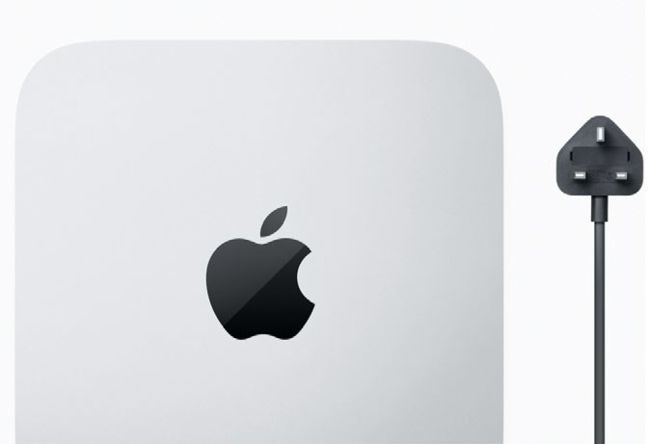
With the Mac mini, you only get the computer and power cord in the box – no accessories are supplied.
The
Mac mini is the cheapest Mac in the Apple Store by some considerable distance. The entry-level model is just £649, a full £400 less than the next cheapest option – the 13-inch MacBook Air (£1,149). However, don’t assume it’s underpowered. This entry-level Mac mini features the latest Apple Silicon M2 system-on-a-chip (SoC), with an 8-core CPU, a 10-core GPU and 8GB of unified memory. You only get 256GB of storage, but if you want more, you can add an external drive or buy the mid-range model instead (£849, 512GB). The top-of-the-range Mac mini also has a 512GB SSD, but it has an M2 Pro chip with 16GB of unified memory and other enhancements (£1,399).
Whichever Mac mini you buy, it has one significant – or maybe ‘potential’ – drawback. All you get in the box is the computer and a power cord. You don’t get accessories; not even a mouse, trackpad or keyboard. As the Mac mini has no screen, you need a monitor too. Naturally, this isn’t a problem if you already own these items, but if you don’t, make sure you factor in their cost when deciding what to buy. Not that these need to be particularly expensive, of course. A Windows keyboard works fine with a Mac, but make sure the display has an HDMI connection. With some hunting and a bit of luck, you could potentially buy everything you need for your Mac mini for around £200-£300.
As well as those on a budget, the Mac mini is ideal for commuters who want to use the same computer at home as well as in the office. At 19.7cm square, 3.58cm high and 1.18kg (1.28kg for the top-of-therange model), it’s extremely portable. If you have a monitor, keyboard and mouse/trackpad controller at home and in the office, you only have to transport the Mac mini between the two. The power cord is a cheap, readily available figure-of-eight lead, so you could leave one at each station for convenience.
1 Ethernet port
The Mac mini has built-in Wi-Fi 6E, but for a cabled connection use its 1Gb Ethernet port. 10Gb Ethernet is also available.
2 Thunderbolt 4
The £649 and £849 Mac mini models have two Thunderbolt 4 ports, while the £1,399 M2 Pro version has four.
3 HDMI
The easiest way to connect your Mac mini to a monitor is through the widely used HDMI port.
4 USB Type A
All models offer two USB-A ports, for up to 5Gb/s transfer speeds. These are great for hubs and peripherals.
5 Audio output
The Mac mini has a built-in speaker, but you can use this 3.5mm headphone jack for wired cans or external speakers.
Mac mini £649
(Entry level)
Chip: Apple M2, 8-core CPU (4 performance cores, 4 efficiency cores), 10-core GPU, 16-core Neural Engine
Memory: 8GB (upgradeable to 24GB)
Storage: 256GB (upgradeable to 512GB, 1TB or 2TB)
Ports: 2x Thunderbolt/USB 4, 2x USB-A, 1x HDMI 2.0, 3.5mm headphone jack, Gb Ethernet (10Gb Ethernet option)
Once again, the Mac mini’s small size and (relatively) low price should not imply a lack of power. Unless you have very high needs, the Mac mini can generally handle anything you throw at it, including photo editing, video production and the latest games. The cheaper two Mac minis are limited to two displays, though, and the top-of-the-range M2 Pro three screens, so bear this in mind if you think it will be an issue.
Upgrade options
If you order your Mac mini via the online Apple Store, you can add custom options depending on which model you buy. The two M2 Mac mini models can be upgraded to 16GB or 24GB unified memory, and/or a 512GB (on the cheapest model), 1TB or 2TB solid-state drive (SSD) for extra storage.
Opt for the most expensive Mac mini and you can upgrade its M2 Pro processor from a 10 ‐core CPU and 16-core GPU to one with a 12 ‐core CPU and 19-core GPU. You can also go for 32GB unified memory, and a 1TB, 2TB, 4TB or even an 8TB SSD.
For extra networking speed, you can upgrade any Mac mini’s Ethernet port to 10Gb Ethernet, and you can also choose to have the Final Cut Pro and/or Logic Pro apps preinstalled.
Mac mini £1,399
(Ultimate)
Chip: Apple M2 Pro with 10-core CPU (4 performance cores, 4 efficiency cores), 16-core GPU, 16-core Neural Engine
Memory: 8GB (upgradeable to 16GB)
Storage: 512GB (upgradeable to 1TB or 2TB)
Ports: 4x Thunderbolt/USB 4, 2x USB-A, 1x HDMI 2.0, 3.5mm headphone jack, Gb Ethernet (10Gb Ethernet option)