Tough testing, trusted ratings
Apple Vision Pro
A revolution in progress
From $3,499 From
www.apple.com
Features micro–OLED display (23 million pixels); refresh rates: 90Hz, 96Hz, 100Hz; 6.5MP Stereoscopic 3D camera; Wi–Fi 6 and Bluetooth 5.3; M2 and R1 chips; iris ‐based authentication
“WHAT THE HECK is happening?” That’s what I said to myself as I played virtual DJ, spinning two records in front of me with a cross–fade knob and special effects I could control with my hands in mid–air. I just reached out and touched them.
I had a similar moment when I just looked at my MacBook to connect and supersize its display on the wall right in front of me. Then I pinned the Apple Music app to the left of my desk and Slack to the right. This is what Apple means by spatial computing.
And I was left almost speechless when I viewed a 3D spatial video of my three dogs coming towards the camera. It’s so immersive you may get a bit emotional. Oh, and you can watch regular 3D movies in Apple TV+ that blow away your local theater.
The Apple Vision Pro is an incredible piece of technology, with an eye– and hand–tracking interface that puts the competition to shame. But there’s some early bugs and some very weird things that come along with this revolution, including a freaky digital Persona version of yourself that can appear in FaceTime calls. The headset is also obscenely expensive and for well–heeled early adopters only, but it is the most innovative product Apple has created in over a decade and a fascinating look at the future of computing and entertainment rolled into one very sleek package. Here’s what it’s like to use and my pros and cons so far.
PRICE AND ACCESSORIES
This headset may be able to track your eyes with amazing precision, but it also starts at an eye–watering price of $3,499. The entry–level model comes with 256GB of storage, and it’s $3,699 for 512GB and $3,899 for 1TB.
Wear glasses? The ZEISS optical inserts for readers cost $99 and prescription lenses cost $149, though I do like how easily they magnetically attach to the Vision Pro. Apple Care+ will run you an additional $499, which gives you two years of unlimited repairs and damage protection.
In terms of accessories, there’s plenty of options, but the one I recommend most is the $199 travel case, which is big and bulky but will protect the Vision Pro when flying or just going to and from the office. Other accessories include Belkin’s battery holder for $50.
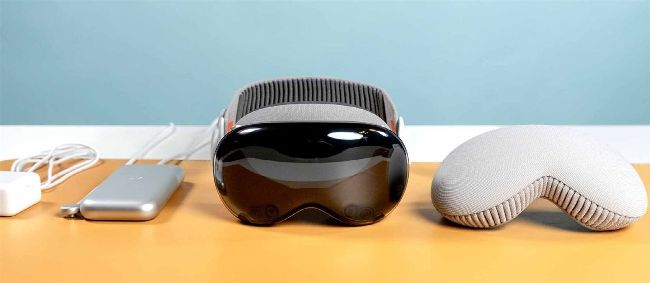
The Apple Vision Pro box comes with the headset itself, the Light Seal fitted for your face, the Light Seal Cushion and both the Solo Knit Band and Dual Loop Band. There’s also the Apple Vision Pro battery, which remains tethered to the headset at all time, a second thicker Light Seal Cushion, a polishing cloth and a 30W USB–C power adapter.
DESIGN AND COMFORT
The Apple Vision Pro is easily the sleekest headset yet, with a curved glass front panel and a modular design that makes it very
customizable to the wearer. But it’s definitely not light, and after 30 minutes I did feel it weighing on my cheeks.
Cheat sheet
WHAT IS IT?
A spatial computing headset that combines augmented reality experiences and virtual reality.
WHO IS IT FOR?
People big on multitasking, enjoying 3D entertainment, capturing photos and videos and business travelers.
WHAT DOES IT COST?
$3,499 plus more for additional storage and accessories.
WHAT CAN YOU DO WITH APPLE VISION PRO?
Supersize your Mac display by looking at it, use and pin multiple apps around your space, capture and view 3D photos and videos, watch 3D movies, experience AR apps, play games.
HOW LONG IS THE BATTERY LIFE?
2 to 2.5 hours.
Making use of the provided cover is important, as the Vision Pro’s front panel has been found to be highly susceptible to scratches.
When ordering your Vision Pro, you’ll scan your face (similar to how you’d set up Face ID) to get a Light Seal that’s personalized, which prevents light from leaking into your view.