GB
  
You are currently viewing the United Kingdom version of the site.
Would you like to switch to your local site?
14 MIN READ TIME

Get set for Monterey

This year’s major new version of macOS is all about consolidation rather than the deep structural changes we’ve seen in recent years. That doesn’t mean that it’s only a minor upgrade, though, and careful preparation is needed if you’re going to move up and take advantage of new features, such as Universal Control to integrate your Mac and iPad or automatic text recognition with Live Text.

If you’re already running Big Sur, these changes won’t be dramatic. Apart from the updates to all bundled apps, pretty much everything that ran in macOS 11 shouldn’t miss a heartbeat when you ask it to work in macOS 12.

Although Monterey has more polish and maturity than Big Sur, at its heart it still brings the same fundamental changes, including the “sealed” snapshot System introduced a year ago. It remains on a different planet from Mojave: 32–bit apps can’t run, and others may fail to cope with its separate read–only System volume. If you’re coming to Monterey from Catalina or earlier, you’ll need to make greater and deeper preparations.

If you’ve any doubts about committing totally to Monterey, and need backwards compatibility, consider installing it on an external drive, if you can. That will enable you to drop back to your current macOS when you need, and postpone going the whole way until you’re ready. However, just be aware that this route still upgrades your Mac’s firmware.

Back up your Mac

Backups are vital in case you lose files or need to migrate
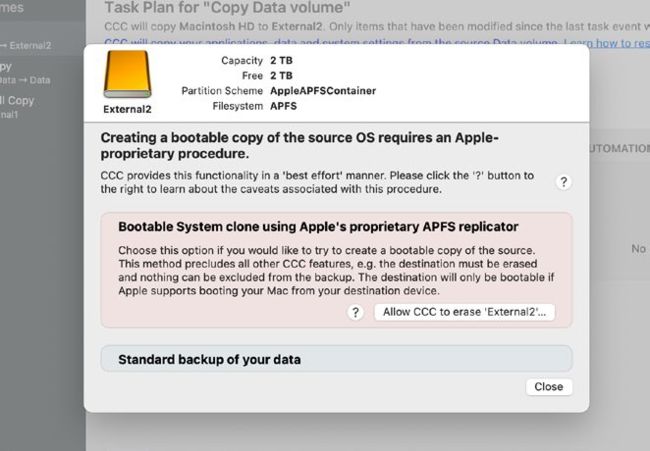
Even Carbon Copy Cloner no longer recommends making System volume clones.

Like insurance, backing up before upgrading is essential to ensure you don’t need those backups: when an upgrade goes well, they should seem a waste of time and effort. But try skipping them, or relying on old or incomplete backups, and when something does go wrong you’re likely to lose hours or days as well as some of your most important files.

Backups made before upgrading to Monterey cover three potentially sticky situations. While the installer will always try to join up the new System with your existing Data volume, that may not work out, in which case you’ll need to migrate your documents, apps and other files from your copy or backup.

Updates also bring a lot of reorganization, in the process sometimes dumping files into folders of relocated or rescued items. Your backup enables you to restore anything that goes missing during the upgrade, and to discover where any relocated items came from.

Unlock this article and much more with
You can enjoy:
Enjoy this edition in full
Instant access to 600+ titles
Thousands of back issues
No contract or commitment
Try for 99p
SUBSCRIBE NOW
30 day trial, then just £9.99 / month. Cancel anytime. New subscribers only.


Learn more
Pocketmags Plus
Pocketmags Plus

This article is from...


View Issues
Mac|Life
December 2021
VIEW IN STORE

Other Articles in this Issue


START
TIME FOR A “NEW” iPHONE?
I’ve been testing the brand new iPhone 13
>>THE TEAM
Matt Lochrie Art Editor The iPad mini is
> THE SHIFT
MATT BOLTON is worried that the Lock screen is becoming too complicated with all the different modes it now has
START
THE LATEST NEWS FROM THE WORLD OF APPLE
iWork apps updated
Apple has released new versions of its iWork
CRAVE
THE GEAR WE’RE LUSTING AFTER
Mac Life
iOS 15 SUPERGUIDE
iOS 15 is packed with new features and improvements. We’ll tell you about the best and show you how to use them
REVIEWS
TOUGH TESTING, TRUSTED RATINGS
Beginner’s Guides
Introducing Family Sharing
Play happy families with Apple’s Family Sharing
You have stuff! You have people! Let’s bring them together!
Share your stuff
Share your storage, your subscriptions and even your apps with the family
HOW TO Set up Family Sharing
1 Invite everyone You can set up family
Make kids’ devices safer
Better bedtimes, healthier habits, and clean content
REVIEWS
iPhone 13 Pro
Yes, it’s good, but is it enough to tempt you?
iPad mini (2021)
Apple’s most portable iPad gets a complete redesign and a pro feel
Q Acoustics M20 HD
Punchy playback for all your devices
Huawei MateView
A 4.5k+ HDR display with wired and wireless connectivity
INTELLI ScoutPro 240W Powerbank
Wired and wireless charging on the go
The best hip bags to carry your tech
Want to move light? Hip bags are perfect for lugging your things around in style
STREAMING SOUNDBARS
Enhance your cinema experience, and upgrade audio streaming at home with these smart soundbars
SONOS BEAM
THE WINNER
1Password 8
Do to your data as to your deepest secrets
Usage: System Activity Monitor
Place key system stats at your fingertips
Dashlane
Password management made easy
SkateBIRD
Tony Hawk meets tiny hawks
Morpho Converter 1.2
Convert units and currencies
Darkroom
Powerful image editor for iOS and now Mac too
Parallels Desktop 17
Run Linux and Windows on your M1 Mac
iOS–exclusive apps
You won’t get these amazing apps anywhere else
Best of the best
Can’t find the hardware or app you’re looking for in our reviews section? Then check in here — we’ve highlighted the best in every major category, as voted for by us
ASK
Don’t forget those backups
WE OFTEN LIKE to set and forget routine
ASK
TECH SUPPORT & TECHSPLANATIONS
> Keep iPhones and iPads safe
After reading about recent malware affecting iPhones, what should I do to keep my iPhone and iPad safe?
Quick–fire questions & answers
HOW TO DISABLE THE VOLUME BUTTONS ON MY
> Use complex characters and symbols
In Pages documents, how can I use characters not in the Character Viewer, such as the maths symbol for average, which is an x with a bar on top?
> How to back up your VMs
How should I back up my Parallels’ virtual machines (VMs)?
> Backups filling up with video clips
How can I stop iMovie and Final Cut Pro from filling my Mac’s Time Machine backups with old edits, but still back my work up?
> Better searches for folder tags
I have many folders tagged, but when I try to search for those tags with Spotlight, it can’t seem to find any. How can I use my tags properly?
> Unblock a command file
I created a shell script file to run a Terminal command, but when I double–click it I’m told I don’t have permissions. Why not?
> Make a custom emoji keyboard
I use emojis a lot, but few apps help me type them in without using the Character Viewer. How can I make a custom keyboard containing those emoji?
CREATE
CREATE
HOW TO DO ANYTHING ON YOUR MAC, iPHONE & iPAD
HOW TO Draw and edit with Markup
1 Pick your app Many of Apple’s own
Create custom shortcuts
Get instant access to important apps and folders with HotKey
HOW TO Save time with HotKey
1 Install the app Install HotKey from the
Take a tour from your Mac
Get where you need to go with these top Apple Maps tips
HOW TO Use Look Around
1 Picture–in–Picture Zoom in until the binoculars icon
HOW TO Create and share a route
1 From here to there Search for a
HOW TO Use and create Guides
1 Build a new gesture Select Global on
> GET A BIRD’S–EYE VIEW
Flyover gives you a new perspective
Make color adjustments
How to adjust the hue, saturation, and lightness of specific colors
Save money on food
Eat cheaply with Too Good To Go and help prevent food waste
Master the Files app
Use Files to sort, scan, share, and scribble on your stuff
Make notes in your books
Use the free Highlighted app to save passages in any book you own
Bring order to chaos
Organize everything from dinners to playdates with FamilyWall
Virtual Private Networks (VPNs)
Discover how VPNs and Private Relay help make your connection secure
RAM
The online Apple Store
It’s easy to take the online Apple Store for granted these days, but Charlotte Henry explains why it had such a big impact on the company’s resurgence when it first launched
Chat
X
Pocketmags Support