Mac Hardware
We’re here to help solve your hardware issues
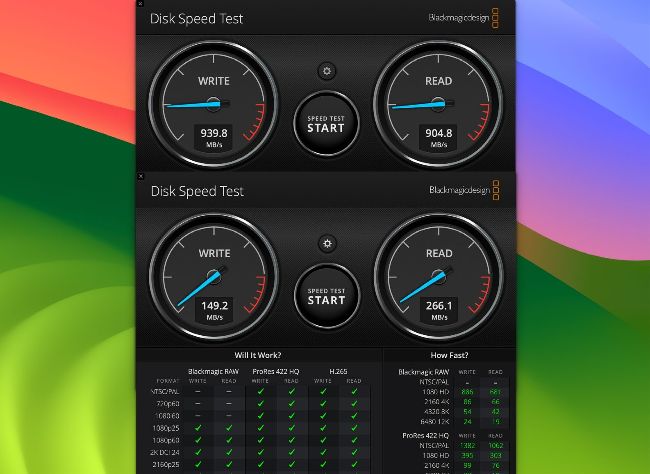
The uppermost dials show NVMe at >900MB/sec; those below are from a SATA drive needing Trimming at <300MB/sec.
> Keep your SSD in Trim
Should I buy an external SSD with SATA or NVMe for use with my M2 MacBook Pro?
An SSD’s internal and external interfaces determine its three key features of speed, Trim, and SMART health indicator support. A SATA internal interface is slowest of all, unlikely to deliver more than about 500MB/sec read or write speeds, with no inherent support for Trim or SMART indicators. An NVMe interface should be able to reach the physical limit of 1,000MB/sec over a USB 3.2 Gen 2 connection, has Trim support, but not SMART unless it’s connected by Thunderbolt, or by USB 4 to an Apple silicon Mac.
Trimming is an important feature that ensures storage blocks in the SSD that are no longer required by the file system are reported to the SSD’s firmware so they can be marked as unused. They can then be erased and returned ready to use again. If Trimming isn’t performed as usual by APFS when it mounts the volumes on that SSD, those storage blocks should normally be reclaimed during the SSD’s routine housekeeping, but that may be delayed or unreliable. If those blocks aren’t released, write speed falls noticeably, and in the worst case blocks, need to be erased immediately before writing. Although it might be possible to use the trimforce command to enable Trim for external SSDs, NVMe SSDs should avoid this completely, and get trimmed when they’re mounted by APFS (or HFS+). With their better speed, they should always be preferred over SATA, particularly when used with a fast Apple silicon Mac.