UPGRADE YOUR APPS
Choosing alternatives to Apple’s built–in apps and tools can take your Mac workflows to the next level. Whatever you’re planning on doing, our pick of the best will help get your projects done
WRITTEN BY HOLLIN JONES
Image rights: Bombich Software Inc, Ginger Labs, Flexibits Inc, Pixelmator Team, Microsoft, Running with Crayons Ltd, Electronic Team Inc, Houdah Software sàrl, Readdle Inc, Doist Inc,
Amazon.com Inc, Mozilla Corporation, Luma Touch LLC, Flexibits Inc, Skylum, Adobe, pCloud
AG, Microsoft, Firecore LLC, Apple Inc.
YOUR MAC COMES bundled with apps and tools to achieve all sorts of things from making music to conference calling and, while they’re great, there are plenty of alternatives on the market. But why, if you have Apple’s apps already, you may ask? As well as providing different ways to do things, third–party apps often go beyond the capabilities of your Mac’s built–in tools, giving you expanded control over your files and folders in the Finder for example, more powerful reminders and scheduling, or giving you access to more professional movie–making features.
In fact, for every one of the Mac’s built–in tools there’s at least a couple of alternatives, sometimes free and sometimes paid for, but always offering a different take on the task at hand. You might find, for example, that you want more sharing options or better cross–platform compatibility in your cloud service than iCloud can offer, or a more advanced email client than Apple’s own Mail, for managing heavy email loads. It could be that Apple’s Photos app doesn’t cut it when it comes to your image–editing needs, and you want to try something like Luminar Neo or Adobe Lightroom to take your pics to the next level. Whatever you need to do on your Mac, there are some awesome alternative options out there — as you’ll discover over the next 12 pages.
A faster Finder
Power up your files and folders with this app that’s perfect for demanding users
COMMANDER ONE
Free (Pro Pack $29.99)
From mac.eltima.com
Features Dual panel view, expanded file and folder info and management, powerful cloud integration
The macOS Finder is the face of your Mac, the means by which you launch applications, manage files and folders, and you generally just use it every day.
Since Apple gives you the same Finder regardless of whether you’re a beginner or a power user, it is tailored more towards being friendly and usable than providing a million options. For those that do want to go deeper, Commander One is an app that both taps into the hidden features of the Finder and adds many more of its own, to give you a remarkable level of access to your stuff.
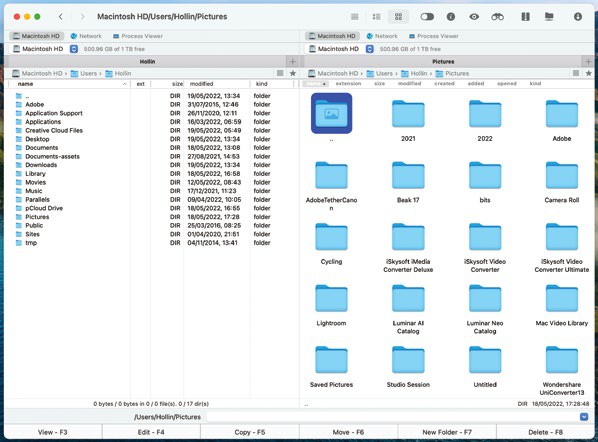
Get total control over your files and folders in a way the Finder doesn’t allow.
Its most noticeable feature is a dual panel view of your files and folders where you can view two different directories at once in different view modes, with extensive information that would normally require several clicks to get visible on the main screen. Common commands like view, edit, copy or delete are mapped to function keys for easy access, and there’s even a switch for viewing hidden files with a single click. The two panels can also contain as many tabs as you like.
POWER FINDER
You can compress groups of files easily and in all major formats with variable compression levels, whereas the Finder allows you only the ZIP format, with no options. There’s a very powerful search function that can even see inside compressed files, and any actions can be assigned to customisable hotkeys. The Pro Pack adds some cool features like direct access to a number of cloud services including Dropbox, Google Drive and Backblaze, the ability to directly mount iOS and Android devices as volumes and a built–in Terminal emulator.
While you can find many of these tools in other third–party apps and sometimes by digging into macOS’s hidden features, Commander One brings them all together into one superpowered file manager that puts them all at your fingertips. The Finder is still running of course, but this app unlocks the full power of macOS while adding quite a few features of its own that Apple simply doesn’t give you. For anyone dealing with files, folders and cloud storage that needs quick and easy access to every aspect of their data, it’s worth checking out.
Drill down deeper
Deep search of your Mac’s files and folders
HOUDAHSPOT
$34 From houdah.com
Features Deep search of Mac files and folders, search templates, text and file preview, AppleScript support
The macOS Spotlight search function is good but definitely has its limitations. HoudahSpot delves deeper, giving you more options for fine–grained searching of files and the content inside those files. Moving beyond its one–field search interface you get to a refined search where you can enter all manner of criteria for names, content, types, dates and more. You can also select not just locations to search but locations to exclude.