DOCTOR
THIS MONTH THE DOCTOR TACKLES...
> M.2 cooling
> Strange boot issue
> 2FA backup
Cooling M.2 drives
I’ve spent several weeks seeking advice on this topic, but haven't found a spec for the recommended operating range for M.2 drives. All I’ve found are mixed messages suggesting they do need cooling and they don’t need cooling. Folks have asked the question because they were concerned after seeing high temperatures via monitoring software like Speedfan and CrystalDiskInfo.
There’s also a question over whether to purchase cooling with a fan or without. My first attempt was to mistakenly purchase an EZDIY=FAB 5V ARGB M.2 Heatsink for my Gigabyte Z370 HD3 motherboard, which doesn't have a 5V location to plug it in. Instead, I’ve ordered a Sabrent M.2 2280 Heatsink that has no fan. One final question: do you recommend using thermal compound paste instead of the “thermal pads/tape” they come with?
–Dean
Johnson
THE DOCTOR RESPONDS: Quite a bit to unpack here. The simple answer is: unless your drive is running consistently ‘hot’, there’s no point in fitting any cooling. But what constitutes ‘hot’? First, M.2 drives naturally run hotter— by around 20°C if the Doc’s PC is anything to go by—than other installed drives. That’s down to where it’s installed on the motherboard, typically near the GPU and CPU where temperatures are higher.
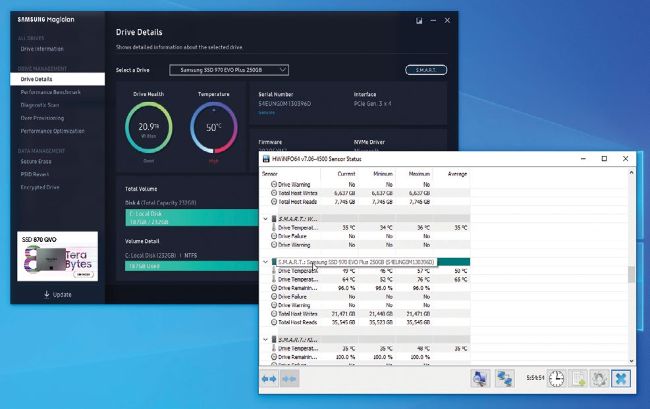
Monitor your M.2 drive temps before plumping for a heatsink.
© MICROSOFT
M.2 drives supply two temperature sensors—one for the drive itself, and the other for the controller. The latter is consistently hotter than the former, but it’s the former you should monitor closely. CrystalDiskInfo and your drive’s official tool (such as Samsung Magician) will provide a real-time display of the drive’s temperature, but you can monitor both sensors using a tool such as HWiNFO64 (www.hwinfo. com). It provides minimum and maximum figures to go with the current setting.