U bekijkt momenteel de Netherlands versie van de site.
Wilt u overschakelen naar uw lokale site?
Laatste editie

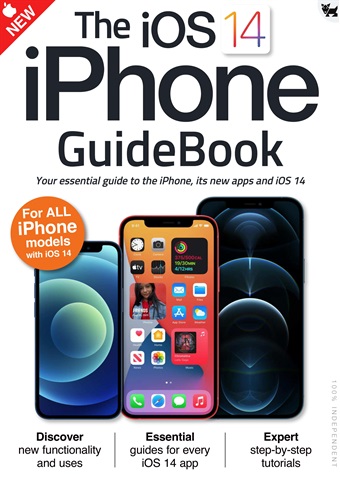
Essential Apple User Magazine iPhone iOS 14 Guide Speciale Editie

English
12 Beoordelingen   •  English   •   Tech & Gaming (Apple)
Only €9,99
iOS 14 brought some great new features to your iPhone!
The user interface is much more compact, with Siri and phone calls now taking up much less space on the screen. There’s a great new Translate app for holding conversations in a wealth of different languages and Picture in Picture lets you continue watching your videos while you use your iPhone for other things. The Home screen has had a huge makeover, with on-screen widgets and a useful App Library and the ever-popular Messages app has had an overhaul, with pinned messages, some great new emoji designs and a revamped group messages feature.
Over the following pages we’ll show you how to get to grips with iOS 14, its apps and its features. The basics such as the keyboard, touchscreen gestures and the Home screen are covered, as are the wealth of bundled applications or apps. Then we go on to its more
advanced features like Siri, Find My and iCloud.
read more read less
Essential Apple User Preview Pages Essential Apple User Preview Pages Essential Apple User Preview Pages Essential Apple User Preview Pages Essential Apple User Preview Pages Essential Apple User Preview Pages Essential Apple User Preview Pages Essential Apple User Preview Pages

Essential Apple User

iPhone iOS 14 Guide iOS 14 brought some great new features to your iPhone! The user interface is much more compact, with Siri and phone calls now taking up much less space on the screen. There’s a great new Translate app for holding conversations in a wealth of different languages and Picture in Picture lets you continue watching your videos while you use your iPhone for other things. The Home screen has had a huge makeover, with on-screen widgets and a useful App Library and the ever-popular Messages app has had an overhaul, with pinned messages, some great new emoji designs and a revamped group messages feature. Over the following pages we’ll show you how to get to grips with iOS 14, its apps and its features. The basics such as the keyboard, touchscreen gestures and the Home screen are covered, as are the wealth of bundled applications or apps. Then we go on to its more advanced features like Siri, Find My and iCloud.


FORMAAT SELECTEREN:
Directe toegang

Beschikbare digitale aanbiedingen:

Speciale digitale editie iPhone iOS 14 Guide
 
9,99 / issue
Deze speciale editie is niet inbegrepen in een Essential Apple User abonnement. Abonnementen omvatten de nieuwste reguliere editie en nieuwe uitgaven die tijdens uw abonnement zijn uitgebracht en beginnen vanaf slechts €2,50 per uitgave

Abonnementsopties
Besparingen zijn berekend op de vergelijkbare aankoop van losse nummers over een abonnementsperiode op jaarbasis en kunnen afwijken van geadverteerde bedragen. Berekeningen dienen alleen ter illustratie. Digitale abonnementen omvatten het laatste nummer en alle reguliere nummers die tijdens uw abonnement verschijnen, tenzij anders vermeld. De door u gekozen termijn wordt automatisch verlengd, tenzij u tot 24 uur voor het einde van het lopende abonnement opzegt in de Mijn Account-zone.

Essential Apple User issue iPhone iOS 14 Guide

Essential Apple User  |  iPhone iOS 14 Guide  


iOS 14 brought some great new features to your iPhone!
The user interface is much more compact, with Siri and phone calls now taking up much less space on the screen. There’s a great new Translate app for holding conversations in a wealth of different languages and Picture in Picture lets you continue watching your videos while you use your iPhone for other things. The Home screen has had a huge makeover, with on-screen widgets and a useful App Library and the ever-popular Messages app has had an overhaul, with pinned messages, some great new emoji designs and a revamped group messages feature.
Over the following pages we’ll show you how to get to grips with iOS 14, its apps and its features. The basics such as the keyboard, touchscreen gestures and the Home screen are covered, as are the wealth of bundled applications or apps. Then we go on to its more
advanced features like Siri, Find My and iCloud.
meer lezen minder lezen
Exclusive to digital. Essential AppleUser Magazine brings you the very latest news, rumours, reviews and technical help for your Apple iPhone, iPad and the iOS along with Mac's, MacBooks, macOS, Apple Watch and all the accessories. This is the publication you will need to keep on top of the must know information and technical help from our team of Apple experts for your Mac, MacBook, iPhone, iPad, Apple Watch, HomePod and Apple TV hardware. If you want to stay informed with everything Apple click subscribe. 100% unofficial.

Als abonnee ontvang je de volgende voordelen:


•  Een korting op de verkoopprijs van je tijdschrift
•  Je tijdschrift elke maand op je apparaat
•  Je zult nooit een editie missen
•  Je bent beschermd tegen prijsstijgingen die later in het jaar kunnen plaatsvinden

Je ontvangt 6 edities gedurende een periode van 1 jaar Essential Apple User abonnement op een tijdschrift.

Opmerking: Digitale edities bevatten niet de omslagitems of supplementen die je zou vinden bij gedrukte exemplaren.

Uw aankoop hier op Pocketmags.com kan op elk van de volgende platforms worden gelezen.


Je kunt hier lezen op de website of de app downloaden voor jouw platform, vergeet niet in te loggen met je Pocketmags gebruikersnaam en wachtwoord.

Apple Pocketmags Online Pocketmags Google Pocketmags
De Pocketmags-app werkt op alle iPad- en iPhone-apparaten met iOS 13.0 of hoger, Android 8.0 of hoger en Fire Tablet (Gen 3) of hoger. Onze webreader werkt met elke HTML5-compatibele browser, voor pc en Mac raden we Chrome of Firefox aan.

Voor iOS raden we elk apparaat aan dat de nieuwste iOS kan gebruiken voor betere prestaties en stabiliteit. Eerdere modellen met lagere processor- en RAM-specificaties kunnen te maken krijgen met een langzamere paginaweergave en incidentele app-crashes, die buiten onze controle liggen.
4,5
/5
Gebaseerd op 12 Beoordelingen van klanten
5
8
4
2
3
2
2
0
1
0
Bekijk beoordelingen

Highly interesting

Informative for those customers of Apple Beoordeeld op 25 april 2022

Very helpful

All the details needed to begin using Apple products Beoordeeld op 17 juli 2019

Artikelen in deze editie


Hieronder vindt u een selectie van artikelen in Essential Apple User iPhone iOS 14 Guide.

Chat
X
Pocketmags ondersteuning