Suitability for casual users
Which option is best for people who just want to start making videos?
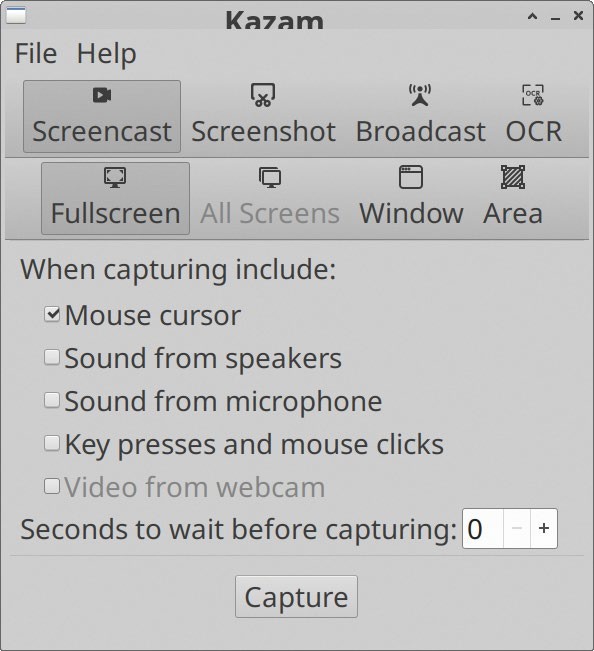
Kazam2 has an interface that covers the basics, and it’s generally ready to run once all needed dependencies are installed.
FFmpeg isn’t the best solution for beginners because it’s a command line-based tool. Beyond basic use, it’s F awkward to make tweaks to the settings. This is one for the tech-heads. Many streamers and YouTubers who wouldn’t class themselves as experts are able to make use of OBS Studio. But having said that, it’s not a simple interface and there are invariably some settings that have to be configured before typical usage of the app. Going from configuration to actual use, we’d place the application at medium level when it comes for ease to use. That’s forgivable for an application that can do a lot. We’d also grade VokoscreenNG as being on a medium level when it comes to ease of use. In all fairness, its user interface exposes a lot of features and options, and the VokoscreenNG interface strikes a good balance. We wouldn’t call it a true casual tool, but the large icons and sensible layout mean that beginners should be able to figure it out. The SimpleScreenRecorder interface isn’t quite as simple as the name might suggest, but at least it doesn’t feel like a compromised application. In terms of workflow, odds are the default settings will work as intended. If not, there are two pages of fairly simple settings that are sufficient for the odd tweak. Of the five applications we’ve looked at, Kazam2 has the simplest interface, and the program itself can handle most basic screen recording jobs with ease. It’s just a shame that installing the latest version requires jumping through some hoops.