Attualmente si sta visualizzando la versione Italy del sito.
Volete passare al vostro sito locale?
Ultima edizione

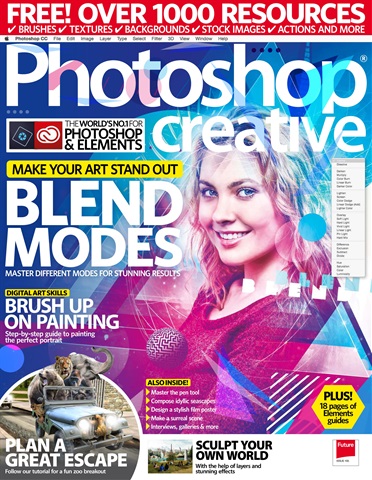
Photoshop Creative Magazine Issue 155 Edizione posteriore

English
5 Recensioni   •  English   •   Art & Photography (Art)
MAKE YOUR ART STAND OUT: BLEND MODES
Blend modes are perhaps the most underrated feature Photoshop offers. They save you time, transform your work in subtle or dramatic ways, and they provide shortcuts to help you blend your work perfectly. They’re central to everything we do in Photoshop: but how much do you know about them Believe it or not, there was a time before blend modes, simply because Photoshop hasn’t always included the Layers panel. Before layers, we just had to edit everything flatly, but blend modes enable you to edit dynamically, changing the way certain pixels look when displayed against other pixels. So in this feature, we’re going to dive deeper into them and discover which ones can be used for different kinds of projects: some of them you’ll know, and some of them you may wish to try out the next time you get creating.
read more read less
Photoshop Creative Preview Pages Photoshop Creative Preview Pages Photoshop Creative Preview Pages Photoshop Creative Preview Pages Photoshop Creative Preview Pages Photoshop Creative Preview Pages Photoshop Creative Preview Pages Photoshop Creative Preview Pages

Photoshop Creative

Issue 155 MAKE YOUR ART STAND OUT: BLEND MODES Blend modes are perhaps the most underrated feature Photoshop offers. They save you time, transform your work in subtle or dramatic ways, and they provide shortcuts to help you blend your work perfectly. They’re central to everything we do in Photoshop: but how much do you know about them Believe it or not, there was a time before blend modes, simply because Photoshop hasn’t always included the Layers panel. Before layers, we just had to edit everything flatly, but blend modes enable you to edit dynamically, changing the way certain pixels look when displayed against other pixels. So in this feature, we’re going to dive deeper into them and discover which ones can be used for different kinds of projects: some of them you’ll know, and some of them you may wish to try out the next time you get creating.


SELEZIONARE IL FORMATO:
Accesso immediato

Offerte digitali disponibili:

Singolo numero arretrato digitale Issue 155
 
5,99 / issue
Questo numero e gli altri numeri arretrati non sono inclusi in un Photoshop Creative abbonamento. Gli abbonamenti includono l'ultimo numero regolare e i nuovi numeri usciti durante l'abbonamento e partono da un prezzo minimo di
Purtroppo questa testata non pubblica più nuovi numeri. È ancora possibile acquistare i numeri arretrati, oppure scorrere verso il basso per visualizzare altri titoli che potrebbero interessarvi.
I risparmi sono calcolati sull'acquisto comparabile di singoli numeri su un periodo di abbonamento annualizzato e possono variare rispetto agli importi pubblicizzati. I calcoli sono solo a scopo illustrativo. Gli abbonamenti digitali includono l'ultimo numero e tutti i numeri regolari pubblicati durante l'abbonamento, se non diversamente indicato. L'abbonamento scelto si rinnoverà automaticamente a meno che non venga annullato nell'area Il mio account fino a 24 ore prima della scadenza dell'abbonamento in corso.

Photoshop Creative issue Issue 155

Photoshop Creative  |  Issue 155  


MAKE YOUR ART STAND OUT: BLEND MODES
Blend modes are perhaps the most underrated feature Photoshop offers. They save you time, transform your work in subtle or dramatic ways, and they provide shortcuts to help you blend your work perfectly. They’re central to everything we do in Photoshop: but how much do you know about them Believe it or not, there was a time before blend modes, simply because Photoshop hasn’t always included the Layers panel. Before layers, we just had to edit everything flatly, but blend modes enable you to edit dynamically, changing the way certain pixels look when displayed against other pixels. So in this feature, we’re going to dive deeper into them and discover which ones can be used for different kinds of projects: some of them you’ll know, and some of them you may wish to try out the next time you get creating.
Per saperne di più leggere di meno
If you want to understand how Photoshop works and how to use it to create amazing images, you need Photoshop Creative.

Every issue is packed full of practical advice and inspiring tutorials that range from simple fixes through to more intense techniques, to transform your photos and create fantastic images for scrapbooking, photomontage or digital art.

Please note: Digital version of the magazines do not include the covermount items or supplements that you would find on printed editions.

Come abbonati riceverete i seguenti vantaggi:


•  Uno sconto sul prezzo di vendita della rivista
•  Nuove edizioni consegnate sul tuo dispositivo il giorno stesso dell'uscita
•  Non perderete mai un numero
•  Siete protetti dagli aumenti di prezzo che potrebbero verificarsi nel corso dell'anno

Riceverete 13 edizioni durante un periodo di 1 anno Photoshop Creative abbonamento alla rivista.

Nota: le edizioni digitali non includono gli articoli di copertina o i supplementi che si trovano nelle copie stampate.

Il vostro acquisto su Pocketmags.com può essere letto su una delle seguenti piattaforme.


Potete leggere qui sul sito web o scaricare l'applicazione per la vostra piattaforma, ricordandovi di effettuare il login con il vostro nome utente e la vostra password Pocketmags.

Apple Pocketmags Online Pocketmags Google Pocketmags
L'applicazione Pocketmags funziona su tutti i dispositivi iPad e iPhone con iOS 13.0 o superiore, Android 8.0 o superiore e Fire Tablet (Gen 3) o superiore. Il nostro web-reader funziona con qualsiasi browser compatibile con HTML5, per PC e Mac si consiglia Chrome o Firefox.

Per iOS consigliamo qualsiasi dispositivo in grado di eseguire l'ultima versione di iOS per migliorare le prestazioni e la stabilità. I modelli precedenti con processore e RAM inferiori possono presentare un rendering delle pagine più lento e occasionali arresti anomali dell'app, che non rientrano nel nostro controllo.
4,0
/5
Basato su 5 Recensioni dei clienti
5
2
4
1
3
2
2
0
1
0
Visualizza le recensioni

Articoli in questo numero


Di seguito una selezione di articoli in Photoshop Creative Issue 155.

Issue 169 issue Issue 169 Issue 169 Acquista per €5,99 Vista | Al carrello
Issue 168 issue Issue 168 Issue 168 Acquista per €5,99 Vista | Al carrello
Issue 167 issue Issue 167 Issue 167 Acquista per €5,99 Vista | Al carrello
Issue 166 issue Issue 166 Issue 166 Acquista per €5,99 Vista | Al carrello
Issue 165 issue Issue 165 Issue 165 Acquista per €5,99 Vista | Al carrello
Issue 164 issue Issue 164 Issue 164 Acquista per €5,99 Vista | Al carrello
Issue 163 issue Issue 163 Issue 163 Acquista per €5,99 Vista | Al carrello
Issue 162 issue Issue 162 Issue 162 Acquista per €5,99 Vista | Al carrello
Issue 161 issue Issue 161 Issue 161 Acquista per €5,99 Vista | Al carrello
Issue 160 issue Issue 160 Issue 160 Acquista per €5,99 Vista | Al carrello
Issue 159 issue Issue 159 Issue 159 Acquista per €5,99 Vista | Al carrello
Issue 158 issue Issue 158 Issue 158 Acquista per €5,99 Vista | Al carrello
Issue 157 issue Issue 157 Issue 157 Acquista per €5,99 Vista | Al carrello
+
Vedi tutti
Chat
X
Supporto Pocketmags