Answers
Got a burning question about open source or the kernel? Whatever your level, email it to lxf.answers@futurenet.com
Neil Bothwick is a timely triple-page troublesome Tux tinkerer.
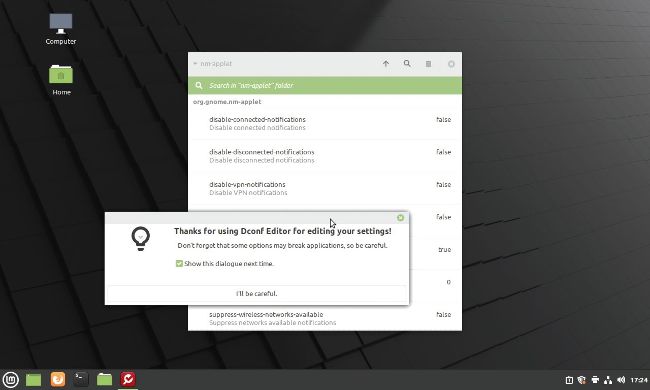
Dconf-editor enables you to change many of the hidden settings for your desktop. It also has options to break it completely, hence the warning.
Q
Stop the silence
I’m running Mint 20.1 Ulyssa Cinnamon. I use the built-in network management tools to connect to a VPN running
OpenVPN.
I used to get a notification on the top right-hand corner confirming a successful connection when I started it, but I accidentally hit the “Don’t show this again” button one day.
Despite searching I cannot find out how to reverse this. It was very useful.
Ian Gibbs
A It’s not obvious, but you need to edit the dconf database that is used to store Gnome settings. You can do this from the command line with the gsettings tool. Run one or more of these commands as your normal user, not with sudo: $ gsettings set org.gnome.nm-applet disable-vpn-notifications “false” $ gsettings set org.gnome.nm-applet disable-connected-notifications “false” $ gsettings set org.gnome.nm-applet disable-disconnected-notifications “false”
The first one controls the VPN notifications you’re asking about, the other two handle the general notifications when you connect to a network. Note that these are settings to disable notifications, so you set them to false to turn the notifications back on. You can use the corresponding get commands to see the settings in force.
If you prefer a GUI approach, first install dconf-editor (Mint doesn’t include it by default) then run it and go to org>gnome> nm-applet and click the various settings to change them. I suspect the warning about being able to break the system with injudicious use of this tool that you see when you start is the reason it’s not installed by default.
Q
Last-gasp passwords
I’m looking for a password vault/ secret server application to centralise credentials for a small team. The current scope is keeping shared credentials secured and I’m looking to solve spread and duplication issues. It needs to be open source, free (because management say so), able to be locally hosted on Linux and have a web UI.
Leon Jarvis
A Have you looked at Bitwarden (www.bitwarden.com)? It’s a password manager along the lines of LastPass, but open source. For the users, it comes with a desktop client, extensions for the popular browsers and mobile apps. You can also use any web browser to access your password store and there’s even a command line client. By default, it connects to Bitwarden’s server, which is fine for many people but doesn’t meet your requirements. However, this does make it easy to see whether it fulfils your needs. If it does, you can run your own server locally.