GB
  
You are currently viewing the United Kingdom version of the site.
Would you like to switch to your local site?
20 MIN READ TIME

iPADOS 16 TIPS, TRICKS & SECRETS

The best iPadOS yet is a massive upgrade for any iPad

We’ve come a long way since the first iPad in 2010. That one ran iPhone OS 3.2, and critics mocked it as a giant iPhone. They did have a point, but even then Apple was making the iPadOS different from the iPhone one – and with each new release, those differences have become much more significant. iPadOS 16 really blurs the lines between iPads and Macs, especially when it comes to multitasking. iPadOS 16 isn’t trying to turn your iPad into a Mac, though. It’s still very much a mobile operating system that plays to the iPad’s particular strengths; its portability, its touchscreen, and its ability to completely transform into different things based on the app you’re using. This is a very big update. It introduces a brand new way of working with multiple apps, it gives Mail and Messages some brilliant new features, it vastly improves your security when you go online and it makes it easier to share the things you love with the people that matter to you. It can even turn back time to undo embarrassing mistakes in messages or emails.

Over the next few pages we’ll discover all the killer features of iPadOS 16, and we’ll show you how to make the most of them.

Whether you have the standard iPad, an iPad Air or the biggest iPad Pro, this latest OS update will make your iPad more flexible, more fun and more you.

Which devices will work with iPadOS 16?

iPad Pro (all models)

iPad Air (3rd generation and later)

iPad (5th generation and later)

iPad mini (5th generation and later)
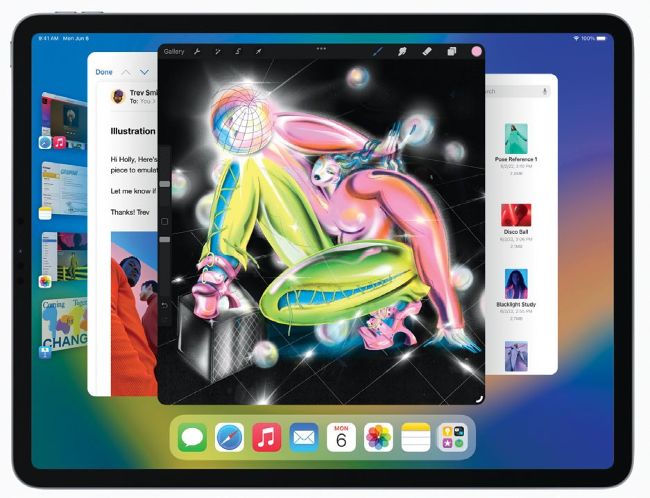
Stage Manager delivers something much closer to the Mac’s multitasking and window system.

Stage Manager and Multitasking changes

One of iPadOS 16’s biggest changes is a little controversial

Stage Manager, the new multi-tasking interface in iPadOS 16, has had a bit of a bumpy ride; it’s been widely criticised by many prominent developers for its many bugs in the iPadOS betas, and it’s been suggested that those bugs are at least part of the reason for the delay in getting iPadOS 16 released. As things stand at the moment Stage Manager is now officially a beta feature, and one of its previously announced benefits – external monitor support – has been temporarily removed. Device compatibility has been changed too; what was originally reserved only for M1 and M2-powered iPads now works on iPad Pros with A12X and A12Z chips.

Stage Manager isn’t on by default; you have to switch it on in the Control Centre. Once you do, your iPad moves into a mode that looks more like the Mac desktop with thumbnails – Apple calls them App Stacks, and they work in a similar way to the tab groups in Safari but for apps instead of open tabs – at the left and the current app in a moveable, resizable window. You can have up to four apps overlapping at once and another four on an external display, and it’s a bit like using macOS on a much smaller screen. We think there will be more significant changes before Stage Manager loses its beta label; it’s one of the most controversial interface changes Apple has made in years.

Don’t worry if you don’t want to use Stage Manager; the familiar Split View and Slide Over options still work perfectly well, and at the moment those are the ones we’re sticking with; as of the final public beta of iPadOS 16 we found Stage Manager was still very buggy and needed a lot more work; its tendency to crash means we’re not planning to use it for serious work just yet.

Unlock this article and much more with
You can enjoy:
Enjoy this edition in full
Instant access to 600+ titles
Thousands of back issues
No contract or commitment
Try for 99p
SUBSCRIBE NOW
30 day trial, then just £9.99 / month. Cancel anytime. New subscribers only.


Learn more
Pocketmags Plus
Pocketmags Plus

This article is from...


View Issues
MacFormat
December 2022
VIEW IN STORE

Other Articles in this Issue


Mac FORMAT
hello (again)
We love this time of year. Not only
Meet the team
Jo Membery Operations Editor The launch of the
MacFormat
MacFormat, Future, Quay House, The Ambury Bath, BA1
APPLE CORE
New iPads & Apple TV 4K
Apple unveils changes large and small
APPLE NEWS ROUNDUP
APPLE CAR PROJECT RESTARTED DEVELOPMENT TEAM REFORMING? >
Apple is working on a folding iPad, say analysts
Seen as a dry run for a future foldable iPhone
Mac Pro set for colossal 48-core chip
But it may not launch until 2023
APP OF THE MONTH
[ MAC APP] Spark Free (IAPs) The best
Crave
THE GEAR WE’RE LUSTING AFTER
CONTACTS
Have your say on all things Apple!
NUMBERS
The iPhone 14 maybe the last iPhone to use the Lightning port if rumours are true. Here are some stats about the connector
MATT BOLTON…
THINKS THAT STAGE MANAGER ON iPAD NEEDS (A LOT) MORE WORK, BUT IT MAKES HIM IMAGINE A SMARTER, ADAPTIVE FUTURE
Win
A super-speedy storage drive from OWC!
Whether there’s a VPN flaw in ios
Why Apple’s privacy credentials are being called into question by a growing number of security experts
APPLESKILLS
NEW IDEAS Your in-depth guide to getting more
APPLE SKILLS
Make the most of Opera GX
Try a web browser that comes loaded with clever extras
Master the Clock app
At long last, the Clock app comes to desktop and notebook Macs
Manage windows with Warp
Save custom layouts and launch them with a keyboard shortcut
Control the Home app from Mac
The long-neglected Home app finally gets a welcome revamp for macOS Ventura
Work with masks and colour
Produce creative selective colour effects using selection tools and masks
Enjoy a better ebook experience
Apple’s Books app has had a few tweaks in iOS and iPadOS 16. Here’s how to use them
Create routes with stop-offs
Factor in stops, or direction choices, along your journey in Apple Maps
Navigate your notifications
Discover the way notifications now work on your Lock Screen in iOS 16
MagSafe
There’s more to MagSafe than just a magnetic cable
GENIUS TIPS
EEE EXPERT ADVICE Our resident genius solves your
iOS software
Swipe away your touchscreen troubles and rekindle your love of Apple’s mobile devices
Mac software
Resolving riddles and restrictions with what you want to run on your Mac
Networking
We help to solve your Wi-Fi woes and connection conundrums
The Ultimate CHRISTMAS Gift Guide
All we want for Christmas is… Apple-friendly goodies! From stocking fillers to Santa going all-out, you’ll find your perfect pressies here
watchOS 9 SUPERGUIDE
Everything you need to know about the best watchOS yet
What’s hot in watchOS 9
Why watchOS 9 is the upgrade many of us were dreaming of…
Health & Fitness improvements
Completely customise your workouts and the information you see on screen
APPLE CHOICE
iPhone 14 Plus
A bigger screen and longer battery life – what’s not to like?
Plume HomePass
Subscription service with useful network security features – and two free routers
Focal Bathys
Seriously stunning in almost every way
Twelve South HiR ise 3
3-in-1 wireless charger lacks polish
Excitrus NitroCharge 30 Pro
Power to your pocket (and MacBook or iPhone)
MAC WRITING APPS
Super software for every creative keyboard warrior
Scrivener
The best writing app for writers – by far
Focused Work 3
Work more efficiently without distractions
coconutBattery 3 Plus
Easily monitor your Apple devices’ batteries
Papers, Please
Modern classic gets iPhone overhaul
6 apps with Lock Screen widgets
Handy info at just a glance
STORE GUIDE
Your guide to the best Apple hardware and third-party accessories
iPad 1.0
With the M2 iPad Pro setting the bar for the top tablet even higher, Graham Barlow looks back at the first-gen iPad
Chat
X
Pocketmags Support