GB
  
You are currently viewing the United Kingdom version of the site.
Would you like to switch to your local site?
8 MIN READ TIME

MacBook Pro 16-inch (2021)

Apple rights the wrongs of the previous gen MBP – and how!

£2,999 FROM Apple, apple.com/uk FEATURES Apple M1 Pro chip (10-core CPU, 16-core GPU), 1TB storage, 32GB of unified memory, 16.2-inch Liquid Retina XDR display (3456x2234 pixels), MagSafe 3, 3x Thunderbolt/USB 4 ports, 1x HDMI 2.0 port, Wi-Fi 6 (802.11ax), Bluetooth 5.0
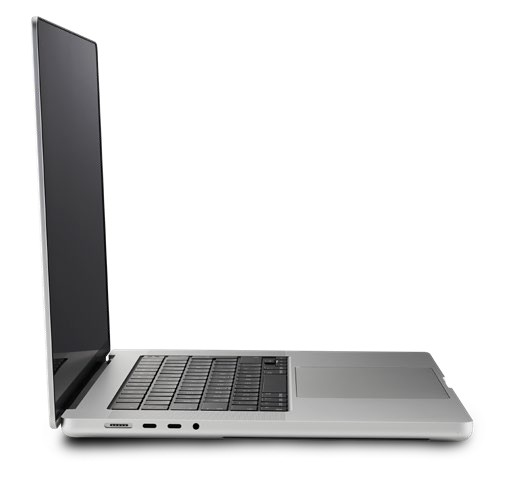
The new both MacBook Pro is thicker and heavier than its predecessors and is beautifully made.

This is the MacBook we’ve been hoping and praying for… a super-fast lean machine that banishes the bad memories and questionable design choices of the recent past in favour of new crowdpleasing features. Such as? Such as proper function keys, a Liquid Retina XDR Display, usable ports and M1 Pro performance. The fact that this machine is only surpassed by the M1 Max is mind boggling. We are blessed.

The 2021 MacBook Pro is certainly a sight to behold. Consciously echoing the look of pre-Touch Bar era Apple laptops, it takes all the things you loved about previous MacBook Pros and dumps the things you didn’t.

That means the welcome (and overdue) return of MagSafe, a trio of Thunderbolt/ USB 4 ports (two on the left-hand side, one on the right), plus a 3.5mm headphone socket, SDXC memory card slot and an HDMI 2.0 port (although HDMI 2.1 would perhaps have been a better choice), plus a scissorswitch matt black keyboard with full-height Function key row (no more Touch Bar – yay!), and a Touch ID-enabled power button for fast, secure logins using your fingerprint. Like previous MacBook Pros, the keyboard deck comes with an over-sized glass Force Touch trackpad and a six-speaker stereo sound system (more on this later).

Unlock this article and much more with
You can enjoy:
Enjoy this edition in full
Instant access to 600+ titles
Thousands of back issues
No contract or commitment
Try for 99p
SUBSCRIBE NOW
30 day trial, then just £9.99 / month. Cancel anytime. New subscribers only.


Learn more
Pocketmags Plus
Pocketmags Plus

This article is from...


View Issues
MacFormat
January 2022
VIEW IN STORE

Other Articles in this Issue


MacFormat
Meet the team
Whether you’re getting a brand new Mac or
APPLE CORE
iPhone self-repair service announced
Apple’s new programme for right-to-repair advocates
BetterTouchTool From $9 (about £7)
New update places Shortcuts power at your fingertips
Crave
THE GEAR WE’RE LUSTING AFTER
APPLE TV IN NUMBERS
After a shaky start, Apple TV+ is on the up and up. Let’s look at the stats behind the service
CONTACTS
Have your say on all things Apple!
MATT BOLTON…
WOULD LIKE TO BREAK THE UPGRADE CYCLE, BUT IT’S HARD TO IMAGINE IT HAPPENING WITH THE WAY THINGS ARE
Apple in 2022
After a big year in 2021, Charlotte Henry wonders what the next 12 months has in store for Apple
FEATURE
Mac Secrets revealed
With hardly an app or pane untouched, we unlock what’s hidden in macOS Monterey’s menus to help us work, relax and play
Mail & Safari
Hide your address for privacy, and browse in tab heaven
Focus
Keep ideas in order and block distractions with new controls
Working together
Tune FaceTime and other collaborative tools to share better
Shortcuts
Automator’s replacement, Shortcuts, is fresh but immature
Making more of your Mac
While some Macs can’t, be tweaked for better performance, most can
Other Monterey tips & tricks
Fuzzy search, full keyboard control, snapshots, and even more
Master Apple shortcuts
macOS > ೫ is the Command key, which
AIRPLAY EVERYTHING
AirPlay is amazing! And here’s why
Use AirPlay on your Mac
Stream music, video and more. Or mirror your Mac on another display
Use AirPlay on iPhone & iPad
Stream and control media from your mobile device for total convenience
Go further with AirPlay
Versatile speaker options, family control, and easy music access for friends
watchOS 8 masterclass
watchOS 8 takes everything that’s great about watchOS 7 and makes it even better, with some important new features and even better integration with Apple services
Face time
Meet the new watch faces and complications
Health, Mindfulness, Fitness and more
How the new watchOS can help you live a healthier life
APPLE SKILLS
Get to grips with Passwords
Use the new Passwords feature for easy access in macOS Monterey
Sort out your people pictures
How to identify, name and manage faces in macOS Photos
Sync your family tree online
Add new facts and people to your tree with the help of FamilySearch
Tailor your exercise
Take a more measured approach to fitness with Gentler
Use the new Focus features
Fed up with distractions? Apple’s new Focus feature is here to help
Master Pages on iPhone
How to get the best from Apple’s pocket publishing powerhouse
Hide your email address
Create one-off email addresses in iOS and iPad OS for any purpose
Control the Weather
See the future, stay dry and avoid UV with Apple’s excellent app
Inside the tech of Thread
The HomePod mini and Apple TV 4K support it… but what is Thread?
GENIUS TIPS
A Mac with a mind of its own
Q A couple of times, my M1
iOS software
Swipe away your touchscreen troubles and rekindle your love of Apple’s mobile devices
Networking
We help to solve your Wi-Fi woes and connection conundrums
Mac software
Resolving riddles and restrictions with what you want to run on your Mac
APPLE CHOICE
AirPods (3rd generation)
These redefined wireless earbuds will be music to your ears
Huawei MateView
A 4.5k+ HDR display with connectivity options
Logitech Ergo K860
An ergonomic ‘split’ keyboard
THE BEST HIP BAGS TO CARRY YOUR TECH
Want to move light? Hip bags are perfect for lugging things in style
THE WINNER Last Pass
Full coverage of other systems and an excellent interface
Photoshop Elements 2022
Fix your photos and create eye-catching social media content
Halide Mark II
Increase your iPhone’s shooting capabilities to include macro subjects
Castlevania: Grimoire of Souls
An underwhelming return to Dracula’s castle
iOS-exclusive apps
You won’t get these amazing apps anywhere else
STORE GUIDE
STORE GUIDE
Your complete guide to the best Apple hardware and third-party accessories
RANDOM APPLE MEMORY
The VideoPad 2 prototype
Apple’s experimental device might have been cancelled in the late 90s, but Charlotte Henry reveals its modern-day value…
Chat
X
Pocketmags Support