SUPERGUIDE
macOS Monterey
Your next big free Mac upgrade has arrived – here’s how to make the most of it, from AirPlay to Shortcuts
Written by Howard Oakley
The last few years of macOS upgrades brought trauma with their advances. We’ve lost 32-bit apps, gained a new file system ideal for SSDs and Time Machine backups but unsuited to hard disks, and previously simple startup volumes have been split to lock the System away in a snapshot.
Monterey is a welcome chance to get your breath back. On Intel Macs at least it makes no deep changes, and even Time Machine will back it up in continuity with existing Big Sur backups. Instead, Apple’s attention has turned to improving its most popular apps like FaceTime and Messages, and bringing new features like Shortcuts and Quick Notes.
These improvements are each enhanced by their integration with other features. Live Text is accessible optical character recognition which isn’t that novel, but when linked with Look Up it becomes a powerful tool.
FaceTime’s SharePlay links to media apps like Music and TV. Those are the themes for Monterey – consolidation, integration, and generally not upsetting the Apple cart.
> Monterey’s features weren’t expected on all supported Macs. The only models to enjoy them all are M1 Macs. Live Text and AirPlay have worked well when tested on most Intel models, but Object Capture requires an M1 or ample memory and VRAM.
Which Macs work with Monterey?
✓ All M1 Macs (all features)
✓ iMac Late 2015 and later
✓ iMac Pro ✓ MacBook Early 2016 and later
✓ MacBook Air Early 2015 and later
✓ MacBook Pro Early 2015 and later
✓ Mac mini Late 2014 and later
✓ Mac Pro Late 2013 and later
Enrich your FaceTime calls and share in Messages
FaceTime, Messages, Photos and more
FaceTime
FaceTime on the web lets others access individual or group calls via their Chrome or Edge web browser without needing Apple hardware to participate, and you can send anyone invitations using web links. Those links and Calendar events ensure that everyone knows when to meet next. For group calls, tile up to 18 callers into a single grid view. Portrait mode puts the focus on the person by blurring the background behind them (M1).

Bring your whole family together in group calls with Android devices and PCs.
Audio improvements add two modes, one to exclude background sounds in Voice Isolation, the other to do the opposite in Wide Spectrum, useful for voices with music or small groups. Spatial audio places each speaker’s voice in space to help you distinguish them.
SharePlay
This integrates shared audio including music, video from movies and TV shows, the screen on your Mac or device, and text from Messages, to enrich FaceTime calls. Enjoy them with those you call in flexible ways: you might want to share your music with friends, each adding their favourite tracks for you to listen to together. Smart volume control adjusts audio levels so that when you want to talk you don’t have to shout over the music.
Play controls like pause and rewind are synced so that everyone watching video remains in perfect sync. Sharing your screen lets you show others websites, and is useful for helping one another with work or solving problems together.
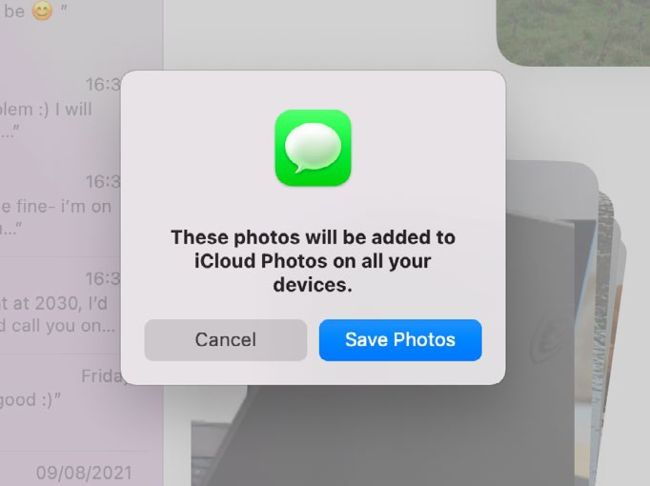
The new Save Photos button beside a stack of images saves them straight to iCloud Photos.
Messages
Major improvements in Messages come in its new Shared with You feature, which links photos, news, TV, podcasts and web links from a message to the corresponding app. Put a link to an article like a product review or a suggestion for a present into your message, and your friend sees that link appear automatically in Safari’s Start Page and its sidebar. The same applies to links to Photos, Apple’s News, Podcasts and TV apps.
To share several photos at once, put them into a collection, which tiles them together into a collage, or add more to turn it into a stack you can flip through. Photos sent in messages also get an easy Save Photos button at last.
Photos
The Photos app is relatively unchanged, with most additions coming in Memories features due in a later update. The app at last gains the ability to import original photos and their edits straight from a second Photos library, which improves management of multiple libraries. Another helpful improvement is faster initial sync with iCloud Photos when you first connect a new device.
Photos is also integrated into Messages’ new Shared with You feature to improve handling of received photos, and there’s integration with Visual Look Up which enables you to learn about objects identified in a photo.
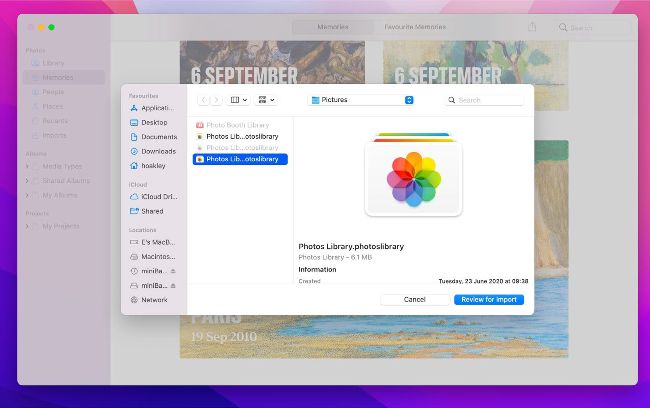
It’s now simple to directly import photos and their edits from another library.
Coming soon in an update to Photos, the look of Memories will be much improved, with animated and titled cards and collages of multiple images. Its interactive interface will have simple controls to pause, replay and skip ahead, while timing of transitions remains synced to the music. You’ll be able to change the song or look in real time too.