42 AMAZING APPLE PROJECTS
Inspirational ideas for Mac, iPhone, and iPad
WRITTEN BY CARRIE MARSHALL
From the very first time we experienced the magic of Apple — in your writer’s case, discovering the Apple IIe at school — we were blown away not by what the hardware was, but what it could help us do. And that’s because every Apple device you buy includes something special: possibilities.
The early Apple IIe helped us write words and explore imaginary worlds, and today’s Apple devices are infinitely more powerful, delivering almost infinite possibilities.
Your iPhone, iPad, and Mac are Swiss Army knives for life, capable of transforming into almost anything: they can become classrooms and darkrooms; recording studios and podcast producers; movie cameras and connected cinemas; travel guides and celebrity kitchens.
With your Mac, iPhone, and iPad, you can find fascinating places, create cartoons from faces, sharpen up your writing, and turbo–charge your talents. If you can imagine it, your Apple device can help you do it. And if you can do it already, your Apple device can help you do it better.
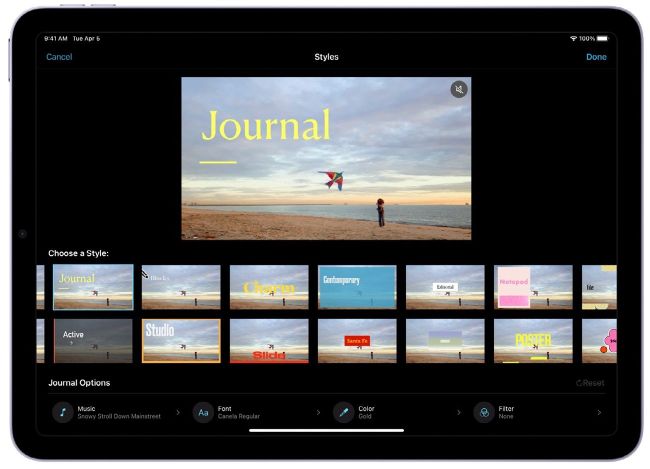
Apple’s iMovie remains our go–to movie app for quick and easy clip creation on all our devices.
Make, animate, and edit your masterpiece
Lights, camera, action!
MAKE HOME MOVIES
THE MAC, iPHONE, AND iPad have inspired generations of movie makers: iMovie was first launched on Mac in 1999, and it has been free on Apple devices ever since. Today’s iMovie is nearly three decades more powerful, but is still easy to use — and you can use it on your iPhone and iPad, too, making it even more accessible.
One of the biggest Apple upgrades for movie making has been the iPhone. Even the most modest iPhone Apple sells can record in 4K, take slo–mo and time–lapse video, and reduce camera shake. It can even reduce the wind noise when you’re shooting outside.
There are other cameras, of course, and other excellent video editing apps: Capcut, Shotcut, Adobe Premiere, DaVinci Resolve, and many more. But what they all bring you is the kind of movie–making setup that the young Steven Spielberg or Wachowski sisters could have only dreamed of.
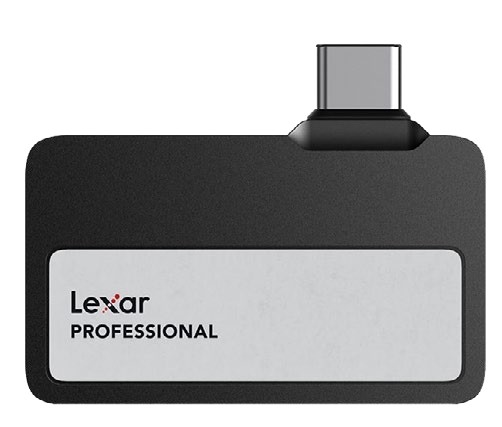
The Lexar Go Portable adds stacks of extra storage, so you can shoot in high quality for longer.
MOVIE NEEDS
You can film, edit, and share an entire movie on iPhone or iPad, and third–party accessories such as gimbals deliver cinema–quality stabilization. Bigger screens definitely make editing easier, though, so an iPad Pro is easier to edit on than an iPhone, and a Mac with a decent display offers even more room to see exactly what you’re doing.
The main issue with mobile movie– making is storage. Your devices won’t have huge amounts unless you buy the most expensive versions, so that can limit shooting time, especially at the top quality settings. The Pro and Pro Max models of iPhone 15 or later can record directly onto external drives, and the storage isn’t too pricey. Lexar’s Professional Go Portable (americas.lexar.com), for example, costs $149.99 for a terabyte (1TB) of fast USB–C storage.
HOW TO Make a blockbuster on iPhone
1 Find a format
Your iPhone and iPad can shoot video in a range of modes, including HD and 4K (depending on the model), at speeds of up to 120 frames per second (fps). Movies are usually 24fps, so 4K/24fps is the best option — it’s quite a storage hog, however.
2 Get Cinematic
On the iPhone 13 onward, you can shoot video in Cinematic Mode, which keeps the subject of your video sharp while adding a blur to the non–focus point. Open the Camera app as normal, and swipe left to select Cinematic Mode.
3 Go to the grid
Turning on the grid in Settings > Camera > Grid and Level helps you compose your video; it divides the screen based on the “rule of thirds” composition guidelines, and those lines also help you ensure things like horizons are level.
WRITE A SKETCH AND PERFORM IT
Do you have funny bones? Pick up Pages, scribble a script for a two–minute sketch, and record it on your iPhone to share it online. The BBC Writers’ Room (www.bbc.co.uk/writers) is a great resource for informed advice and examples of real scripts for both US and UK audiences — not just for comedy, but for all kinds of shows.