Tech Support & Techsplanations
ASK
TECH SUPPORT & TECHSPLANATIONS
Get official documentation at support.apple.com| Get help with hardware at support.apple.com/repair
EXPERT ADVICE
Our resident genius solves your Mac and iOS problems
Email Mac|Life at ask@maclife.com
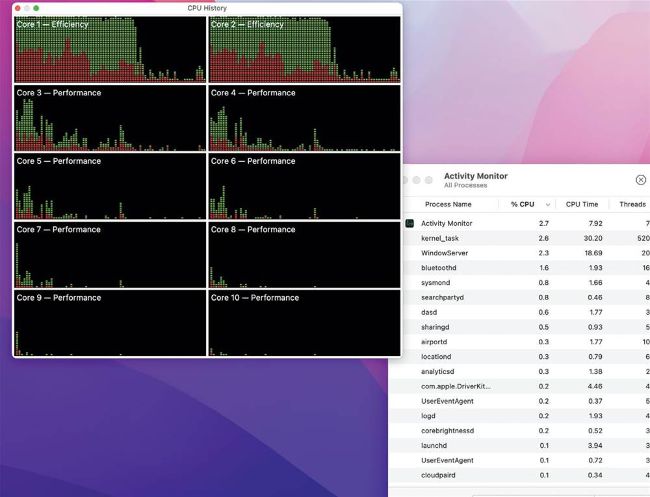
When there’s heavy work for its efficiency cores (top), the M1 Pro runs them faster to compensate for only having two.
> Efficiency core speed check
Does an M1 Pro or M1 Max run some software slower than an original M1, given that it has half the number of efficiency cores?
You’d probably conclude that any app or other process which relies on the M1 chip’s efficiency (E) cores would run at half the speed on the M1 Pro/Max chip with its two E cores, compared with the original version of the M1 with four. If the cores were running at the same clock speed, that would be expected, but macOS manages them differently so the newer version of the M1 chip isn’t slower than the original.
Few third–party apps use the E cores much, as they’re largely interactive and run preferentially on the Performance cores instead. Most of the tasks done by the E cores are macOS background activities like Time Machine backups and Spotlight indexing. When the E cores in the original M1 are working on those, they’re run at around 1,000 MHz, half their maximum, which is highly efficient. In the M1 Pro/Max, though, under load its two E cores are driven at twice that speed, so accomplish as much as the four in the M1, with a similar total power consumption and equal performance. As this is controlled by macOS and not built into the chips, Apple can change that should it wish.
Logging out to refresh
IT MIGHT NOT have been common knowledge, but one of the quickest ways to fix problems was to log out and log back in again. This shut down all your user processes, only to start them up again suitably refreshed. Just a few seconds could then spare you the time and tedium of a full restart.
We’ve even known macOS to use this manoeuvre itself, when WindowServer — the key process which composites your windows for display — was in trouble. Once the user was logged out, WindowServer could be safely restarted, and sometimes avoid leading on to a kernel panic.
But now, for the sake of speed, many user processes are left running once you’ve logged out, and don’t get refreshed like they used to. Although not entirely without merit, logging out and back in isn’t as effective a solution as it once was.