GB
  
You are currently viewing the United Kingdom version of the site.
Would you like to switch to your local site?
14 MIN READ TIME

DO YOU NEED AN M1 MAX?

Apple’s latest MacBook Pros come with two powerful versions of its M1 chip — but which do you need?

Late last year, Apple announced the MacBook Pro 16–inch and the MacBook Pro 14–inch with a pair of new chips inside, the M1 Pro and M1 Max. Both of these are substantial upgrades over Apple’s original M1 chip (which powers the latest MacBook Air and MacBook Pro 13–inch), with the M1 Max–powered MacBook Pro being by far the most powerful laptop Apple has ever made. The kind of performance the M1 Max provides comes at a price, however, with the 14–inch model starting at $2,899.

With that kind of investment, you need to make sure you’re getting your money’s worth, and for most people, the M1 Max is overkill. The good news? The M1 Pro is a more affordable, brilliant performer. As for the M1 Max, if you’re going to be doing some serious creative work, such as complex 3D modelling, then it’ll be worth investing in a MBP that packs it. Read on to find out whether you should get an M1 Max–powered MacBook.

What’s inside the M1 Max?

A

EFFICIENCY CORES The CPU of the M1 Max is made up of 10 cores; two efficiency cores and eight performance cores. When you’re browsing the web and don’t need a lot of CPU power, the M1 Max will use the efficiency cores to preserve battery life.

B

NEURAL ENGINE The 16–core Neural Engine handles the chip’s machine learning (ML) duties, like computional photography. The Neural Engine in the M1 Max helps deliver 11.5x faster ML performance when tracking moving objects in Final Cut Pro.

C

GPU This is the GPU of the M1 Max. Coming in both 28–core and 32–core configurations, this particular part of the chip is much larger than the M1 Pro. It allows the M1 Max to offer more graphical performance.

D

PERFORMANCE CORES While the efficiency cores are used for low–power tasks, the CPU switches to the performance cores when you’re performing more intensive tasks.

E

SYSTEM LEVEL CACHE There are also four blocks of SLC (system level cache), and on the M1 Max there’s 48MB of it, which is a big leap over the original M1’s SLC capabilities.

F

MEDIA ENGINES The M1 Max’s media engines handle video encoding and decoding duties (including ProRes and ProRes RAW content), while maximizing battery life.
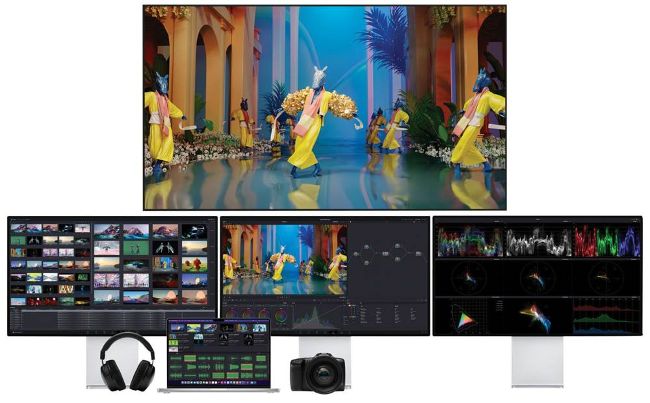
While the M1 Pro 16in MBP offers 2.5 times the graphic performance of the previous model, the M1 Max version offers four times the graphics performance.
Unlock this article and much more with
You can enjoy:
Enjoy this edition in full
Instant access to 600+ titles
Thousands of back issues
No contract or commitment
Try for 99p
SUBSCRIBE NOW
30 day trial, then just £9.99 / month. Cancel anytime. New subscribers only.


Learn more
Pocketmags Plus
Pocketmags Plus

This article is from...


View Issues
Mac|Life
May 2022
VIEW IN STORE

Other Articles in this Issue


START
TRICKLING DOWN THE TECH
Apple is really starting to dominate in the
THE SHIFT
MATT BOLTON thinks that if Apple’s VR/ AR headset is aimed at the mainstream, it’ll have to do better than the “Metaverse”
LETTER OF THE MONTH
To the editor: thanks for all the new
New desktop powerhouse
Apple introduces Mac Studio with M1 Max or new M1 Ultra chip
Apple unveils Studio Display
New 27–inch 5K display with built–in camera and audio
Universal Control has arrived
Apple device integration hits a new level
5G (and iPhone) now on top
THE SALES OF 5G smartphones surpassed those of
News in brief
A bite of the Apple
CRAVE
THE GEAR WE’RE LUSTING AFTER
MAC LIFE
85 FAST FIXES
The ultimate trouble–shooting guide for Mac, iPhone & iPad
CATALOG YOUR COLLECTIONS
How to use apps to compile, maintain, and manage the things you’re passionate about
REVIEWS
TOUGH TESTING, TRUSTED RATINGS
REVIEWS
iPhone SE (3rd generation)
Now even more bang for your buck
iPad Air (5th generation)
A welcome upgrade — thanks to the M1
Caldigit Thunderbolt Station 4 Dock
All the ports a pro user could need
Keychron Q2 Custom Mechanical Keyboard
Customize everything about your keyboard
Jbuds Frames
Ambient wireless listening with nearly any glasses
Dell Ultrasharp U3223QE
Perfect for productivity, but Dell’s IPS Black image tech isn’t as good as it claims to be
NOISE CANCELLING OVER–EAR HEADPHONES
Immerse yourself in a world of wireless sound
SONY WH–1000XM4
Superb all–rounders with bags of features and great sound
Home Inventory 4
Need a way to keep track of your possessions? Home Inventory 4 will do just that
Pixelmator Photo 2.0
Powerful image editing, now on iPhone
Backbone
A beautiful and bizarre noir narrative
Safe+
Is being “just” a password manager enough anymore?
Paper — writing app
Smarten up your writing
SmashTunes
Display a track in your Mac’s menu bar
6 apps to block unwanted content
Banish ads, protect your privacy, and more
Best of the best
Can’t find the hardware or app you’re looking for in our reviews section? Then check in here — we’ve highlighted the best in every major category, as voted for by us
ASK
ASK
TECH SUPPORT & TECHSPLANATIONS
CREATE
Set and hit your life goals
HOW TO DO ANYTHING ON YOUR MAC, iPHONE & iPAD
Plot data in a radar chart
Keynote has a brand new chart that will dazzle your audience
Get better Messages in Monterey
The new version of macOS features some big improvements in Messages
Tidy your music library
Move your music library to an external drive or use multiple libraries
Scan documents with Notes
Say hello to the paperless everything with the scanning feature in Notes
Enlarge text and objects
The iPhone’s Magnifier is a great tool when you need to zoom in
Connect to the internet
No Wi–Fi? No problem. Connect your Mac or iOS device and keep surfing
NFTs explained
Are non–fungible tokens a money–maker or a bubble destined to burst?
Chat
X
Pocketmags Support