GB
  
You are currently viewing the United Kingdom version of the site.
Would you like to switch to your local site?
6 MIN READ TIME

Optimized internal battery charging

How your Mac, iPhone and iPad can make their power cells last longer
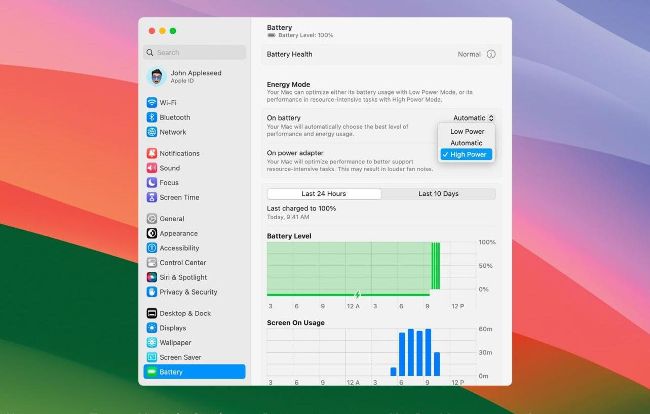
You can use Energy Mode in Settings > Battery to set your MacBook’s power preferences

HOW IT WORKS

YOU WILL LEARN

Why Apple optimizes battery charging and why it’s important

KEY FACT

Batteries for iPhones up to and including the iPhone 14 are designed to retain 80% of their original capacity after 500 complete charge cycles. That figure increases to 1,000 complete charge cycles for the iPhone 15.
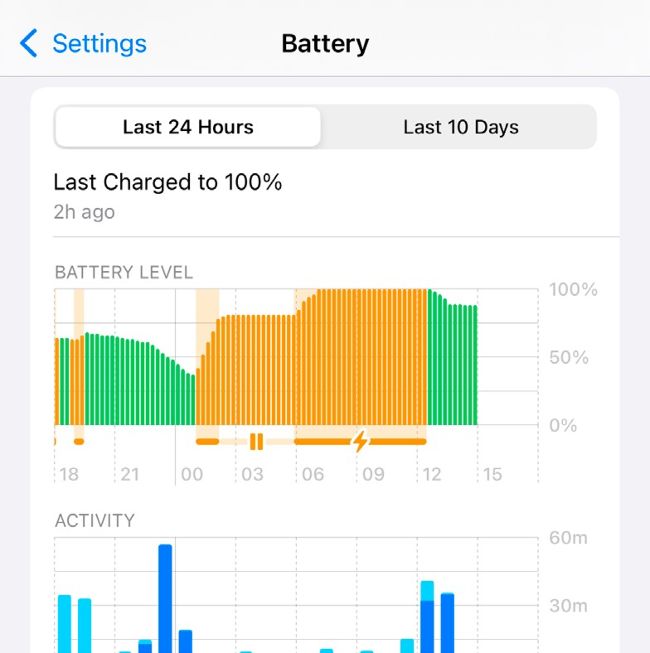
In iOS and iPadOS, going to Settings > Battery will show you which apps are draining the most power.

WHEN IT COMES to battery life, we’re living in a golden age of Apple hardware: while the processors in our Apple devices have become ever more powerful and capable of doing ever more things, that doesn’t mean we’ve had to sacrifice the all– day battery life we’ve got used to over the last decade. Whether it’s an Apple Watch, a pair of AirPods or a MacBook Pro, the batteries in your Apple kit have serious stamina for even the toughest tasks.

But while tech has improved dramatically in recent years, even Apple can’t change the laws of chemistry —and those laws say that over time, every battery will lose capacity. Eventually so much you need to replace it.

Unlock this article and much more with
You can enjoy:
Enjoy this edition in full
Instant access to 600+ titles
Thousands of back issues
No contract or commitment
Try for 99p
SUBSCRIBE NOW
30 day trial, then just £9.99 / month. Cancel anytime. New subscribers only.


Learn more
Pocketmags Plus
Pocketmags Plus

This article is from...


View Issues
Mac|Life
November 2024
VIEW IN STORE

Other Articles in this Issue


START
NO, YOU’RE GLOWING!
AS EXPECTED, APPLE launched a slew of
What’s next?
More Apple product releases and upgrades to come
> Who needs the Pro?
Base–model iPhone boost closes the gap
> EU wants more changes
THE EUROPEAN UNION has begun proceedings to force
News in brief
A bite of the Apple
Apple, AirPods & your hearing health
Can AirPods Pro really be an effective alternative to traditional hearing aids?
> THE SHIFT
JOHN–ANTHONY DISOTTO thinks that while Apple Intelligence sounds promising, it’s got to be Apple’s most confusing product launch ever
FEATURES
Say hello to... macOS Sequoia
What’s new in macOS 15? What is Apple Intelligence, and what can it do for you? Will my Mac be able to run it? We tell you all this and more
Create great movies now!
Turn your video clips into slickly edited stories with pro production values
KIT OUT YOUR HOME OFFICE
Create the perfect working environment in your own space
CREATE
Share songs, shows and movies
HOW TO DO ANYTHING ON YOUR MAC, iPHONE & iPAD
Protect your Mac with Bitdefender
How to keep viruses and ransomware at bay with the antimalware app
Run Windows games on your Mac
Discover how to run Windows games and apps with CrossOver
Go further with Freeform
Share scribbles, discuss diagrams and have fun in Apple’s drawing app
Cook dinner with Crouton
Frozen pizza? Again?! Why not fire up your tastebuds with Crouton instead?
Follow the sun with Sunlitt
You may not see it, but you’ll always know the sun is there
Create custom wallpapers
See your favorite photos on your iPad’s Lock Screen and Home Screen
Optimize your exercise
Use Gentler Streak to improve your fitness without breaking your body
ASK
ASK
TECH SUPPORT & TECHSPLANATIONS
Quick–fire questions & answers
HOW CAN I USE THE SAFARI WEB INSPECTOR
Networking
We help to solve your Wi–Fi woes and connection conundrums
macOS
Shine a spotlight on the solutions to your most irritating Mac problems
REVIEWS
iPhone 16 Pro
Bigger and better in almost every way
AirPods 4 with ANC
A new design and Active Noise Cancellation
AOC 16T3EA
A second screen on the go for less than you think
Halide Mark II (2.15)
The ideal app for photographers looking for more manual control
Death Stranding Director’s Cut
An outstanding horror tale
Belkin Auto–Tracking Stand Pro
Get your iPhone to follow your every move
Best of the best
Can’t find the hardware or app you’re looking for in our reviews section? Then check in here — we’ve highlighted the best in every major category, as voted for by us
Chat
X
Pocketmags Support