GB
  
You are currently viewing the United Kingdom version of the site.
Would you like to switch to your local site?
4 MIN READ TIME

Backups, syncing and security

Find out how to sync your data across your Apple gear, and how to keep it secure
With iCloud, you can back up your mobile devices to the cloud and restore later if necessary.

What is iCloud+?

An Apple ID gives you 5GB of iCloud storage, which includes all the backup and syncing features discussed in this article. But if you pay for more storage through a monthly subscription (including an Apple One subscription), you get access to extra features, collectively known as iCloud+.

Naturally, one of the main benefits of an iCloud subscription is more storage — up to 2TB, depending on your plan. Other benefits are iCloud Private Relay, the Hide My Email service, a Custom Email Domain, HomeKit Secure Video support, and Family Sharing.

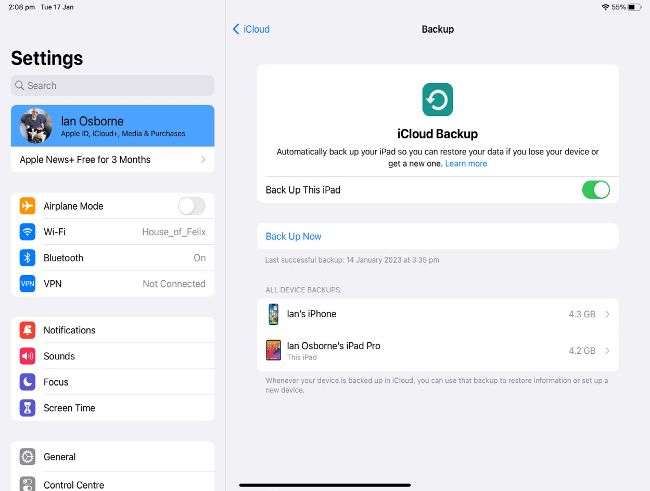
Using the iCloud service to back up your iPad and iPhone is easy. First of all, open the Settings app. At the top of the list (iPhone, iPod touch) or in the sidebar (iPad, plus–sized iPhones) tap your name to get to the Apple ID screen. Tap iCloud, then iCloud Backup. On this screen, you can turn on iCloud backups using the switch. If your device has cellular connectivity, you can choose whether to use it for backups, or restrict yourself to backing up over Wi–Fi to save mobile data. You can also tap an option to back up there and then, instead of waiting for a regular backup time. Tap one of the backups to see a list of apps that are taking up space. You can switch off individual apps, so they won’t be backed up.

Unlock this article and much more with
You can enjoy:
Enjoy this edition in full
Instant access to 600+ titles
Thousands of back issues
No contract or commitment
Try for 99p
SUBSCRIBE NOW
30 day trial, then just £9.99 / month. Cancel anytime. New subscribers only.


Learn more
Pocketmags Plus
Pocketmags Plus

This article is from...


View Issues
Mac|Life
Spring 2023
VIEW IN STORE

Other Articles in this Issue


START
A BETTER APP EXPERIENCE
AS YOU MIGHT have noticed from our team
ChatGPT revolution
Is the AI–powered chatbot the future or just a fad?
> Apple Watch at risk?
Patent dispute threatens imports
> Windows OK on Mac
IF YOU REALLY need to run Windows, you
News in brief
A bite of the Apple
Have we reached “peak iPhone”?
The latest news from the world of Apple
> THE SHIFT
MATT BOLTON thinks the new Mac mini “Pro” is finally a worthy successor to the old power Mac towers. If you squint a bit
LETTER OF THE MONTH
Commentary for consideration
FEATURES
iCLOUD TIPS & TRICKS
From humble beginnings as MobileMe, Apple’s iCloud service has grown into an excellent facility. But what is iCloud, and what can it do for you?
What is iCloud?
In a nutshell, it’s a range of services made possible by connecting your computer or mobile device to Apple’s servers. Here’s a breakdown…
iCloud Photos
You can keep all your snaps and clips synced across your Apple devices, and more
Files, Documents & iCloud Drive
iCloud Drive is great for storing and syncing files, as well as collaborating with others
Get started with iCloud.com
The iCloud website recently had an overhaul. How does it work and what can it do?
Family Sharing
Share your purchases and subscriptions with your family, and enjoy theirs too
30 BEST SAFARI SECRETS
Improve your web browsing experience with these essential Mac tips and tricks
STAY FOCUSED ON MAC
How to blot out those distractions, stay organized, and get more done on your Apple Mac
CREATE
Organize your Mac’s display
Changing your screen resolution is easy, and you have other options too
Discover Apple Mail’s new features
Explore what’s new in Apple Mail, from undo send to handy email reminders
Easily share your photos
Invite friends and family to contribute to a Shared Photo Library
Surf the web privately and safely
Get started with DuckDuckGo for Mac — the privacy–focused web browser
Master the Weather app
Keep an eye on the weather wherever you are — or aren’t!
Boost your home Wi–Fi
Get super–strong wireless signals everywhere with a network extender
Work with PDF docs on iPad
Use iPad tools and functions to create, split, merge, and edit PDFs
Fast fixes for apple Watch charging woes
Revive your smart watch with these handy tips and tricks
ASK
TECH SUPPORT & TECHSPLANATIONS
EXPERT ADVICE Our resident genius Howard Oakley solves
REVIEWS
HomePod (2023)
Stellar audio, with some new tricks
Asustor Lockerstor 2 Gen 2 AS6702T
Network storage and more
Belkin iPhone Mount for Mac Desktops and Displays
A sturdy mount for Continuity Camera calls
pCloud Pass
Could this be a good home for all your passwords?
DaVinci Resolve For iPad
Pro–level video editing and VFX on your iPad
Satechi Thunderbolt 4 Slim Hub
Three TB4 ports and charging for your devices
Best of the best
Can’t find the hardware or app you’re looking for in our reviews section? Then check in here — we’ve highlighted the best in every major category, as voted for by us
Chat
X
Pocketmags Support