TECH SUPPORT & TECHSPLANATIONS
EXPERT ADVICE
Our resident genius Howard Oakley solves your Mac and iOS problems
Email Mac|Life at ask@maclife.com
Is Apple checking your images?
APPLE SELDOM DISCUSSES future products in public, and when it did back in August 2021, its early proposals for checking images for Child Sexual Abuse Material (CSAM) brought a storm of objections. It also sparked misinterpretation of features such as Visual Look Up, introduced a few months later in Monterey 12.3. An essential part of that process is sending Apple’s servers a “NeuralHash” characterizing the image being looked up. Suspicions grew that CSAM detection had already arrived. Those claims weren’t hard to rebut as the log contains copious entries documenting how this works, and nothing is sent to a server until the user initiates the look up. As a means of detecting CSAM, Visual Look Up would be useless. Thankfully, Apple has finally made clear that it has abandoned CSAM detection altogether.
> How long will my Mac’s SSD last?
How do I discover the remaining life of my Mac’s internal SSD?
While a few die prematurely, the main determinant of the working life of an SSD is the amount of data written to it. SSDs have firmware to ensure that wear is distributed evenly, so if you discover how much data has already been written to the disk, and the total bytes written (TBW) when failure is expected, you can estimate how long it should last.
Although Apple doesn’t publish the TBW values for its internal SSDs, they should be good for at least 600TB per TB of capacity, probably nearer 1,000TB. Boot disks see most use, and may write 30TB or more per year, giving a 1TB disk a life of over 20 years, although most are expected to die after 10. If your Mac were to write the same amount to a 256GB SSD, then it would only last eight and a half years.
macOS doesn’t have a tool for revealing the total amount of data written to the internal SSD; for that you’ll need an app like DriveDx, SMARTReporter, or the command tool smartmontools.
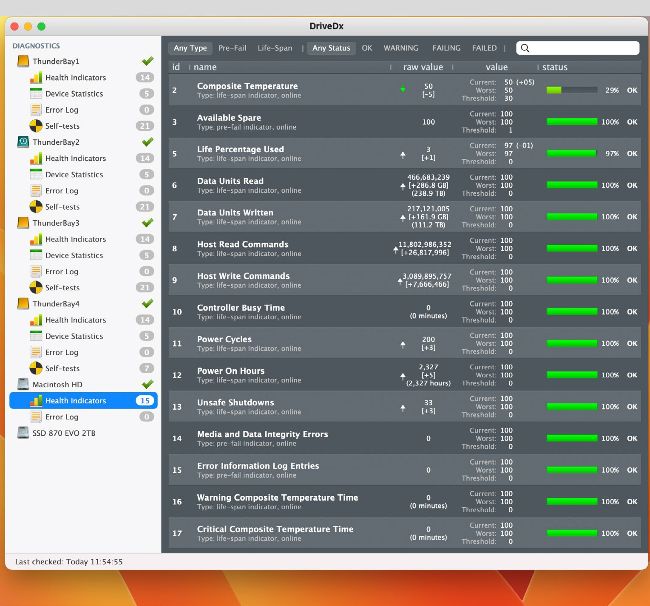
An SSD’s SMART indicators 5 and 7 are the most important for estimating its remaining life, as shown here in DriveDx.
Get official documentation at support.apple.com | Get help with hardware at support.apple.com/repair
> Sharing iPad external storage
How can I use external storage to share files between my new iPad Pro and MacBook Pro?