BEST FREE SOFTWARE
To Stay 100% Private Online
Don’t compromise your privacy by using the same old tools. Robert Irvine reveals the best new ways to block web trackers, protect your data, and stay anonymous
Privacy is such an important aspect of our online lives that it’s often exploited to promote software that’s not private.
‘Keep your privacy under control’, says the download page for Chrome, despite Google being court-ordered to destroy user data it collected through the browser’s Incognito mode (tinyurl.
com/ysb8xpcv). ‘Maintain your online privacy’ promises CCleaner, whose privacy policy states that it ‘collects personal data in order to personalize ads for you’ (tinyurl.com/58kskj9f).
Popular though these programs are, they undermine your privacy rather than boost it, while some lesser-known tools are more trustworthy. Rather than collect and share information about your web activities, they protect you from companies who engage in intrusive practices by blocking trackers, disguising your identity, and letting you easily delete your private data.
In this feature, we reveal the best secret software for staying anonymous
online, as well as highlighting new features and hidden privacy settings in programs you may already use.
Unlike Chrome’s Incognito mode, which doesn’t stop sites collecting your data—as Google now admits— these tools work exactly as promised, allowing you to browse the web discreetly without being spied on.
We’ve chosen a mix of free Windows software, browser extensions, and mobile apps to keep you 100 percent private on every device.
BLOCK ALL TOOLS THAT TRACK YOU
Block more trackers in web pages
All the main web browsers now include tracking protection, though some (Brave and Firefox) do a better job than others (Chrome and Edge) through their ‘strict’ or ‘aggressive’ settings. However, to stay completely private online by blocking every hidden tracker, you need uBlock Origin (ublockorigin.com).
This extension now has around 55 million users worldwide, but it’s still not as well known as inferior rivals such as AdBlock and Adblock Plus. Even if you already use uBlock Origin to block ads, trackers, and annoyances, you may not realize that it has additional options for blocking further privacy risks.
Right-click the add-on’s toolbar button, choose Options, and click the ‘Filter lists’ tab. Click the arrow next to Privacy and tick the AdGuard Tracking Protection and AdGuard URL Tracking Protection boxes—as well as Easy Privacy, if it isn’t enabled ( 1 in our screenshot below). These augment uBlock Origin’s own filters with rules from freemium service AdGuard to provide comprehensive, and constantly updated protection against the latest trackers—including those hidden in web addresses. Click ‘Apply changes’, then ‘Update now’ 2.
Annoyingly, Google’s new Manifest V3 system, which it’s introducing this year, will limit content blockers to using 30,000 filtering rules—uBlock Origin currently uses around 300,000—which will make them less effective at blocking ads and trackers. To beat this restriction, uBlock Origin has created a Lite version for Manifest V3 (tinyurl.com/mrx2udcp) that lets you configure its filters on a siteby-site basis by choosing from Basic, Optimal, or Complete filtering modes.
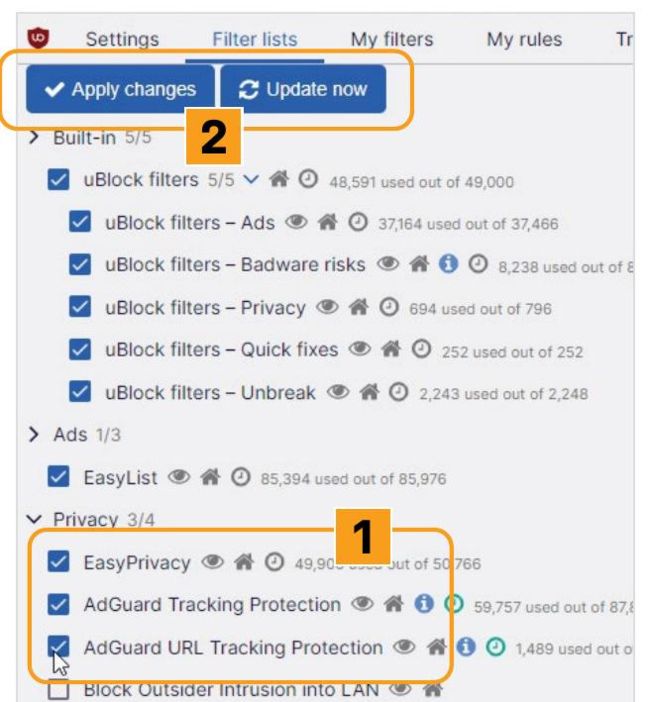
Boost uBlock Origin’s tracking protection using additional filters from AdGuard.
© UBLOCK ORIGIN, ZEN, CLEARURLS
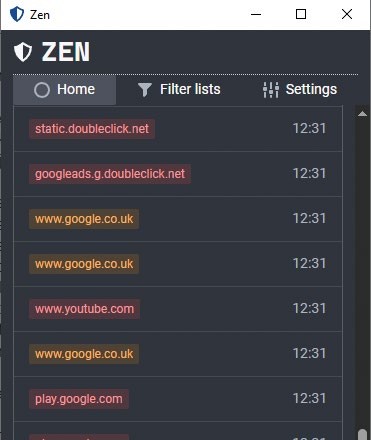
Zen sets up a proxy to block tracking requests in Windows software.
Block trackers in Windows software
Tools such as uBlock Origin make it easy to block trackers in your browser, but it’s more difficult to avoid them in other software on your PC. Many programs now include tracking elements that connect to the internet in the background to share details of your activities with developers, advertisers, and data brokers—and potentially criminals.
You can block these using a new open-source tool called Zen (tinyurl. com/ycfrfd2p—go to the Downloads section under the program description), not related to Zen Internet. This free ad-blocker and privacy guard sets up a proxy that intercepts tracking requests from internet servers and blocks any containing ads, tracking scripts, malware, and other unwanted content. By working at a system level, Zen protects your PC against threats that browser extensions miss, such as trackers embedded in Windows software and system components.
Download and run either the x64 installer or portable version of Zen, clicking ‘More info’ then ‘Run anyway’ when you see the Microsoft Defender SmartScreen warning—it’s safe to use. When you first open the program, click Start then Yes to install its root certificate, which allows it to check and modify HTTPS requests. This certificate is privately generated and stored on your PC.