REAL WORLD BENCHMARKING
Nate Drake explores how tools like 3DMark, Geekbench 6, UNIGINE, and Superposition reveal your device’s true capabilities

© CD PROJEKT RED, CD PROJEKT,
CDP.PL
IN THEORY, using tools to run ‘synthetic’ benchmarks is a great way to test specific components like GPUs through carefully crafted workloads. A whole industry has sprung up around this. Each developer claims to offer the best kinds of tests. Some, like Geekbench 6 or 3DMark, even have their own scoring system.
Still, winning 10,000 points and a gold star from any one benchmark doesn’t necessarily mean your gaming rig will perform optimally with specific applications. This is particularly true for resource-intensive games like Cyberpunk 2077, and precisely what makes titles like these popular with reviewers, who like to subject devices to ‘real world’ benchmarks.
In this feature, we’ll explore some of the most popular benchmarking software available, and discuss how to run some ‘real world’ tests of your own.
Geekbench 6
GEEKBENCH is one of the best-known benchmarking platforms, and a favorite of hardware review sites.
Speaking to Ars Technica in 2023, Geekbench creator John Pool explained the inspiration for creating a new series of benchmarks came in 2005 when he purchased a Power Mac G5. Dissatisfied with existing tests, which consisted of running arithmetical operations on small amounts of data, Poole developed his own.
When it comes to scoring, Geekbench uses a baseline of 2500 based on benchmarks run on a Dell Precision 3460 with an Intel Core i7-12700. A higher score indicates better performance. According to Geekbench’s documentation, theoretically this means that if one device has double the score of another, it will perform twice as well.
Geekbench 6 provides two composite scores of both single-core and multicore performance. These are calculated using a weighted average of the subsection scores. In turn, these scores are worked out through using the geometric mean of workloads contained in that subsection.
Although this sounds quite involved, the results are easy to interpret, and it’s relatively simple to compare the performance of your device to others. The only downside is that if you choose to use the free version of Geekbench 6, your results will automatically be uploaded to the main website.
On the plus side, Geekbench is a truly cross-platform application. Mobile versions are available, and it can even run on Linux, albeit from the command line.
If you’re running Windows, once the software has been downloaded from w w w.geekbench.com and installed, it will automatically display key information about your OS and hardware. At this stage, all you need to do is click ‘Run CPU Benchmark’.
Unlike many other benchmarking apps, there’s no graphics rich video or minigame to play, but Geekbench offers some of the very best workloads for real world benchmarking.
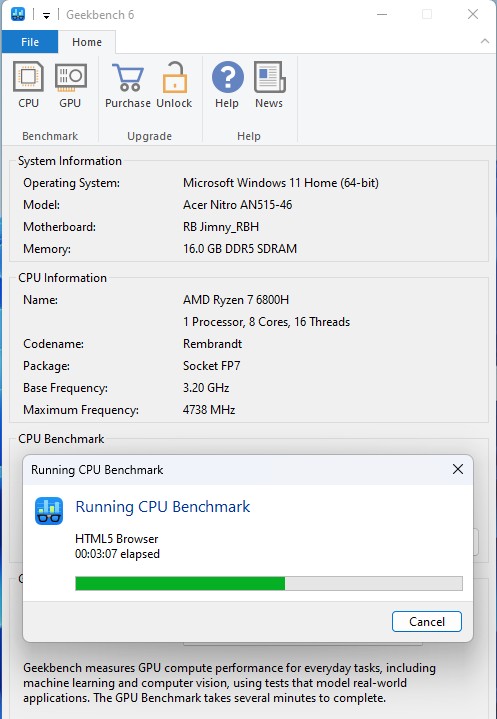
Geekbench 6 runs ‘real world’ workloads like simulating opening multiple web pages.
© GEEKBENCH
The software will first attempt to run ‘productivity’ workloads. This includes a test of how your device handles file compression, using a 75 MB Ruby source archive with LZ4 and ZSTD compression codecs. There’s also a ‘Navigation’ workload that generates directions over 24 routes in two different locations via OpenStreetMap.
Special mention should also go to the HTML5 workload, which uses a ‘headless’ browser to simulate typical internet activity by opening, parsing, and rendering texts for various web pages like Instagram and Wikipedia. There’s also a ‘PDF render’ workload, which uses park maps from the American National Park service and a ‘Photo Library’ workload to categorize and tag images based on objects they contain.