Block all adverts in Windows
YOU’LL NEED THIS
A PC RUNNING WINDOWS 10 OR 11 Copy style of what’s needed.
OVER THE LAST FEW YEARS,
Microsoft has been peppering its operating system with nags, nudges, recommendations, and offers. You might say that’s only to be expected, given that these days, most people haven’t had to pay to get a new version of Windows, they simply upgraded for free. Perhaps that’s why Microsoft is increasingly trying other ways to recoup its costs, including splashing adverts across its operating systems (both Windows 10 and 11). They’re popping up in the Start menu, Cortana, Action Center, the lock screen, and more.
Most of the adverts originate from Microsoft itself and tend to be offers for its paid-for subscriptions and suggestions to perform tasks within Windows, rather than promotions from third parties, but they’re annoying all the same. Thankfully though, there are ways of stopping your eyeballs from being bombarded by these offers—and it only takes a few tweaks in settings until we can go ad-free. Here, we will explain how to block them.
–NIK RAWLINSON
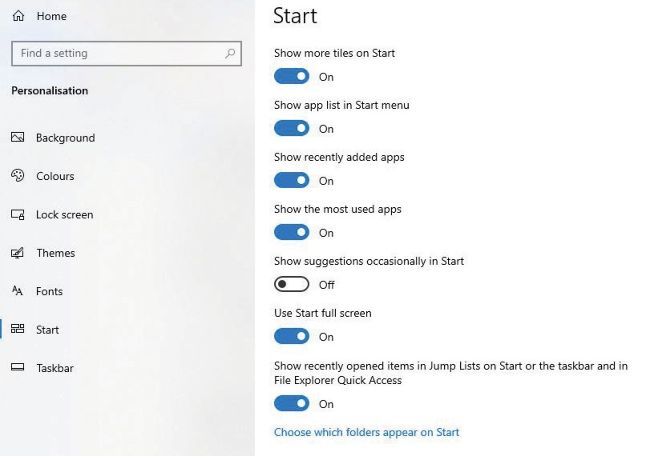
» Disable suggestions in the Windows 10 Start menu by turning off the ‘Show suggestions’ setting.