HACK WINDOWS
WITH TEN TOOLS & EXPERT KNOW-HOW
BARRY COLLINS & NIK RAWLINSON REVEAL HOW TO TAILOR THE LOOK, FEATURES AND FUNCTIONALITY OF WINDOWS 11 TO SUIT YOU, NOT MICROSOFT
Life as a Windows user can sometimes feel like being a passenger in the back of a cab. You don’t have any real control, you have to go in whichever direction Microsoft decides to take you. If Microsoft tweaks the Start menu (again), or changes the way Explorer behaves, or deprecates a feature that you’ve relied upon for years it’s, well, tough.
However, you needn’t surrender complete control of your computer. The ten apps covered in this feature let you wrest power back from Microsoft, allowing you to tweak the behaviour of your Windows machine in all manner of ways.
It could be entirely overhauling the appearance of the Windows desktop, opening apps via custom launchers, or adding mods that bring new features to the OS, such as scrolling on the taskbar to adjust the volume.
Most of the apps in this roundup are free, or (with perhaps one exception) come at a modest cost, so taking back control of your computer needn’t be a costly business. Especially as we also reveal exactly how to modify Windows without installing a single app.
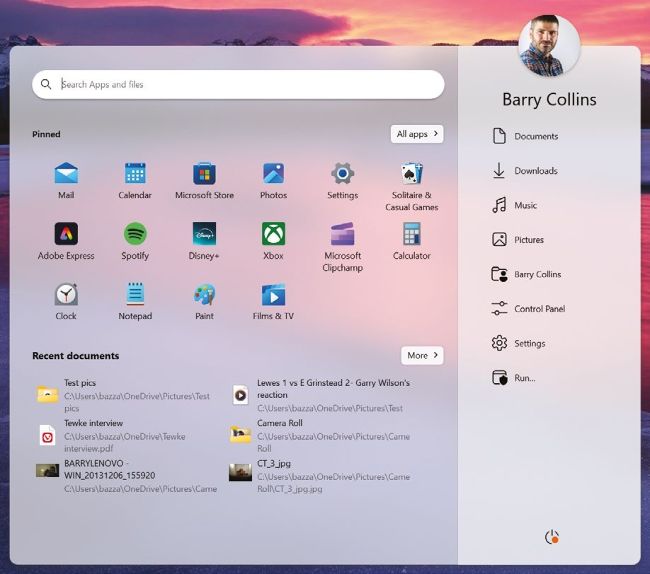
ABOVE
Start11 lets you customise what’s pinned to the Start menu
STARDOCK START11
PRICE
£10 for one PC
from
stardock.com/products/start11 SCORE
Stardock has been fiddling with the Windows Start menu for as long as we can remember, offering so much customisation that Microsoft’s UX designers must absolutely hate it. Version 2.0 of Start11 allows more tweaks than ever before... arguably too many.
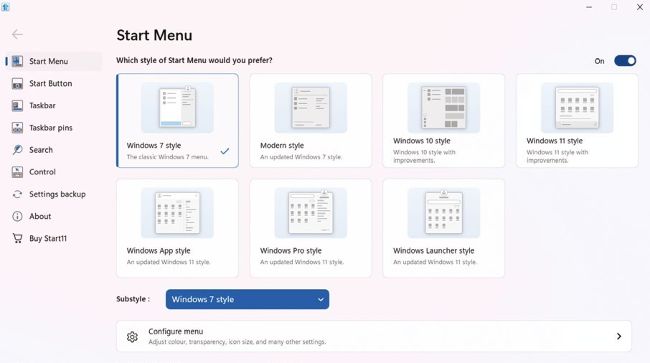
BELOW
You can choose from seven different Start menu options
You’re forced into an immediate decision on which style of Start menu you’d prefer: a return to the Windows 7 era, the Windows 10 look complete with the divisive tiles, or various different shades of the Windows 11 styling.
Those seven pre-formatted choices are far from the only options available. You can tweak which items (say Music or Pictures) appear as shortcuts, customise the menu’s appearance (colour, transparency and fonts), maybe stop nannying around with pins altogether and just have the
Start menu show all apps by default. The level of control is off the charts.
Start11 also lets you take control of the taskbar, banging it back to the left of the screen, or to the top or sides of the screen if you prefer, with the option to have the taskbar in different positions on your primary and secondary display. You can pin files or folders to the taskbar for quick access, too.