What You Must UNINSTALL in 2026!
Rid your PC and phone of rubbish programs and apps to start the new year junk-free. Robert Irvine reveals the dismal, dubious and dangerous tools you must remove
In our ‘Best New Software for 2026’ Cover Feature in Issue 724, we recommended the most useful new programs to download over the next 12 months. But the start of a new year is also the perfect time to rid yourself of software you no longer use or that’s taken a turn for the worse.
In 2025, we’ve seen lots of once-great programs become bloated with unwanted options, intensify the nagging to pay for their premium versions and suffer serious privacy and security concerns. Browser extensions and mobile apps have been injected with malicious code that steals your data and bombards you with ads, and AI features have been foisted on us whether we want them or not.
These annoying trends are likely to continue in 2026, so it’s a good idea to take action now and purge your PC, phone and tablet of existing junk. In this feature, we reveal the programs, add-ons and apps you should uninstall to begin the new year with a clean and safe slate.
Our removal recommendations include programs the developers have lost interest in or messed up with pointless redesigns; software with flaws that compromise your personal data; apps that don’t work as they promise; and fake copies of popular tools that trick you into installing them.
It’s time to uninstall this rubbish for a much happier 2026.
WHAT YOU CAN DO
• Remove Windows apps you never use – or no longer can
• Uninstall programs with privacy and security flaws
• Ditch rip-off software for superior free alternatives
• Stop using extensions that secretly share your data
• Avoid fake and malicious phone, tablet and TV apps
• Hide unwanted AI tools in your favourite browsers
WINDOWS TOOLS YOU MUST UNINSTALL
Maps
In July, Microsoft deprecated its Maps app for Windows 10 and 11, and removed it from the Microsoft Store (see screenshot below). It still works for the moment but won’t receive any updates.
Maps always struggled to compete with Google Maps, suffering from outdated and poor-quality maps, inaccurate route planning and technical glitches. Its best feature was offline maps, but that was discontinued in 2023.
Microsoft recommends you uninstall the app and use Bing Maps (www.snipca. com/57174) instead. Open the Settings app, select ‘Apps & features’ (in Windows 10) or ‘Installed apps’ (Windows 11) and click Uninstall next to Maps.
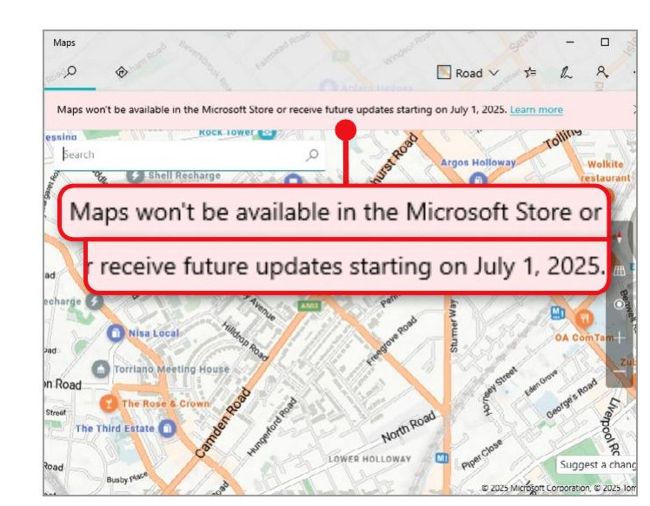
The Maps app for Windows was discontinued in July
Mail and Calendar
It’s now a year since Microsoft ended support for its Mail and Calendar apps, and replaced them with its controversial new Outlook app. Although they’re no longer included with Windows 11, if you’re still running Windows 10 or chose to keep your apps when upgrading to Windows 11, Mail and Calendar may still be on your PC.
Opening either app redirects you to Outlook (see screenshot below), so uninstall them in 2026 through Windows Settings. If you don’t like Outlook,
uninstall that too and replace it with Thunderbird (www.snipca.com/57170) or Proton Mail (www.snipca.com/57171).
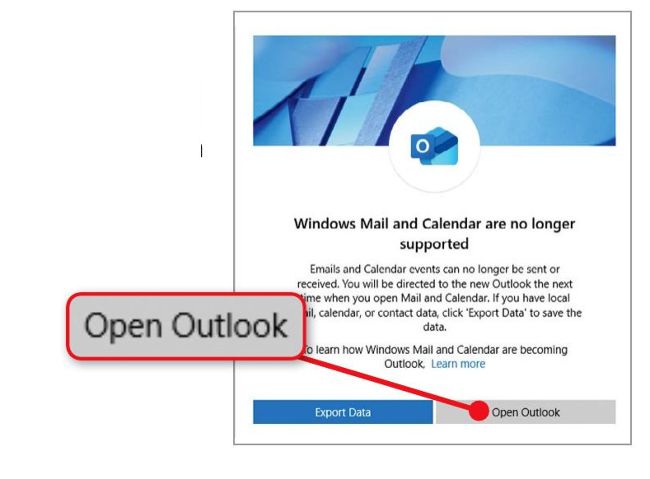
There’s no point hanging on to Mail and Calendar in 2026
News and Weather
Even Microsoft has lost interest in its News and Weather apps for Windows 10 and 11. While they’re still available from the Microsoft Store – as Microsoft News and MSN Weather – the apps haven’t been updated for several years and there are now many easier ways to read the headlines and check the forecast.
Windows 10 has ‘News & interests’, which displays the news and weather when you hover your cursor over its taskbar icon. Windows 11 has a Widgets feature, which shows a weather summary on its taskbar button (see screenshot below) and opens news stories and forecasts in Edge.
These are more convenient than opening separate apps, and you can switch them on or off in ‘Taskbar settings’. Uninstall the News and Weather apps through Windows Settings.
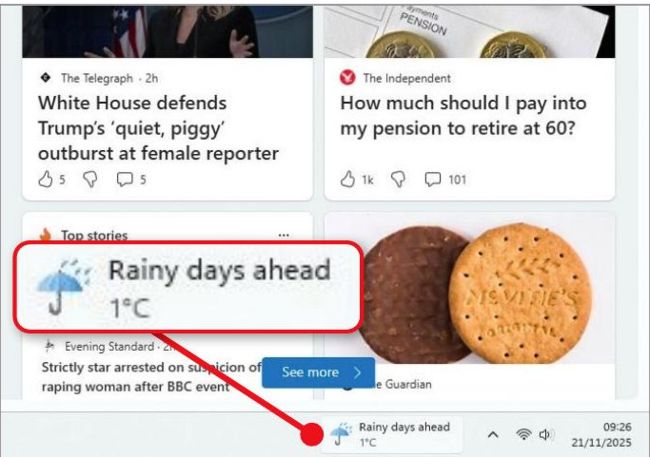
Use Windows 11’s Widgets instead of Microsoft’s News and Weather apps
Copilot and Microsoft 365 Copilot