Photo Active
10 things you can shoot and create this month, from standing stones to pelicans and military re-enactments
Use your tips cards
This project features in this month’s bonus tips cards. For a handy guide to capturing photos like this, take your tips cards with you.
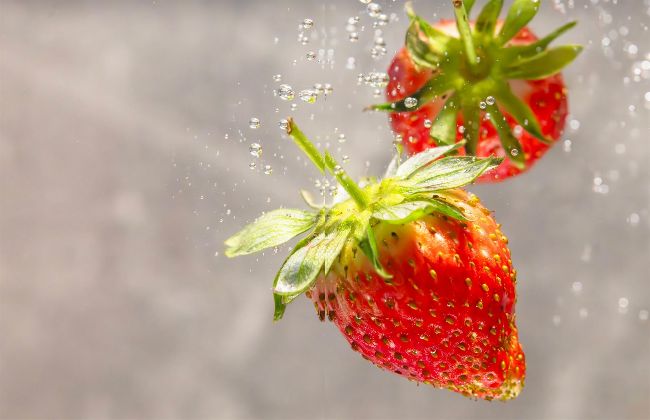
Dropping multiple pieces of fruit at once is unpredictable, so you may require numerous attempts to get the nearer item in focus.
Wendy Evans
1 | CREATIVE Have some fruity fun
Wendy Evans concludes the series on using a fish tank for photo projects, by throwing strawberries in it
Our final project from this triumvirate of tank-based tasks is to capture the effects of dropping fruit into water. You don’t need to use flash for this to freeze the motion, as we’re only going to be photographing the effects underwater, not the surface splash. However, you do need plenty of light. The first thing is to fill up your tank with tepid water – too hot or too cold and condensation will form. Position your light source above the tank, rather than in front, so you don’t get reflections from the glass. Ideally, place some silver foil under the tank to reflect light upwards, because you’re going to need as much light as possible. Place the tank in front of a window, if possible, or expect to ramp up the ISO and reduce the resulting image noise using software later.
The key aspect is how close you can focus, which probably means using a macro lens – and that’s what I did here, in the form of a Sigma 105mm F2.8. This has a knock-on effect, in that the depth of field is quite shallow and you need as much as you can reasonably get because of the vagaries of how the fruit moves when it hits the water. So look at f/8 as giving the minimum depth, but if you can, stop down to f/11.
1/1000 sec
f/8
ISO 20,000
1 Prepare to focus
You’ll need to use manual focus for this project, so it’s best to hold something underwater in the tank where the target area for the drop is. Place the camera on a tripod so it doesn’t move. Focus on the marker, then switch offautofocus. For simplicity, try to position the marker near the centre of the tank, as this will help when you drop the fruit in.
2 Set the shutter
You’ll need a fast shutter speed, around 1/1,000 sec, and because the fruit travels in unpredictable patterns, a continuous shooting mode is essential. I set this up with a Rotolight Neo 2 light at full power and 5600K, but even with that, it required some fairly high ISO ratings to get the aperture down to f/11. So the more light you can apply, the better.
3 Ready, steady, drop
With everything set, position the fruit over the target drop spot and put your finger on the shutter button. Drop the fruit and, as it hits the water, fire the shutter and keep shooting as it descends and then comes back up. Bear in mind, this process is unpredictable and even more so if you use more than one piece of fruit. Expect to try this stage over and over again!
Acquiring the focus point
To help acquire the point of focus, I held a wooden spoon in the middle of the tank and focused on that. When dropping fruit into the water, the higher the drop, the bigger the splashes out of the tank. Use a lens hood to keep this off the lens and keep a cloth handy for mopping up between shots.
Original
Enhance NR
Clean up the noise in editing software
If your tank isn’t next to a window, it can be difficult to get enough light into the scene, resulting in having to increase the ISO rating to very high levels – here, I had to ramp it up to ISO 20,000, which as you can see, was very noisy.
In Lightroom’s Develop module, I went to Detail and Noise Reduction, clicked on Denoise and then used the Amount slider to balance between noise reduction and retaining detail (this process doesn’t work with jpegs, so use it on the raw file).
2 | DOCUMENTARY Shoot the beat on the street
Jade Burrell hits the pavements with tips for capturing buskers without missing a note