BIBISCO
Plan and write your next smash-hit novel
Nick Peers reveals how to develop better stories with the help of our favourite freemium app for budding novelists.
OUR EXPERT
Nick Peers has one particular story idea knocking around his head – Bibisco could be the tool to finally bring it to fruition.
Anyone who’s written – or attempted to write – a novel will appreciate just how difficult it is A without doing your research. And where do you put all that research so it’s easy to access when bringing it all together? Linux is blessed with all manner of apps promising to bring order to your storywriting chaos – we rounded up five in LXF294, and settled on Bibisco as the best of a very promising bunch. So, let’s find out how it can help you with your next writing project, whether fiction or non-fiction.
Package me not
Sadly, Bibisco doesn’t exist in any repository – you need to head to https://bibisco.com and scroll down to the Download section, where you’ll find a choice of two downloads: the free Community Edition or the paid-for Supporters Edition, which costs a minimum of £24 (including VAT). All the core functionality can be found in the Community Edition, which includes a 30-day free trial of the Supporters Edition, so we’ll clearly signpost any paid-for features we think are worth exploring.
Assuming you’re starting with the free Community Edition, after clicking the Get It! button you’re prompted to supply your email address. Once entered, click Get and you’ll see a Show Content button, behind which you can find the downloads you need. Before doing this, you’re prompted to create an account – this is recommended as it will give you easy access to updated versions in the future.
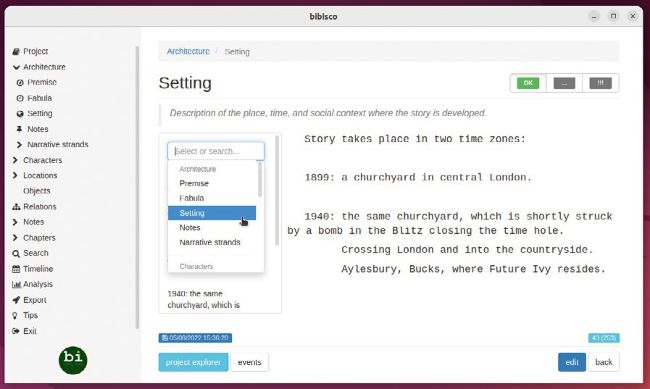
Bibisco’s Project Explorer tool enables you to view any or all of your notes, research and other info while editing.
Once done, you’ll see a list of downloads (Bibisco is also available for Mac OS and Windows), and here you have a choice of three: DEB, RPM and ZIP. Ubuntu users will, of course, find the DEB package the easiest to work with – once downloaded, open the file in Software Install and follow the prompts.
First-time setup
Once installed, open Bibisco via the applications launcher. Read through and accept the licence terms, then select your language – English (UK) – to begin. You’re now prompted to select a folder for your projects (typically a subfolder inside Documents) and a place to store backups.
BIBISCO’S TEXT EDITOR
When planning and writing your novel, you have ample opportunity to get acquainted with Bibisco’s rich text editor. It’s not as powerful as a word processor, but contains all the key elements you need. Styling is limited to bold, italics, underline and strike-through, plus a highlighter, but you can define a default display font, size, lining spacing and so on via the settings button. There are also handy undo/redo buttons.
You’ll also see a full-screen button, which switches Bibisco to distractionfree mode, but note this is an SE-restricted feature. When in fullscreen mode, there are no formatting controls on view, so make use of the usual keyboard shortcuts, such as Ctrl+B for bold text, and press Esc to revert back to the normal windowed view.
As you start typing, you’ll see Bibisco is set to automatically save your changes as you go, but there’s also a manual save button, too. You’ll see a handy word count in the bottom-right of the screen, and once you’ve finished typing your premise, you can change its status using the three buttons in the top-right – !!! (to-do), … (not complete) and OK (completed) – to track progress.
You’ll also see a Project Explorer button beneath the text editor window. Clicking this enables you to display the contents of any other section – from architecture to characters and chapter summaries – alongside the editor window, providing an easy way to refer back to your notes as you type. It’s accessible from any text editor window.