HotPicks
THE BEST NEW OPEN SOURCE SOFTWARE ON THE PLANET
Nautilus Moonshine Ethereal (Wireshark) Bluefish Webalizer Krusader Xine Chromium BSU Defendguin GnuCash TeXmacs
Neil Mohr
travels back in time to dig up the earliest HotPicks and check on their progress.
FILE MANAGER
Nautilus
Version: 0.5 (January 2001)
Web: https://gitlab.gnome.org/GNOME/nautilus
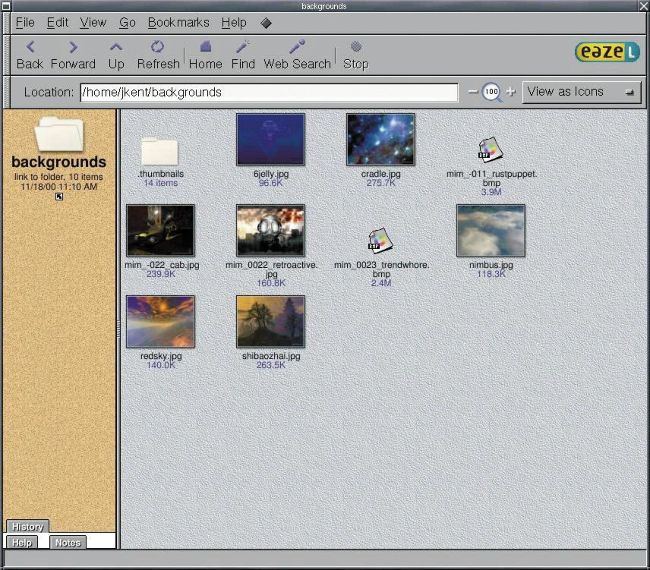
From 2001: Graphic files viewed as thumbnails. Do we really need to tell you how useful this feature is?
Wefirst looked at Nautilus back in LXF010, the January 2001 issue, and things could get a little confusing because what was called Gnome Nautilus back then is now known as Gnome Files. We guess that’s so people understand what it does, though we imagine the original thinking was that it helps you plumb the depths of your filesystem, like the eponymous submarine. This particular issue would have been written around December 2000, and that’s handy to know because Nautilus version one wasn’t released until March 2001 and was then absorbed into the Gnome project. Back then, we had the following to say about it:
Nautilus is a file manager (or Desktop Shell, as Eazel – the developer – likes to refer to it) on steroids, that has been designed to work on the HelixCode Gnome desktop. Currently it is available as a preview release, so it is therefore a little bit rough around the edges, but is showing a lot of promise.
As this is still a preview you should expect some program crashes to occur. Nautilus development is looking very good for the future; it is expected to replace the existing default file manager in the next release of Gnome and is more user-friendly than its predecessor ever was. It’s fairly stable and, occasional crashes aside, is also very usable. Along with HelixCode, Nautilus goes some way in helping to make the Gnome environment more polished and user-friendly. Overall, this is a very eye-catching application, with some interesting features. Whether you feel that all these bells and whistles make sense as part of a desktop file manager or not, you will be impressed by the way Nautilus functions and its suave good looks. Get it now.
HelixCode, in case you were wondering, was a company created to originally support Gnome Desktop
development. It became Ximian (a founding member of Gnome) very early on and was later acquired by Novell. There are some old Ximian website fragments on Archive.org (https://bit.ly/lxf329helix) that make an interesting historical read straight from the founders’ mouths.
As you’d expect, Gnome Nautilus was developed in lockstep with the Gnome desktop, so Nautilus 2.0 was shifted to GTK+ 2.0 in June 2002 and received a major interface overhaul to bring it in line with the Gnome 2.0 interface for Nautilus 2.2 in February 2003. Nautilus 2.3 heralded the biggest shift from the old-style Windows 95/98/2000 spatial windows to the fancy new browser-style single-window, multi-panel design in March 2010. This was relatively quickly followed by the shift to Gnome 3.0 and GTK3 in April 2011 that caused the start of all the desktop ruckus and projects such as Linux Mint Cinnamon breaking away. Nautilus received a complete interface overhaul for modern aesthetics and interfaces. Gnome Nautilus was renamed Gnome Files for the 3.6 release in September 2012, and it also gained another interface refresh that refined the original 3.0 design to pretty much what remains today.
25
years of Linux Format
IDE
Moonshine
25
years of Linux Format
Version: 0.1 (May 2000)
Web: https://moonshine-ide.com
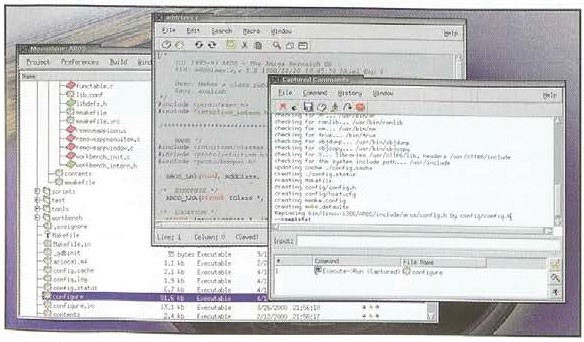
Linux can have graphical IDEs, too. It’s not all shell commands and switches, you know!