Apple didn’t invent the graphical user interface (GUI); that was the work of Doug Engelbart in the 1960s. Researchers at Xerox PARC built on his work and made the 1973 Alto, the first personal computer with a GUI. It had many of the things we take for granted today: a mouse and pointer; windows for different things; icons; and menus with drop-down menus. That operating system spawned another, Gypsy, the first WYSIWYG (What You See Is What You Get) interface. And it lead to the 1981 Xerox Star, a computer that incorporated many of these ideas. A certain Steve Jobs was particularly impressed by the PARC’s work as Apple made its own GUI, helped by many former PARC members.
The first GUI product Apple shipped was the Apple Lisa in 1983. Early versions of its operating system didn’t even have icons, but as Apple visited Xerox and occasionally poached its people the design evolved. Apple took Xerox’s ideas and added their own, such as drag and drop.
When Apple introduced the Apple Macintosh with its GUI in 1984, there was a mixed reception. Some tech pundits scoffed: who needs eye candy when word processing works just fine in plain text? But the GUI made computers so much more friendly, and it did for desktop publishing, digital art and personal computing what the iPhone would later do for smartphones. When you used an app such as MacPaint, you saw the future of everything.
Evolution and revolution
Apple’s System Software evolved through multiple versions. Multitasking, the ability to do more than one thing at a time, arrived in 1987’s System Software 5’s MultiFinder, and the interface received a huge overhaul with the release of System 7 in 1991. That introduced aliases, drag and drop into applications, balloon help and TrueType fonts. And on compatible Macs, it even ran in full colour. But the biggest change in Mac interfaces happened in 2001 with the arrival of Mac OS X. That wasn’t evolution. It was revolution.
The water-inspired Aqua interface of Mac OS X actually appeared first in 2000’s iMovie, but it was the liquidlooking OS that, according to Steve Jobs, you’d want to lick. The 2000 public beta Steve Jobs described it as “lickable”. was a beautiful thing, an operating system quite unlike anything you’d ever seen before with a new place for your apps: the Dock.
Aqua used blue, white and grey with little pops of colour such as the glassy buttons on windows. You couldn’t really customise it beyond choosing the darker Graphite option, but you didn’t really need to. Mac OS X was gorgeous.
The next big change was in Mac OS X Panther, which somewhat divisively applied Brushed Metal to the Finder, and Mac OS X Leopard, which applied it system-wide. But the biggest earthquake in Mac interface design wasn’t until 2020. That’s when Big Sur made macOS look more like iOS than ever before with its unified design, something that’s undoubtedly prettier but disappointed some long-term Mac users.
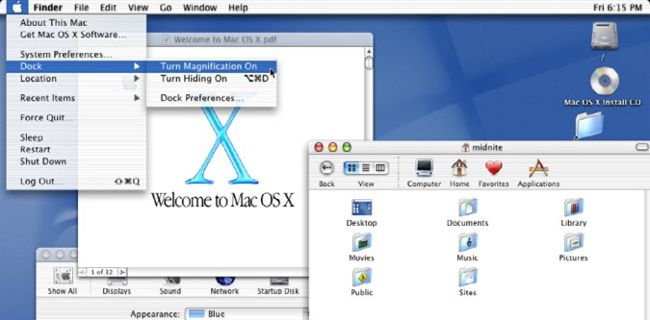
The liquid-inspired design of OS X was so beautiful Steve Jobs described it as “lickable”.
Image credit: Apple Inc, Commodore International/MORE, Be Inc, NeXT
Famous for 15 minutes
The interfaces that almost made it…
Amiga OS (1985)
> Commodore’s 1980s Amiga has a special place in the hearts of gamers and musicians. It was fast, did proper multitasking and boasted arcadequality games, but sadly Commodore couldn’t maintain the momentum.
BeOS (1990)
> BeOS hoped to be a rival to Apple and Windows, and it courted Mac clone makers to ship it on their computers. Apple considered buying it but passed; Steve Jobs would find a better parent for Mac OS X.
NeXTSTEP (1989)
> While exiled from Apple, Steve Jobs set up NeXT, with hardware running NeXTSTEP OS. It wasn’t a big hit – although Tim Berners-Lee created the web browser on it. Apple bought it in 1996 and made it part of Mac OS X.
Newton OS (1993)
> The Newton offered a mobile Apple experience that proved too expensive for the portable device buyers of the early 1990s. But you can see how it paved the way for the iPhone and ultimately iOS.
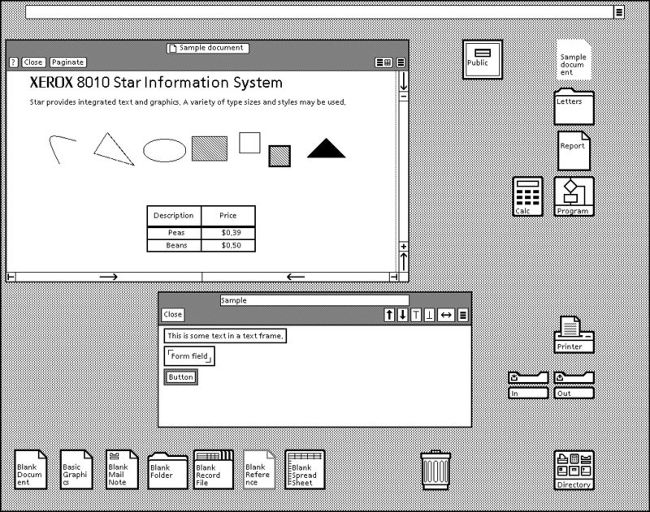
Apple didn’t steal the GUI from Xerox, but it did poach a good few Xerox team members.
Sleepless in Seattle
When Apple launched the Mac, Microsoft didn’t have Windows
Apple says Microsoft’s Windows shamelessly copied the Mac; Bill Gates says he was inspired by different software long before. But there’s no doubt that when the Mac launched with its GUI, Microsoft’s only OS was the text-based MS-DOS. Its first GUI, the half-baked Windows 1.0, didn’t arrive until 1987 and Microsoft didn’t really get it right until Windows 3.1 in 1992. Windows 95 made the PC cool, arguably eclipsing the Mac, but Microsoft fell into a design rut that it didn’t escape until the launch of Windows 10 in 2015.
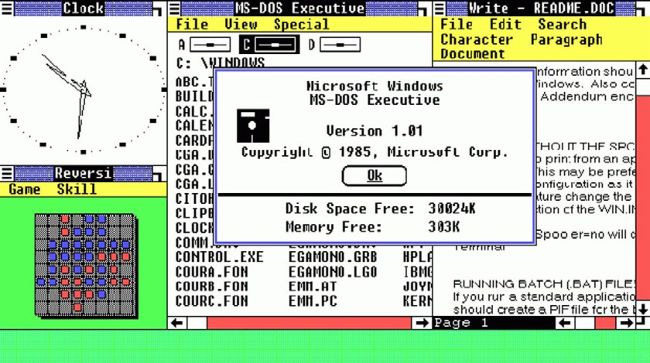
Microsoft’s graphical user interface (GUI), Windows 1.0, came late to the party. And it wasn’t very impressive.
Image credit: Xerox Corp, Apple Inc, Microsoft
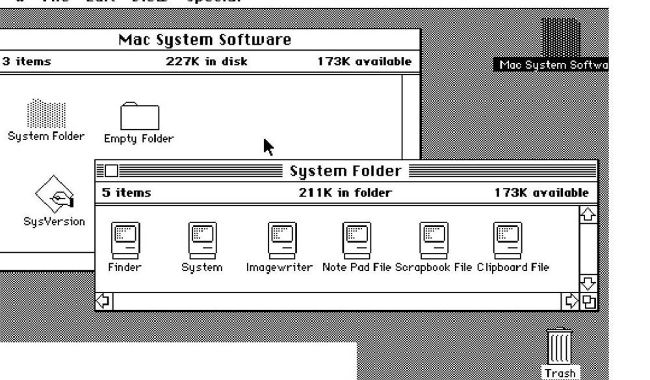
The Macintosh popularised the graphical user interface, unlocking all kinds of creativity.
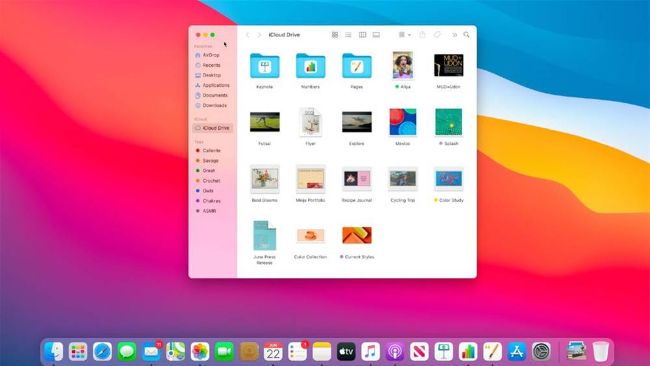
Big Sur was the biggest Mac interface revamp since Mac OS X. There was a lot of loud criticism of its new look.